
Most packaging reprints trace back to a small set of dieline mistakes: wrong color mode, dimensions that do not match the template, missing bleed or safety margins, mislabeled structural lines, and artwork that ignores board caliper. The fix is not more careful looking at the flat file. It is running a preflight checklist and building a mockup, either physical or 3D, before the file ever reaches a press. The sections below walk through why each mistake happens and how to prevent it.
TL;DR:
- Most dieline mistakes stem from design errors such as incorrect color mode, mismatched dimensions, or missing bleed, which can be prevented with a thorough preflight checklist.
- Accurate dieline dimensions and structural labels are essential; measuring panels against the latest template and clearly naming layers help avoid assembly issues and miscuts.
- Creating a physical or digital mockup before production reveals folding, alignment, and artwork distortion problems that flat files alone might miss.
- Proper planning for shipping, including consideration of board caliper, internal supports, and ISTA testing requirements, ensures structural integrity during transportation.
- Establishing a single source dieline file with mandatory preflight signoff and mockup validation reduces reprints, shortens production turnaround, and maintains brand consistency.
Table of Contents
- The top dieline mistakes at a glance
- Where each mistake comes from and how to fix it
- The preflight checklist that catches these mistakes before press
- Turning a flat dieline into a working 3D mockup
- When ISTA transport testing should shape your dieline
- Why these mistakes keep happening
- Getting packaging files right before they reach the press
- Sources
- FAQ
The top dieline mistakes at a glance
Some of these errors are visible the moment you open the file. Others only surface once the box is folded, and by then the print run is already committed. Scan the list below to spot which ones apply to your current project, then jump to the detailed breakdown for the fix.
- Wrong color mode: designing in RGB instead of CMYK shifts colors unpredictably once plates are made.
- Dimension mismatch: using an outdated or incorrect template produces panels that do not fold into the intended shape.
- Missing bleed: artwork that stops exactly at the cut line leaves white slivers after trimming.
- Incorrect safety margins: text or logos placed too close to a fold or cut get clipped or distorted.
- Mislabeled structural lines: cut, crease, and perforation lines that are not clearly distinguished confuse the die maker.
- Deleted dieline elements: locks, flaps, or glue tabs removed during a design cleanup break the assembly.
- Ignored board caliper: thicker stock consumes more material at each fold than the flat dieline accounts for.
- Artwork crossing creases: graphics that span a fold without planning for distortion warp once the panel bends.
- Type too close to cuts: small text near a die line risks being sliced or unreadable once glued.
- Unflattened transparencies and spot color errors: effects that render fine on screen can shift or disappear on press.
- Missing regulatory labeling space: no reserved area for mandatory net-content or manufacturer information.
- No mockup before production: approving a flat PDF without ever seeing the assembled form.
Where each mistake comes from and how to fix it
Wrong color mode. Designers who build packaging in RGB are working in a color space the press cannot reproduce directly. Once converted to CMYK for plates, saturated blues, greens, and oranges often shift noticeably. Set your working file to CMYK from the start, and where brand color accuracy matters, work toward a ΔE2000 of 3 or lower between your proof and the final print, a target color management guidance for print advertising also applies to packaging.
Incorrect dieline dimensions. A surprising number of reprints happen because someone designed against last quarter's template, or scaled a dieline without checking that panel widths still summed to the correct total. Before you place a single graphic, measure every panel against the printer's supplied dieline and confirm the overall flat size matches the folded carton dimensions you were given. A dieline basics checklist is worth keeping open during this step.
Missing bleed and safety margins. Bleed exists because trimming is never perfectly precise. A common standard is an eighth of an inch of bleed beyond the cut line, with a similar safety margin keeping text and logos clear of any fold or cut. Skip either one and you risk a white edge on one side of the run and a clipped logo on the other.
Mislabeled or deleted structural lines. Cut lines, crease lines, and perforation lines need to be visually distinct, on their own named layers, and never touched during artwork cleanup. Export your dieline as a separate structural layer from your artwork layer so a die maker can isolate exactly what gets cut, scored, or perforated. When a lock, flap, or glue tab gets deleted because it looked redundant on screen, the carton simply will not close.
- Name layers by function: Cutline, Creaseline, Perforation, Glue, Artwork.
- Never merge structural and artwork layers before export.
- Confirm every fold, flap, and lock present in the original template survived your edits.
Ignored board caliper and fold allowance. A flat dieline drawn at zero thickness does not account for the fact that a 24-point board consumes real space at every fold. As material wraps around itself, each fold needs a small allowance added to its adjacent panel, or the box will not close square. Ask your printer for the caliper of the specified stock and calculate fold allowance before finalizing panel widths, not after the first sample comes back too tight.
Artwork crossing creases and curved panels. A logo or pattern that runs across a fold line will bend at an angle you did not intend. On curved panels like tubes or rounded corners, straight artwork can visibly distort. Preview any element that spans a structural line against the folded form, not just the flat file, before it goes to press.
Type and legibility near cuts and seams. Small text set close to a die line or a glued seam risks getting sliced during trimming or obscured once the seam overlaps. Keep body copy at least the safety margin's distance from any cut or fold, and avoid placing fine print directly over a glue flap.
Unflattened transparencies, spot color misuse, and font problems. Drop shadows, glows, and blend modes that render cleanly in your design software can behave unpredictably once flattened for press, and spot colors substituted incorrectly for process colors shift hue entirely. Fonts that are not embedded or outlined can reflow or default to a substitute typeface at the print shop. Export to a press-ready PDF/X standard, most commonly PDF/X-1a or PDF/X-4 depending on what your printer requests, and confirm with them which variant they prefer before sending files.
Missing regulatory labeling space. In the United States, the Fair Packaging and Labeling Act requires most consumer commodity packages to display net contents in both metric and inch or pound units, a clear statement of what the product is, and the name and place of business of the manufacturer, packer, or distributor. These are not optional design flourishes. Reserve dedicated space for them on the dieline before artwork placement begins, because retrofitting mandatory copy onto a finished layout is how projects end up back at the printer.
No mockup before production. A flat, approved PDF tells you almost nothing about how the finished carton will actually look and function. That gap is where the next section picks up.
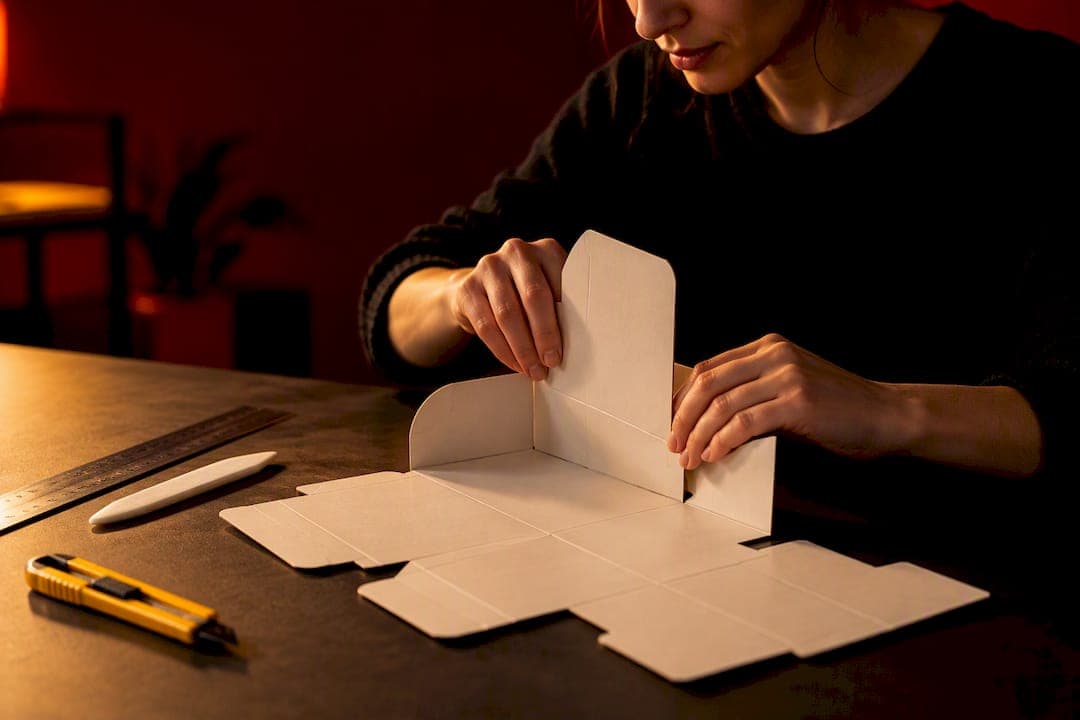
Pro Tip: Print your dieline at actual size on plain paper, cut and fold it by hand before you ever send a digital file to press. A five-minute paper mockup catches panel-fit problems no screen review will show you.
The preflight checklist that catches these mistakes before press
Run this sequence on every packaging file before it leaves your desk, not just on jobs that feel risky.
- Confirm the dieline template matches the current job spec and printer, not a saved file from a previous run.
- Verify all layers are named clearly and structural lines are isolated from artwork.
- Check the color mode is CMYK throughout, with no stray RGB elements.
- Review spot colors against the printer's supported palette.
- Embed or outline every font in the file.
- Confirm bleed and safety margins meet the printer's stated minimums.
- Verify every structural element, cuts, creases, locks, flaps, is present and labeled.
- Confirm panel dimensions account for board caliper and fold allowance.
- Export to the PDF/X standard your printer specifies.
- Order a die-cut blank or request a digital 3D proof before committing to a full run.
Ask your printer for a die-cut blank sample whenever the structure is new or has changed, and request a press proof for any job where color accuracy matters. Annotate proofs directly, marking exact locations of any issue rather than describing them in a separate email.
Pro Tip: Assemble the printed blank yourself, check how the locks and flaps actually fit, then photograph it next to your 3D render. Discrepancies between the two usually point to the exact panel that needs adjusting.

Turning a flat dieline into a working 3D mockup

A flat file review misses a category of problems that only appear once the structure exists in three dimensions: seams that do not align, artwork that stretches or compresses on a curved panel, and proportions that read fine on screen but look off in hand. Converting a dieline into a 3D mockup surfaces these before a single sheet goes on press, a process the studio's dieline-to-3D pipeline walks through in more detail.
The conversion itself follows a consistent sequence: import the dieline geometry into a 3D environment, assign textures that match the intended stock, set realistic board thickness and crease behavior, then render wrap-around views along with close-ups of every seam.
- Seam misalignment becomes visible the moment the panels fold together digitally.
- Artwork distortion on curved or rounded panels shows up clearly in render, long before a physical sample exists.
- Realistic lighting can reveal printing issues, like a color break at a seam, that flat artwork hides.
A 3D mockup or a physical die-cut blank exposes misalignments, panel-fitting problems, and artwork wrap issues that flat dieline checks often miss, which is why pairing a render with the print-ready handoff catches problems a purely digital review cannot. Deliverables worth including alongside the final press files: a rendered mockup from at least two angles, an annotated dieline marking any corrections made, and photos of an assembled sample where one exists.
When ISTA transport testing should shape your dieline
Some structural decisions on a dieline exist purely for shipping performance, and it helps to know which ones before a formal test flags them. ISTA's Procedure 2A covers packaged products up to 150 pounds and is the baseline most single-item cartons get measured against, while Procedure 3E applies to unitized loads shipped by full truckload, and the 6-Amazon.com-OB guidance governs over-boxing and dunnage for marketplace fulfillment.
Board caliper, locking mechanism design, and internal supports all affect how a carton performs under stacking and vibration, and a dieline that leaves too much empty volume inside the box changes how it behaves in an over-box test.
- Fill an assembled box with product and gently shake it to check for movement before committing to formal testing.
- Stack several assembled samples and photograph the result to spot leaning or crushing tendencies early.
- Treat these low-cost checks as a filter, not a replacement, for formal ISTA testing when a client or marketplace requires certification.
Why these mistakes keep happening
In our experience, dieline mistakes rarely come from a lack of skill. They come from process gaps: a last-minute creative revision made after the dieline was locked, a layer-naming convention that varies from one designer to the next on the same team, or a rushed handoff where production receives a file nobody has actually assembled by hand.
The single fix that helps most teams is a single-source dieline master, one file everyone works from, paired with a mandatory preflight signoff and a mockup stage that no project skips regardless of deadline pressure. It adds a day, sometimes two, to the front end of a project. It routinely saves weeks of reprint time on the back end, and it keeps a brand's time to market predictable instead of dependent on how the current run happens to go.
— 35mm
Getting packaging files right before they reach the press
Reviewing dielines in-house catches most obvious errors, but structural problems, like a lock that binds or artwork that stretches on a curved panel, often need a trained eye and a proper mockup to surface. A packaging design service can build the dieline, verify structure against chosen stock, and produce a rendered 3D mockup before anything moves to print.

A typical project can deliver an annotated dieline, wrap-around and seam-close-up renders, and press-ready export files matched to printer specifications, along with guidance on what to request for a physical proof. If your team is preparing a new packaging structure or troubleshooting a design that failed on a recent run, review the packaging design page or request a quote for your next project.
Sources
- Fair Packaging and Labeling Act: Regulations Under Section 5(c) of the Fair Packaging and Labeling Act | Federal Trade Commission
- ISTA, Your Alliance in Transport Packaging — 2A overview
FAQ
What is the most common dieline design error?
Designing in RGB instead of CMYK and mismatched panel dimensions against the printer's template are the most frequent causes of reprints. Both are caught reliably by a preflight checklist run before any file leaves the design stage.
How much bleed should a packaging dieline include?
An eighth of an inch of bleed beyond the cut line is a common standard, paired with a similar safety margin keeping text and logos clear of cuts and folds. Your printer's specification always takes priority over a general default.
Why does my printed box not fold correctly even though the file looked fine on screen?
This usually points to board caliper or fold allowance not being built into the panel dimensions, since a flat file at zero thickness cannot show how material consumes space at each fold. Ordering a die-cut blank or building a 3D mockup before the full run reveals this problem early.
What labeling information is legally required on packaging?
In the United States, the Fair Packaging and Labeling Act requires net contents in both metric and inch or pound units, a clear identity statement, and the manufacturer's or distributor's name and place of business. Space for these elements should be reserved on the dieline before artwork placement.
Do I need ISTA testing for every packaging project?
Formal ISTA testing is not required for every project, but it matters when a marketplace or client specifies certification, particularly for unitized loads or over-boxed shipments. Low-cost checks like a fill-and-shake test or a stacked-sample photo can flag likely failure points before committing to formal testing.