

Motion graphics is defined as graphic design brought to life through purposeful animation, using moving text, shapes, icons, and abstract elements to communicate ideas with clarity and visual impact. Unlike traditional animation, motion graphics do not rely on character-driven storytelling. They are the discipline behind explainer videos, broadcast title sequences, UI micro-interactions, and social media ads. Tools like Adobe After Effects, Cinema 4D, and Autodesk's motion graphics suite are the industry standard for producing this work. If you have ever watched a product launch video where data charts animate into view or seen a logo reveal on a streaming platform, you have already experienced what motion graphics can do.
What is motion graphics, and how does it differ from animation?
Motion graphics is the practice of animating graphic assets — text, shapes, icons, and abstract forms — to move ideas visually, without the character-driven narrative that defines traditional animation. A character animator builds a world with personalities and plot. A motion graphics designer builds a system of visual information that guides the viewer to a clear conclusion. The goal is clarity and information design, not cinematic storytelling.
Motion design is the broader discipline that encompasses motion graphics as one of its tactical applications. Motion design also covers UI/UX animation, branding systems, and interactive media. Motion graphics, by contrast, refers specifically to the animation of graphic elements for communication purposes. Understanding this distinction matters when you are scoping a project or hiring a specialist.
Static graphic design communicates through composition, color, and typography. Motion graphics add a time dimension to those same principles. That addition changes everything: a viewer's eye follows movement instinctively, which means a well-timed animation can direct attention more precisely than any static layout.
Pro Tip: When comparing vendors or freelancers, ask whether they specialize in motion graphics or motion design. The answer tells you whether they are built for communication-focused work or broader brand system thinking.
| Element | Static graphic design | Traditional animation | Motion graphics |
|---|---|---|---|
| Primary purpose | Visual communication | Narrative storytelling | Information design |
| Key assets | Typography, color, layout | Characters, scenes, dialogue | Text, shapes, icons, data |
| Typical outputs | Posters, logos, brochures | Films, cartoons, series | Explainer videos, UI, ads |
| Core tools | Adobe Illustrator, Photoshop | Toon Boom, Maya | After Effects, Cinema 4D |
Why use motion graphics in business and marketing?
The average online focus span has dropped below 8 seconds. That number means a static image or a block of text has almost no time to earn a viewer's attention before they scroll past. Motion graphics solve this problem by triggering the brain's instinctive response to movement, buying the extra seconds a brand needs to land its message.

The applications span nearly every commercial context. Explainer videos use motion graphics to break down complex products or services in under two minutes. UI/UX designers use micro-interactions, those small animated responses to a button tap or a page load, to build user trust and reduce friction. Social media teams use animated posts and stories to outperform static content in feed algorithms. Broadcast and streaming platforms use motion graphics for title cards, lower thirds, and transitions that reinforce brand identity across every frame.
Animated CTAs and micro-interactions improve user retention and conversion by making digital interfaces feel responsive and intentional. A button that pulses gently when hovered communicates interactivity without a single word. That kind of purposeful animation builds the subconscious trust that keeps users engaged longer.
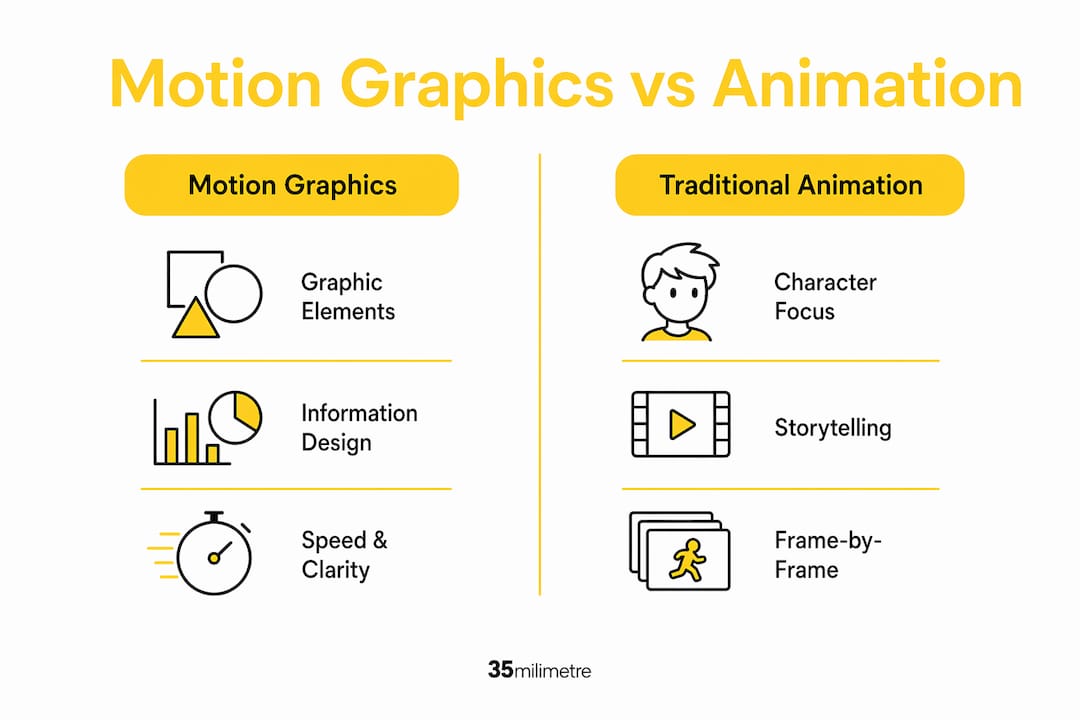
Cost is another practical argument. Motion graphics cost less than character-driven animation because the assets are simpler to produce and easier to update. A brand can refresh an animated explainer video by swapping out text and color without rebuilding the entire production. That flexibility makes motion graphics a strong choice for B2B content, product launches, and ongoing social media campaigns.
The core business advantages of motion graphics include:
- Attention capture: Movement stops the scroll and holds viewer focus longer than static visuals.
- Message clarity: Complex data, processes, or product features become easier to understand when animated step by step.
- Brand consistency: Repeatable animation systems keep visual identity coherent across platforms and campaigns.
- Production efficiency: Updating motion graphics assets is faster and less expensive than reshooting live video.
- Conversion support: Animated CTAs and social media video content drive measurably higher engagement rates than static alternatives.
Optimal explainer videos run 60–90 seconds when built around motion graphics. That length is long enough to explain a concept fully and short enough to hold attention without losing the viewer. It is a useful benchmark when planning any motion graphics production for marketing purposes.
What are the different styles and technical aspects of motion graphics?
Motion graphics split into two primary technical categories: 2D and 3D. 2D motion graphics prioritize speed and clarity, making them the default choice for explainer videos, social media content, and data visualization. 3D motion graphics add depth and physical realism, which makes them the right tool for product visualization, architectural walkthroughs, and premium brand campaigns where tactile quality matters.
Within those two categories, several distinct styles define the field. Kinetic typography animates text itself, turning words into visual rhythm that reinforces the spoken or written message. Animated infographics transform data charts and diagrams into sequences that reveal information progressively, making complex statistics easier to absorb. Logo animations give a brand's mark a signature moment of movement. UI motion design covers everything from loading screens to onboarding flows.
The technical workflow for professional motion graphics production typically follows this sequence:
- Concept and storyboard: Define the message, map the visual sequence, and establish timing before opening any software.
- Asset creation: Build or source graphic elements in Adobe Illustrator or Photoshop, keeping layers organized for import into After Effects.
- Keyframe animation: Set start and end states for each element in After Effects, then refine the easing curves to create natural, intentional movement.
- Expression-based automation: Expression workflows in After Effects use JavaScript to automate repetitive animations and maintain consistency across a project, which is how professional studios handle large-scale or template-driven work.
- Sound design: Add music, sound effects, or voiceover to reinforce the visual rhythm and emotional tone.
- Export and delivery: Render in the correct format and resolution for each platform, whether that is H.264 for web, ProRes for broadcast, or a transparent PNG sequence for compositing.
Rhythm and timing are the two principles that separate effective motion graphics from flashy but ineffective ones. An animation that moves too fast loses the viewer. One that moves too slowly loses their attention. The goal is to pace each element so the viewer's eye lands exactly where the designer intends, at exactly the right moment.
Pro Tip: Build your After Effects projects with pre-composed layers and labeled nulls from the start. Cleaning up a disorganized timeline mid-project costs more time than the initial setup saves.
How can beginners create impactful motion graphics?
Starting with motion graphics does not require mastering every tool at once. The most effective path is to learn one software deeply before expanding. Adobe After Effects is the industry standard entry point, with a large library of tutorials on platforms like YouTube and LinkedIn Learning. Cinema 4D pairs naturally with After Effects for anyone who wants to add 3D elements to their work.
The practical steps for a beginner's first motion graphics project follow a clear sequence:
- Start with a single, clear message. Motion graphics that try to communicate too many ideas at once fail at all of them.
- Sketch a rough storyboard on paper before opening any software. This forces you to think in time, not just in space.
- Build simple assets in Adobe Illustrator. Clean vector shapes animate more predictably than complex raster images.
- Import assets into After Effects and animate one element at a time. Master the position, scale, and opacity keyframes before touching anything else.
- Apply easing to every keyframe. Linear animation looks mechanical. The Easy Ease function in After Effects is the fastest way to make movement feel natural.
- Add a sound layer last. Music and sound effects reveal timing problems that are invisible when working in silence.
- Export a draft and watch it on the platform where it will actually appear. A video that looks great in After Effects can feel wrong on a phone screen.
The most common beginner mistake is overcomplicating the visual hierarchy. Every element that moves competes for the viewer's attention. If everything moves at once, nothing stands out. Purposeful movement means animating only what needs to be seen at that moment, then letting it settle before the next element enters. This principle connects directly to the visual content creation fundamentals that apply across all visual media.
A second common mistake is ignoring the relationship between motion graphics and the broader ad agency workflow. Motion graphics rarely exist in isolation. They are part of a campaign, a brand system, or a product launch. Understanding how your animation fits into that larger context makes every creative decision more purposeful and more effective.
Key Takeaways
Motion graphics is the discipline of animating graphic elements, including text, shapes, and icons, to communicate ideas clearly, and it is distinct from both traditional animation and static graphic design.
| Point | Details |
|---|---|
| Motion graphics vs. animation | Motion graphics animate abstract elements for clarity; traditional animation builds character-driven narratives. |
| Business case | Animated content captures attention in under 8 seconds and costs less to update than character animation. |
| Optimal video length | Explainer videos built on motion graphics perform best at 60–90 seconds for audience engagement. |
| 2D vs. 3D choice | Use 2D for speed and clarity in social and explainer content; use 3D when realism and depth serve the brand. |
| Beginner priority | Learn After Effects keyframes and easing before adding complexity; one clear message per project. |
Motion graphics as a strategic tool, not just a style choice
At 35milimetre, we have spent over two decades working at the intersection of post-production, compositing, and visual storytelling. Motion graphics come up in almost every conversation we have with brands and agencies, and the pattern we see most often is this: teams treat motion graphics as a finishing touch rather than a communication strategy.
That framing leads to predictable problems. Animations get added late in a project, after the core message has already been locked, which means the motion has no real job to do. It decorates rather than communicates. The result is visually busy content that does not move the needle on engagement or conversion.
The studios and brands that get the most out of motion graphics treat them the way a copywriter treats a headline. Every movement is a choice. Every transition carries meaning. The timing of a text reveal or a data chart animation is not a stylistic preference. It is a decision about what the viewer should understand, and when.
We also see a growing role for 3D motion graphics in brand work, particularly in the technology and automotive sectors where we do a lot of our work. The ability to animate a product in three dimensions, showing it from angles that a photograph cannot capture, is a genuine competitive advantage. It is not about visual spectacle. It is about giving the viewer information they could not get any other way.
The future of motion graphics sits at the intersection of AI-assisted production and real-time rendering. Tools are getting faster, and the barrier to entry is dropping. But the underlying discipline, knowing what to move, when to move it, and why, remains a craft that requires judgment, not just software.
— 35mm
Take your motion graphics further with professional post-production
Motion graphics reach their full potential when they are paired with polished post-production work. A well-animated sequence that sits inside a poorly composited or color-graded video loses much of its impact. The visual quality of the surrounding production either reinforces or undermines the motion graphics work.
At 35milimetre, we work with brands, ad agencies, and creative teams to bring motion graphics projects to a professional finish. From compositing and color grading to CGI integration and visual post-production services, our team handles the technical execution that turns good animation into compelling, brand-ready content. If your next project involves motion graphics and you want the final output to match the quality of the concept, we are ready to talk.
FAQ
What is the motion graphics definition in simple terms?
Motion graphics is graphic design that moves. It uses animated text, shapes, and icons to communicate ideas clearly, without relying on characters or narrative storytelling.
How do motion graphics differ from traditional animation?
Motion graphics animate abstract graphic elements for information design purposes, while traditional animation focuses on character-driven storytelling and narrative sequences.
What software do professionals use to create motion graphics?
Adobe After Effects is the industry standard for motion graphics production. Cinema 4D is commonly paired with it for 3D work, and Adobe Illustrator is used to build the source assets.
How long should a motion graphics explainer video be?
The optimal length for explainer videos using motion graphics is 60–90 seconds. This is long enough to explain a concept and short enough to hold viewer attention.
Are motion graphics worth the investment for small businesses?
Motion graphics cost less than character-driven animation and can be updated without full reproductions, making them a practical and cost-effective choice for businesses of any size.