

A digital mockup is defined as a high-fidelity, static visual representation of a product or interface that shows final colors, typography, and layout without any interactive functionality. In the design workflow, it sits between wireframes and prototypes, making it the first moment a stakeholder can actually see what a product will look like. Understanding what is digital mockup and where it fits in your process is the difference between a smooth approval cycle and an expensive round of late-stage revisions. At 35milimetre, we work with mockups daily across packaging, app interfaces, and product campaigns, and the clarity they create is simply irreplaceable.
What is a digital mockup and how does it fit the design workflow?
A digital mockup is the pixel-accurate visual draft of a product or interface, bridging wireframes and prototypes in the standard UI design hierarchy. That hierarchy runs in one direction: wireframe first for structure, mockup next for visual detail, prototype last for interaction. Each stage builds on the previous one, and skipping any step creates gaps that cost time and money later.
Wireframes are skeletal layouts. They show where elements live on a screen or page, but they carry no color, no real typography, and no imagery. A mockup fills all of that in. It applies brand colors, selects typefaces, places photography or illustration, and renders the composition at full resolution. The result is a static image that looks finished, even though nothing in it is clickable or functional.

This distinction matters because mockups set visual standards for the entire project. Developers reference them to match spacing and color values. Marketing teams use them to plan campaigns before a product ships. Stakeholders approve them before a single line of code gets written. The mockup is not a draft. It is the agreed visual contract for what the final product will look like.
How do mockups differ from wireframes and prototypes?
The three design deliverables serve different purposes, and confusing them leads to wasted effort. The table below makes the distinctions clear.
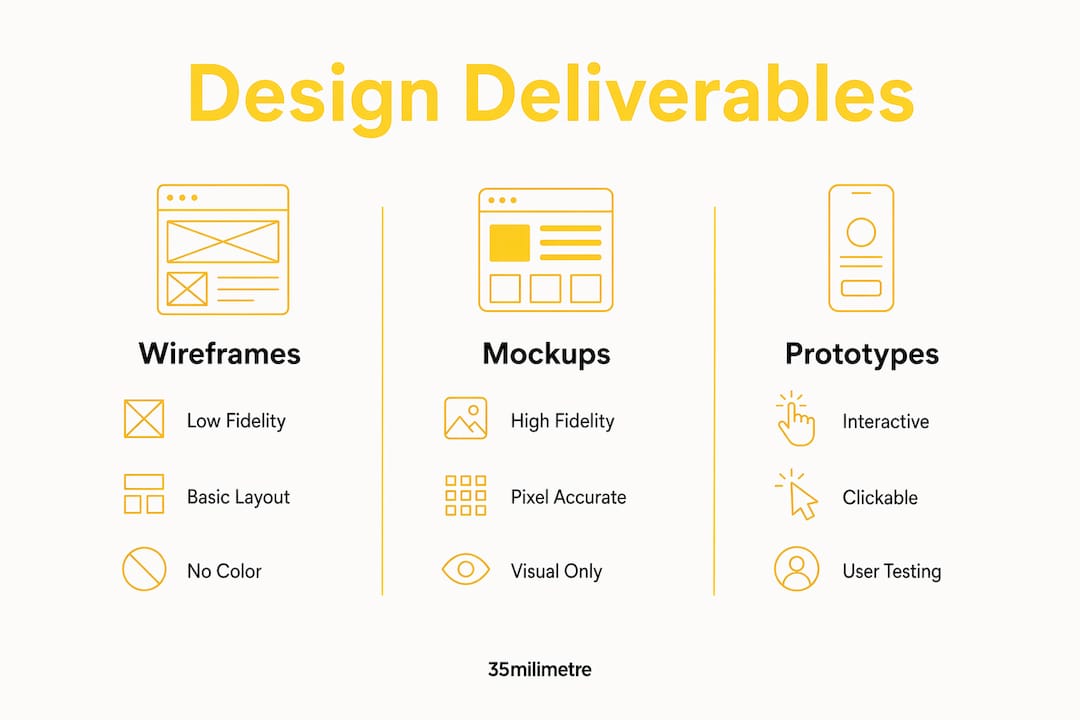
| Deliverable | Fidelity | Visual detail | Interactivity | Primary use |
|---|---|---|---|---|
| Wireframe | Low | None | None | Structure and layout planning |
| Mockup | High | Full (color, type, imagery) | None | Visual approval and brand alignment |
| Prototype | High | Full | Yes | User testing and behavior validation |
Wireframes answer the question "Where does everything go?" Mockups answer "What will it look like?" Prototypes answer "How will it behave?" Each question belongs to a different stage, and each stage requires a different deliverable.
Mockups are visual only and non-interactive, which is precisely what makes them useful for visual communication and brand standard setting. You are not testing behavior at the mockup stage. You are confirming that the product looks right before anyone invests development time. Prototypes come after that confirmation, not before. Teams that skip the mockup stage and jump straight to prototyping often discover visual problems during user testing, which is the worst possible moment to find them.
What types of digital mockups exist?
Digital mockups cover a wide range of formats, and the right type depends on what you are presenting and to whom.
2D flat mockups are the most common. They place a design on a flat surface, such as a phone screen, a book cover, or a product label. They are fast to produce and work well for social media, pitch decks, and e-commerce listings.
3D mockups add depth and perspective. A 3D product render of a cosmetics bottle, for example, shows how the label wraps around the container and how light catches the surface. This format is standard in packaging design and automotive branding, two areas where 35milimetre has deep experience.
Multi-view mockups show the same design from several angles in a single composition. They are common in apparel, where a client needs to see a logo on the front, back, and sleeve of a garment before approving production.
Animated mockups add motion, typically a short loop showing a phone being picked up or a screen scrolling. They are not interactive, so they remain mockups rather than prototypes, but they add a layer of realism that static images cannot match.
Across sectors, the use cases are consistent. Technology companies use app interface mockups for investor presentations. Retailers use packaging mockups for buyer meetings. Ad agencies use billboard and print mockups for client approvals. The format changes; the purpose stays the same: show the real thing before the real thing exists.
How to create digital mockups in five steps
The professional mockup creation process follows a clear sequence, and each frame typically takes about five minutes when you work from a prepared template. That speed comes from preparation, not shortcuts.
Step 1: Capture or prepare your design asset. Export your design from your design tool at full resolution. For screen-based mockups, this is usually a PNG at the exact pixel dimensions of the target device.
Step 2: Upload the asset into your mockup template. Professional templates use smart objects in Photoshop, which allow non-destructive editing. Double-click the smart object layer, paste your design, save, and the template updates automatically across every scene in the file.
Step 3: Frame the device or product in its environment. Choose a scene that matches the context your audience expects. A banking app belongs on a desk with a coffee cup nearby, not floating in a white void.
Step 4: Set the background and lighting. Realistic lighting and environmental context increase stakeholder confidence far more than isolated device screenshots. Natural window light, soft shadows, and a believable surface all contribute to a presentation that feels real.
Step 5: Export the final file. Export at 2x or 3x scale in PNG format to keep the image crisp on Retina and high-density displays. PNG preserves transparency, which gives you flexibility when placing the mockup on different backgrounds in marketing materials.
Pro Tip: Build a library of layered PSD templates organized by device type and scene. When a client requests a revision, you update one smart object and every scene refreshes in seconds. This approach cuts revision time dramatically on multi-format campaigns.
For a deeper look at building this kind of repeatable system, the guide on how to build an efficient visual workflow covers the full process for agency-scale production.
What are the benefits of digital mockups for teams and stakeholders?
Digital mockups replace abstract descriptions with tangible previews. That shift from "tell" to "show" changes how quickly teams reach alignment and how confidently stakeholders approve decisions.
The strategic benefits are concrete:
- Stakeholder buy-in: Mockups increase stakeholder confidence in project feasibility by 30–50% during initial pitches. A visual representation removes ambiguity that written briefs and wireframes cannot.
- Reduced development errors: Skipping the mockup stage forces developers to make design decisions during coding, which increases errors and rework costs. Mockups set the visual standard before development begins.
- Faster approval cycles: Stakeholders can respond to what they see. Reviewing a mockup takes minutes. Reviewing a written spec takes much longer and produces more questions.
- Flexible iteration: Because mockups are static files, you can produce multiple visual directions quickly and present them side by side. Teams can compare options without building anything.
- Marketing readiness: Validated visual choices for color, typography, and layout translate directly into campaign assets. A strong mockup library shortens the time from approval to launch.
"Mockups act as a risk-mitigation tool in pitches by visually representing the product before it exists, giving investors and stakeholders a concrete reference point that abstract documents simply cannot provide."
For designers working with technology clients, the article on visual design tips for technology companies shows how these principles apply in high-stakes brand contexts. Cinematic storytelling in visual media follows the same logic, and how cinematic storytelling builds stronger brands offers a useful perspective on why visual conviction matters at every stage of a project.
Key Takeaways
A digital mockup is the most efficient tool a design team has for aligning stakeholders, preventing development errors, and producing marketing-ready visuals before a product ships.
| Point | Details |
|---|---|
| Definition and position | A digital mockup is a high-fidelity, static visual that sits between wireframes and prototypes in the design workflow. |
| Mockup vs. prototype | Mockups show what a product looks like; prototypes test how it behaves. Confusing the two wastes time and budget. |
| Creation efficiency | Smart objects and layered PSD templates reduce each mockup frame to roughly five minutes of production time. |
| Stakeholder impact | Mockups increase stakeholder confidence by 30–50% in pitches by replacing abstract descriptions with concrete visuals. |
| Export standards | Always export at 2x or 3x scale in PNG format to maintain clarity on Retina displays and across marketing contexts. |
Where most mockup workflows go wrong
The most common mistake we see at 35milimetre is treating mockups and prototypes as interchangeable. They are not. A mockup answers a visual question. A prototype answers a behavioral one. Presenting a prototype when a client asked to approve the look wastes everyone's time, and presenting a mockup when a user test is needed gives you no useful data.
The second mistake is ignoring environment. A phone mockup on a plain white background communicates nothing about how the product feels in real life. One still frame placed on a desk with natural light and a believable context does more for client confidence than ten isolated screenshots. We have seen this shift the tone of an entire pitch meeting.
The third mistake is exporting at screen resolution and calling it done. A 1x PNG looks fine on a laptop but falls apart on a Retina display or a large-format print. Exporting at 2x or 3x is not optional for professional work. It is the baseline.
The underlying principle is that mockups work best when they are part of a structured workflow, not a shortcut. Wireframes first, mockups second, prototypes third. Skipping stages does not save time. It creates problems that surface later, at a much higher cost.
— 35milimetre
How 35milimetre elevates your mockup presentations
A well-built mockup is only as strong as the visual quality behind it. Flat templates and basic compositing get you to "acceptable." Professional retouching, color grading, and post-production finishing get you to "credible."

At 35milimetre, we specialize in exactly that finishing layer. Our team handles commercial retouching, compositing, and CGI production for brands in technology, automotive, and retail, turning solid mockup concepts into presentation-grade imagery that holds up in investor decks, ad campaigns, and marketplace listings. If your mockups need to look like the real product, not a template, our visual post-production services are built for that standard. Reach out and we will show you what the difference looks like.
FAQ
What is a digital mockup in simple terms?
A digital mockup is a static, high-fidelity image that shows what a product or interface will look like, including color, typography, and layout, without any interactive functionality.
How is a mockup different from a prototype?
A mockup is a visual-only representation used for approval and brand alignment. A prototype adds interactivity and is used to test user behavior.
How long does it take to create a digital mockup?
A single mockup frame typically takes about five minutes when you work from a prepared layered template with smart objects, as the template updates automatically when you replace the design asset.
What file format should I use when exporting mockups?
Export mockups as PNG files at 2x or 3x scale. PNG preserves transparency and maintains sharpness on Retina and high-density displays, making it the standard format for both marketing and presentation use.
Do I need design software to create digital mockups?
Professional mockup creation uses layered PSD templates in Photoshop, which give you smart object editing and non-destructive workflows. Template-based generators are available for simpler needs, but they offer less control over lighting, environment, and export quality.