

3D modeling is the process of creating a mathematical, coordinate-based representation of any surface or object in three dimensions using specialized software. Artists build these objects by manipulating vertices, edges, and polygons across X, Y, and Z axes, which allows the model to be viewed and adjusted from any angle. Tools like Blender, Autodesk 3ds Max, and Adobe Substance are the industry standard for this work. What is 3D modeling in practice? It is the foundation behind the characters in your favorite video games, the product shots in tech ads, and the architectural walkthroughs architects show clients before a single brick is laid.
What are the common types of 3d modeling?
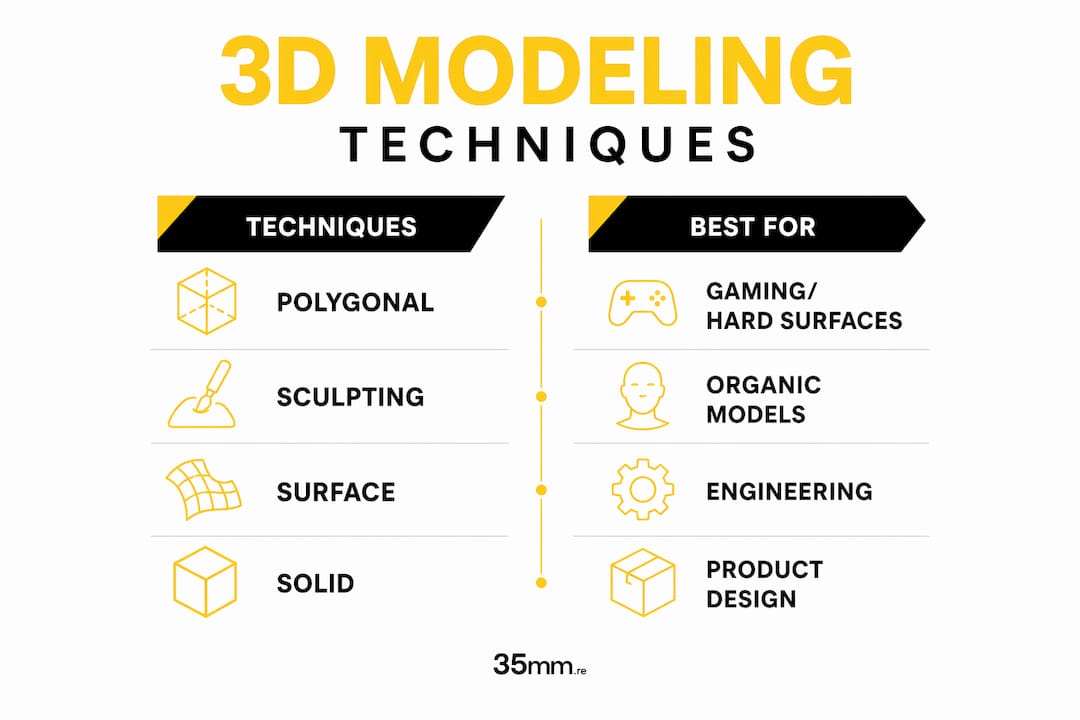
Four primary modeling techniques define the field: wireframe, surface (polygonal), solid, and sculpting. Each serves a different purpose, and choosing the wrong one for your project wastes time and creates technical problems downstream.
Polygonal modeling is the industry standard. It works by connecting vertices with edges to form flat faces, usually triangles or quads. This approach is memory-efficient and optimized for real-time applications like gaming, which is why studios from Naughty Dog to indie developers rely on it for character and environment work.

Sculpting treats the digital model like clay. Software like ZBrush or Blender's sculpt mode lets you push, pull, and smooth geometry to create organic shapes, skin pores, wrinkles, and natural forms that would take hours to build with polygons alone. Creature designers and character artists favor this approach.
Surface and solid modeling are more common in engineering and product design contexts. Solid modeling, used in tools like Autodesk Fusion 360, treats objects as mathematically precise volumes. This matters when you need exact wall thickness for manufacturing or 3D printing.
| Technique | Best For | Key Advantage |
|---|---|---|
| Polygonal | Gaming, hard-surface assets | Memory-efficient, real-time ready |
| Sculpting | Organic characters, creatures | Natural, freeform shape creation |
| Surface | Automotive, industrial design | Smooth, mathematically clean curves |
| Solid | Engineering, 3D printing | Precise volume and wall thickness |
Pro Tip: Match your technique to your end goal. Polygonal for hard surfaces, sculpting for organic models is the consensus approach professionals use across gaming and film studios.
How does the 3d modeling workflow progress?
A finished 3D model does not appear in one sitting. The typical workflow follows seven steps: conceptualization, reference gathering, blockout, detailing, texturing and UV mapping, lighting and shading, and final rendering. Understanding each phase prevents the most common beginner mistake, which is jumping straight into detail work before the foundation is solid.
- Conceptualization. Define what you are building. Sketch it on paper or in a tool like Procreate. Clarity here saves hours of rework later.
- Reference gathering. Collect photos, drawings, and real-world references. Professional artists keep reference boards in PureRef or Pinterest before touching their 3D software.
- Blockout. Build a rough, low-detail version of the entire model first. This phase sets correct proportions and overall silhouette. Skipping it is the single biggest mistake beginners make.
- Detailing. Refine the blockout by adding surface detail, hard edges, and fine geometry. This is where polygonal and sculpting techniques diverge most sharply.
- Texturing and UV mapping. Unwrap the 3D surface into a flat 2D layout, then paint or project color, roughness, and normal maps onto it. Adobe Substance Painter is the industry-standard tool for this step.
- Lighting and shading. Set up lights and assign material properties so the model responds realistically to its environment. This step transforms a flat-looking mesh into something that reads as real.
- Rendering. Output the final image or animation using engines like Arnold, V-Ray, or Blender's Cycles. This is where the workflow from concept to render becomes a finished visual asset.
Pro Tip: Work in a non-destructive, history-based workflow whenever possible. This lets you modify base geometry without rebuilding the entire model from scratch, which is critical when a client requests changes at the detailing stage.
What software is best for 3d modeling beginners?
3D modeling software ranges from free, community-supported tools to professional-grade applications that cost hundreds of dollars per month. The right choice depends on your goals, budget, and the industry you want to work in.
Blender is the strongest starting point for most beginners. It is free, cross-platform, and covers the full pipeline from modeling to rendering and animation. The Blender community produces thousands of free tutorials on YouTube and platforms like Blender Artists, making it one of the most learnable tools available.
Autodesk Maya is the standard in film and game studios. It has a steeper learning curve than Blender, but if your goal is a career at a major studio, learning Maya early gives you a direct advantage. Autodesk offers free educational licenses for students.
Cinema 4D is the go-to for motion graphics and advertising work. Its procedural modeling tools and tight integration with Adobe After Effects make it the preferred choice for designers who work in broadcast and commercial production.
Autodesk 3ds Max remains dominant in architectural visualization and game asset production, particularly in European and Asian markets.
Regardless of which software you choose, the core transformation tools are the same across all platforms: Move, Rotate, and Scale. Mastering these three operations before exploring advanced features is the most efficient path forward for any beginner.
| Software | Price | Best For | Skill Level |
|---|---|---|---|
| Blender | Free | All-around modeling, rendering | Beginner to Pro |
| Autodesk Maya | ~$235/month | Film, game studios | Intermediate to Pro |
| Cinema 4D | ~$95/month | Motion graphics, advertising | Intermediate |
| Autodesk 3ds Max | ~$235/month | Architecture, game assets | Intermediate to Pro |
What industries and applications use 3d modeling?
3D modeling is used across more industries than most beginners realize. Its applications span gaming, film, architecture, product design, and medical visualization, and the skills you build in one field transfer directly to another.
In gaming, 3D models form every character, weapon, vehicle, and environment. Studios like Rockstar Games and CD Projekt Red employ hundreds of 3D artists to build the worlds players explore.
In film and animation, modeling is the first step in creating digital characters and environments. Pixar, Industrial Light and Magic, and Weta Digital all rely on proprietary pipelines built around polygonal and sculpted models.
Architecture and product design use 3D models to present concepts before they are built or manufactured. A product designer at a consumer electronics company can model a new device, render it photorealistically, and share it with stakeholders without producing a single physical prototype. This saves significant time and production cost.
Medical visualization is one of the fastest-growing application areas. Surgeons use 3D models of patient anatomy for pre-operative planning, and medical device companies use them for training simulations.
3D printing adds a practical constraint to the modeling process. Models designed for printing require careful attention to wall thickness, orientation, and slicing requirements from the very start of the design process. A model that looks perfect on screen can fail completely on a printer if these factors are ignored.
The Stanford Bunny, one of the most famous 3D sample models in computer graphics history, illustrates how a single well-built mesh becomes a universal reference across research, rendering tests, and software development. Understanding how 3D models feed into larger workflows, including visual storytelling and post-production, is what separates artists who model in isolation from those who create work that actually ships.
Key takeaways
3D modeling is a structured discipline where technique selection, workflow order, and software choice each directly determine the quality and usability of the final asset.
| Point | Details |
|---|---|
| Technique matches end use | Use polygonal modeling for hard surfaces and sculpting for organic, character-based forms. |
| Blockout before detail | Always establish correct proportions in a rough blockout before adding surface detail. |
| Non-destructive workflows | Work history-based to allow revisions at any stage without rebuilding from scratch. |
| Software is transferable | Core Move, Rotate, and Scale tools work the same across Blender, Maya, and Cinema 4D. |
| Model for your output | 3D printing, real-time gaming, and film rendering each require different technical specifications from the start. |
What 3d modeling has taught us at 35milimetre
After two decades of working with 3D artists and integrating CGI into commercial campaigns, one pattern stands out clearly. Beginners consistently overestimate the importance of software choice and underestimate the importance of fundamentals.
We have seen artists switch from Blender to Maya expecting their work to improve overnight. It never does. What actually improves work is understanding topology and edge flow before touching a single polygon. A model with clean geometry renders better, animates better, and holds up under the scrutiny of a commercial client who will zoom in on every surface.
The other thing beginners consistently skip is the planning phase. Jumping straight into modeling without reference images or a rough sketch is the equivalent of building a set without a blueprint. You end up tearing down and rebuilding, which kills momentum and confidence.
The creative potential of 3D modeling is genuinely extraordinary. At 35milimetre, we have watched the discipline evolve from a niche technical skill into the backbone of modern visual communication. Product renders, CGI advertising, architectural visualization, and AI-enhanced imagery all trace back to someone building a clean mesh in a viewport. If you are starting out, commit to the basics. The advanced features will make sense once the foundation is solid. And if you want to see what 3D design delivers for brands, the results speak for themselves.
— 35mm
Take your 3d work further with 35milimetre
If you are ready to see how professional 3D modeling integrates into high-end commercial production, 35milimetre is the studio to know. Led by Mehmet Turan, the team has spent over two decades delivering CGI, compositing, and post-production work for major brands in technology and automotive sectors.
Whether you need photorealistic product renders, advertising visuals, or full post-production support, 35milimetre brings the technical depth and creative judgment that separates polished commercial work from amateur output. Explore the full range of professional visual post-production services and see how expert 3D modeling can transform your next project from concept to finished asset.
FAQ
What is 3d modeling in simple terms?
3D modeling is the process of building a digital object with length, width, and depth using specialized software. Artists manipulate vertices, edges, and polygons to create anything from a game character to a product prototype.
How is 3d modeling different from CAD?
3D modeling focuses on visual fidelity and topology for rendering and animation, while CAD prioritizes mathematical precision for engineering and manufacturing. The tools, workflows, and output formats are distinct for each discipline.
What is the best 3d modeling software for beginners?
Blender is the strongest starting point because it is free, covers the full pipeline, and has an extensive library of community tutorials. Students can also access free educational licenses for Autodesk Maya and 3ds Max.
How long does it take to learn 3d modeling?
Most beginners can produce competent models within three to six months of consistent practice. Mastering core tools like Move, Rotate, and Scale comes quickly; developing an eye for topology and clean geometry takes longer.
What are the main types of 3d modeling techniques?
The four primary techniques are polygonal, sculpting, surface, and solid modeling. Polygonal is the most widely used due to its efficiency in real-time applications like gaming, while sculpting suits organic character work.