
Set extension advertising is the VFX and compositing process of digitally extending or replacing physical sets and backgrounds for commercials and product visuals. Use it when you need scale, safety, or location variety that a physical build cannot deliver within budget. The technique spans everything from a simple digital matte painting that pushes a studio wall into an open horizon, to a full 3D CG environment surrounding a product hero shot. As the Audi case study below demonstrates, some productions even capture extensions live on-camera using synchronized projection rigs, reducing post workload significantly. Standard delivery formats are OpenEXR multilayer sequences with ACES color management, and a well-briefed studio can move from plate handoff to final comp in two to four weeks for a mid-complexity commercial.
Three quick signals that set extensions are the right call: your location budget is under pressure, the creative requires an environment that cannot be safely or practically built, or the brand needs consistent visual control across multiple executions.
Key Takeaways
Set extension advertising delivers scale, safety, and location variety for commercials when physical builds are impractical or cost-prohibitive — and the quality of on-set capture determines the quality of the final composite.
| Point | Details |
|---|---|
| Choose the right technique | Match the method (matte, 3D CG, projection, AI) to camera move complexity and budget before the shoot. |
| Capture HDRI and grey-ball on set | These two items are the fastest way to reduce lighting mismatch and compositor rework in post. |
| Lock camera moves in previs | Limiting parallax cuts both schedule and cost; agree on move limits with the VFX supervisor before principal photography. |
| Brief with plates and metadata | A complete brief (hero plate, HDRI, camera metadata, shot list) gets an accurate studio quote on the first pass. |
| 35milimetre for full-pipeline delivery | 35milimetre handles compositing, CGI, AI imagery, and archive handoff for ad agencies and brand teams. |
Table of Contents
- When should you use set extensions in advertising?
- What types of set extensions work best for commercials?
- What does an end-to-end set extension workflow look like?
- What data does your on-set team need to capture?
- What drives cost and timeline for a set extension project?
- How do you brief a post-production studio for set extensions?
- What are the most common set extension mistakes — and how do you avoid them?
- Case study: how an Audi commercial used live projection to extend the set
- What deliverables and file formats should you expect at handoff?
- A studio perspective on delivering set extensions for ads
- 35milimetre: post-production for set extensions that agencies can rely on
- Sources
When should you use set extensions in advertising?
The clearest use case is the product hero shot where the environment needs to feel expansive but the studio is small. A 20-by-20-foot cyc wall becomes a desert plain, a futuristic showroom, or a coastal cliff with the right plate and a skilled compositor. Automotive work is another natural fit: placing a vehicle in a dramatic mountain pass or an urban canyon is far cheaper and safer as a digital set extension than a full location shoot with a crew of 80.
Safety-sensitive stunts benefit too. When talent or a vehicle needs to appear in a hazardous environment, shooting against a neutral background and extending the world in post removes the physical risk entirely. For FMCG and CPG brands, post-production in fast-turn campaigns can swap seasonal backgrounds across a product range without reshooting.
A quick decision checklist for producers:
- Budget allows for post time but not a full location build or travel
- Camera moves are limited or locked off (complex parallax multiplies cost)
- Deliverable quality target is broadcast or premium digital
- Brand safety requires full creative control over every background element
- Shot count is five or fewer unique environments per campaign
Pro Tip: Lock the camera for at least one clean plate per setup. A locked-off clean plate is the single most cost-effective thing you can do on set to reduce compositor time and rework.
What types of set extensions work best for commercials?
Each technique has a distinct cost and quality profile, and choosing the wrong one early is the most common source of budget overruns.
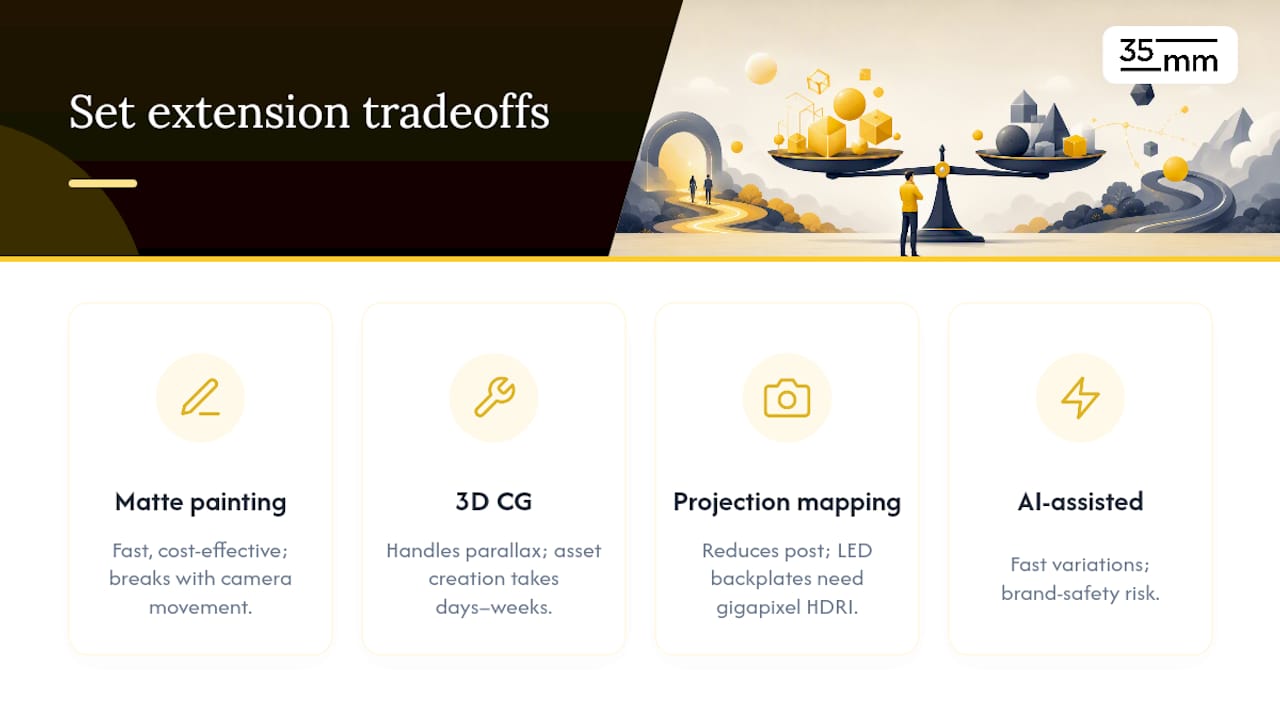
Digital matte painting is the workhorse for static or near-static shots. A skilled matte artist extends the set in 2D, painting directly over the plate. It is fast and cost-effective, but it breaks down quickly with significant camera movement or parallax.
3D CG set extensions handle complex camera moves and parallax correctly because the environment is a genuine three-dimensional asset. The tradeoff is asset creation time: modeling, texturing, and lighting a CG environment adds days or weeks to the schedule. This is the standard approach for automotive commercials where the camera orbits or tracks alongside the vehicle.
Projection mapping and live on-camera projection push the effect upstream into principal photography. The environment is projected onto physical surfaces or the subject itself, captured live in-camera. This reduces post work substantially, as the Audi case study illustrates. Backplates for LED volumes require gigapixel-resolution panoramas with matched HDRI data to hold up on large screens and allow reframing.
AI-assisted environment generation is maturing fast. It enables rapid creative variation for product work, but it introduces brand-safety considerations. A light-first prompting strategy with a T2I-to-I2V master reference workflow and a 10–15% resolution heuristic when upscaling AI outputs keeps brand fidelity and avoids visual drift between frames.
Pro Tip: For product commercials where the camera barely moves, AI-generated backgrounds with a locked master reference image can cut environment creation time dramatically. Reserve full 3D CG for shots with meaningful camera parallax.
Pro Tip: Prefer on-camera projection or LED backplates when your production has the rig budget but wants to minimize post revisions. The effect is locked at the shoot, which removes a full round of client approvals in post.
What does an end-to-end set extension workflow look like?
A well-run set extension pipeline has seven stages, each with a clear owner and handoff.
| Stage | Owner | Key Output |
|---|---|---|
| Concept & previs | Creative director + VFX supervisor | Animatic, camera move list, environment references |
| Tech scout & camera tests | DOP + VFX supervisor | Lens metadata, sensor specs, tracking marker plan |
| On-set capture | DOP + data wrangler | Hero plates, clean plates, HDRI, grey-ball, Macbeth chart |
| Tracking / matchmove | VFX compositor | Solved camera, tracking data, FBX export |
| CG / environment creation | 3D artist | Modeled, textured, lit environment assets |
| Lookdev, lighting match & comp | Compositor | Integrated multilayer EXR sequences |
| Color grade & QC | Colorist + producer | Graded master, review ProRes, QC checklist |
The most effective schedule compression happens between stages three and five: while editorial assembles selects from the hero plates, the 3D artist can begin blocking the environment geometry using the previs references. HDRI capture and plate prep run in parallel, so the compositor receives both at the same time.
What data does your on-set team need to capture?
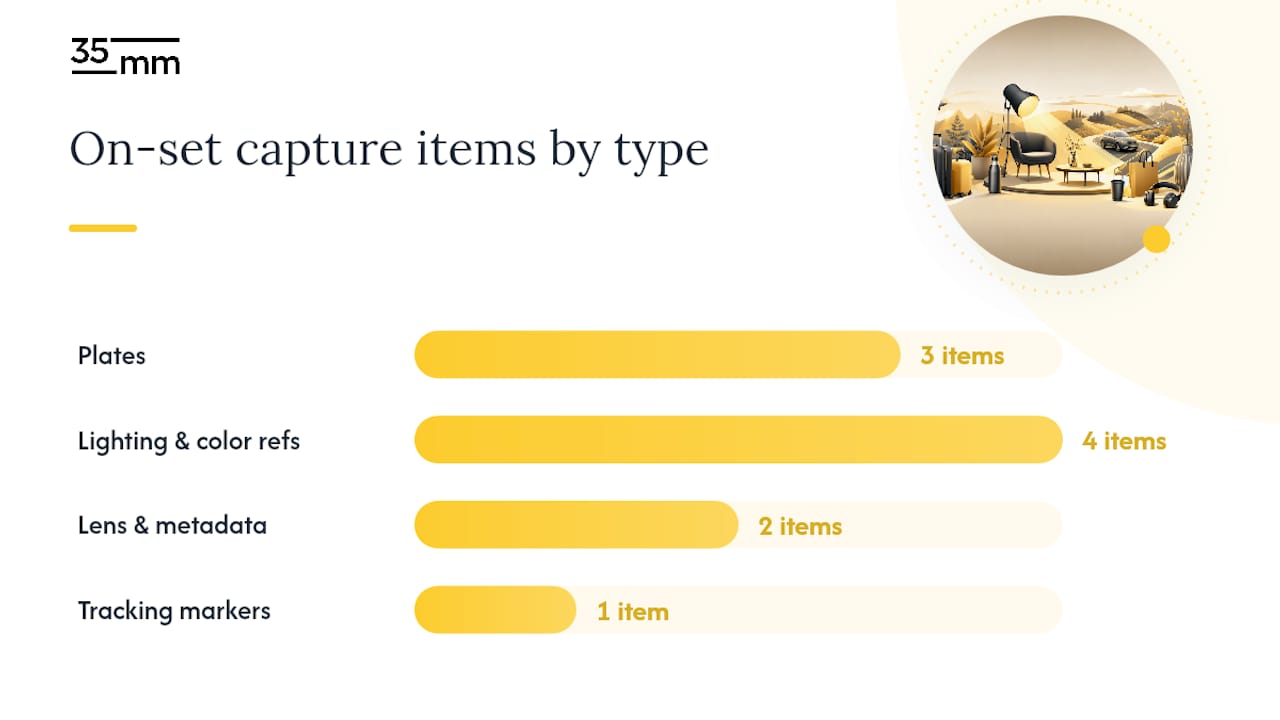
Skipping even one item on this list typically costs more in post than the time it would have taken to capture on set. Plate capture best practices call for a hero plate, reference plates, HDRI, grey-ball, Macbeth chart, and a lens-distortion grid, all managed under ACES color management.
Mandatory capture items:
- Hero plate (primary camera, primary take, full resolution)
- Clean plate (same framing, no talent or hero product, locked off)
- Reference plate (wider field of view showing full set context)
- HDRI panorama at subject position (at least 14 stops of dynamic range)
- Grey-ball and chrome-ball reference (for diffuse and specular lighting reconstruction)
- Macbeth ColorChecker chart (for color calibration in comp)
- Lens-distortion grid (shot at start and end of each lens change)
- Camera metadata: make, model, lens, focal length, sensor height, shutter angle, frame rate
- Tracking markers or crypto-mattes (for any shot with camera movement)
Pro Tip: Shoot the grey-ball and Macbeth chart in the same lighting conditions as the hero plate, not at the end of the day when the light has shifted. The reference is only useful if it matches the plate.
Labeling and naming conventions matter as much as the capture itself. OpenEXR multi-channel sequences with embedded timecode and camera metadata speed compositor work and reduce the chance of a mislabeled plate derailing the schedule. A reliable naming template: sequence_shot_pass_dirty-clean_version.exr.
File handoff checklist for data wranglers:
- All plates exported as OpenEXR, 16-bit minimum, with embedded metadata
- HDRI delivered as 32-bit EXR panoramas, labeled by position and time of day
- Camera metadata in a spreadsheet (one row per setup)
- Tracking markers documented with a diagram of their on-set positions
What drives cost and timeline for a set extension project?
Shot count is the primary lever. A single locked-off product shot with a simple matte painting can be turned around in three to five days. A five-shot automotive sequence with full 3D CG environments, complex camera moves, and multiple revision rounds realistically takes four to six weeks.
The other major drivers are camera move complexity, photorealism target, and asset creation scope. A dolly or orbit move requires accurate matchmove data and a full 3D environment; a locked-off shot needs neither. Choosing to limit parallax by restricting camera movement is the single most effective producer-side decision for compressing both schedule and cost.
Pro Tip: When budget is tight, ask the VFX supervisor whether projection mapping on-camera or an LED backplate workflow can replace a planned 3D CG environment. For the right shot, it can cut post time by half.
Strong visual content consistently outperforms static imagery in engagement, which makes the ROI case for investing in a well-executed set extension straightforward for most campaign briefs.
How do you brief a post-production studio for set extensions?
A complete brief eliminates pricing surprises and gets the studio to an accurate quote on the first pass. Include every field below.
Brief template fields:
- Project summary (product, campaign, deliverable intent)
- Creative references (mood board, environment references, competitor examples)
- Shot list with selects and camera move descriptions
- Camera and focal data (make, model, lens, focal length, sensor size)
- Required deliverables and formats (EXR passes, ProRes review, Nuke script)
- Target resolution and color space (e.g., 4K DCI, ACES AP0)
- Technical constraints (camera move limits, parallax restrictions)
- Brand-safety notes (restricted imagery, logo placement, color palette)
- Approval points and expected revision rounds
Attach to the brief:
- Hero plate and clean plate (full-resolution EXR or camera-native RAW)
- HDRI panoramas (labeled by position and time of day)
- Macbeth chart and grey-ball reference photos
- Camera metadata spreadsheet
- Editorial selects (a short cut or frame list, not the full camera roll)
- A short reference reel (30–60 seconds showing the environment tone you want)
Clear acceptance criteria prevent delivery disputes. Specify: EXR multilayer passes (beauty, diffuse, specular, depth, normals, mattes), a ProRes 4444 review copy, a Nuke or After Effects compositing script, and a QC checklist signed off by the VFX supervisor before final delivery.
What are the most common set extension mistakes — and how do you avoid them?
Light and color mismatch is the failure mode that kills otherwise solid work. When the plate was shot at 5,600K and the CG environment is rendered at 6,500K, no amount of comp work fully closes the gap. Recording the Kelvin value, key-to-fill ratio, and backlight intensity on set, then handing that data to the compositor alongside the HDRI, is the mitigation.
Parallax errors surface when a strong camera move was not anticipated in previs and no accurate tracking data was captured. The fix is upstream: agree on camera move limits with the VFX supervisor before the shoot, not after.
AI-generated extensions introduce a specific risk: temporal instability, or "drift," where the background shifts subtly between frames.
Pro Tip: Lock lens and sensor geometry in the paperwork before the shoot. A lens swap on set that is not documented creates a tracking mismatch that can cost a full day of rework in post.
Case study: how an Audi commercial used live projection to extend the set
The production team on this Audi virtual set extension chose projection mapping over full post-CG, projecting animated environments directly onto the vehicle and surrounding surfaces and capturing the result live on-camera.
The production synchronized multiple projectors across long distances, used very high-sensitivity cameras for some shots, and produced several animated plates for the final spot — all captured in controlled conditions to minimize downstream compositing work.
Key lessons for agencies considering a similar approach:
- On-camera projection locks the effect at the shoot, removing a full client approval round in post
- Very high-ISO camera capability is a prerequisite; test this before committing to the approach
- On-site camera placement tests are not optional; they determine whether the projection geometry works
- The technique suits environments that can be pre-rendered as animated plates, not spontaneous or reactive environments
For automotive visual campaigns where the environment is known and controllable, live projection consistently reduces post cost and schedule compared to full 3D CG.
What deliverables and file formats should you expect at handoff?
A complete set extension delivery includes more than a graded master. Specify every item in the contract before work begins.
| Deliverable | Format | Notes |
|---|---|---|
| Beauty render + AOVs | OpenEXR multilayer, 32-bit | Diffuse, specular, normals, depth, mattes |
| Tracked camera file | FBX or Alembic | Includes lens data and sensor geometry |
| Compositing script | Nuke (.nk) or After Effects (.aep) | Organized, labeled, with LUTs embedded |
| Color space notes + LUTs | .cube or .clf | ACES or project-specific transform |
| ProRes review copies | ProRes 4444 | Watermarked for client review rounds |
| Final graded master | ProRes 4444 XQ or DPX | Delivery spec per broadcaster or platform |
| Project archive | ZIP or LTO | All plates, assets, scripts, and metadata |
Handoff checklist for agencies:
- Confirm all EXR passes are named per the agreed convention before signing off
- Verify the Nuke or After Effects script opens cleanly on your own workstation
- Check that LUTs and color space notes match the delivery spec
- Request a QC checklist from the studio confirming frame range, resolution, and color space
A studio perspective on delivering set extensions for ads
At 35milimetre, we have spent over two decades working at the intersection of compositing, CGI, and advertising imagery. Led by Mehmet Turan, our team brings together post-production artistry, 3D design, and graphic craft on every project, with the flexibility to scale for larger campaigns when the shot count demands it. Our automotive and product work for major brands has taught us that the brief is where most projects succeed or fail, long before a single plate is ingested.
The single most useful thing an agency can do is send a complete brief with plates, HDRI, and camera metadata in the same delivery. When those three elements arrive together, we can begin environment blocking and lookdev in parallel, which typically shaves several days from the schedule. Our agency post-production workflow is built around that parallel structure. Portfolio examples and project references are available directly through the studio.
35milimetre: post-production for set extensions that agencies can rely on
35milimetre delivers the full set extension pipeline for ad agencies and brand teams: commercial compositing, CGI environment creation, AI-enhanced imagery, photo retouching, and complete archive handoff in broadcast-ready formats. Our track record in automotive and product advertising means we understand the technical precision and brand-safety standards that agency briefs demand.

If your next campaign needs environments that a studio wall cannot provide, the practical next step is a project brief. Share your shot list, plates, and creative references, and we will return a scoped quote with a realistic timeline. Start the conversation with 35milimetre and get your set extension project moving.
Sources
A short list of technical references worth bookmarking when you build your next set extension call sheet: