

A complete post-production handoff is a packaged inventory of final exports plus documented source files, a README, access credentials, and clear acceptance instructions. Send that package, then ask the receiver to verify access and run the QA checklist you supplied. That single move, grounded in standards like UPDIG and GS1, is what separates a professional handoff from a folder of files and a hopeful email.
TL;DR:
- A full post-production handoff package includes final exports, source files as scoped, a README, access credentials, and a clear acceptance process to prevent follow-up questions.
- Deliverables must be documented with metadata like color profiles, layer notes, pass breakdowns, and licensing, with file formats aligned to use cases and proper naming conventions for efficiency.
- Secure file transfer should use password-protected links, clear directory structures, and checksum files for large projects to ensure integrity and prevent rework.
- During the handoff meeting, clarify acceptance criteria, record the session, and assign issues with owners and due dates to ensure smooth project closure and support.
- Self-sufficient handoffs minimize questions and revisions, and outsourcing this process to specialists like 35milimetre can save time, with standards based on UPDIG, GS1, and VES transfer specifications.
Table of Contents
- What Goes Into a Post-Production Handoff Package?
- File Formats, Color Space, and Layer Rules That Prevent Rework
- How Should You Package and Transfer the Files?
- How Do You Run the Handoff Meeting and Confirm Acceptance?
- What Happens After the Files Are Delivered?
- Why Self-Sufficient Handoffs Save Real Budget
- Let 35milimetre Handle Your Next Handoff
- Where to Go for the Original Standards
- Sources
- FAQ
What Goes Into a Post-Production Handoff Package?
A deliverable inventory is the backbone of any clean handoff. It's a simple table, one row per asset, that tells the receiver exactly what they're getting, in what format, where to find it, and whether they're allowed to touch it. Agencies that skip this step almost always end up fielding the same three questions by email: "Which file is final?" "Can I edit this?" "Where's the source?" A written inventory answers all three before anyone has to ask.
Here's a workable template you can adapt for your next transfer:
Whether to include source files depends on what the contract says. If the client paid for compositing layers or a fully editable PSD, deliver them. If the agreement covered only final retouched exports, you can withhold RAW files by default and hand over only what was scoped. A production handoff checklist should spell this out in writing before delivery day, not negotiate it after.
Beyond the files themselves, list the metadata that makes them usable:
- Color profile used for each master file (Adobe RGB, sRGB, or a print-specific profile).
- Mask and channel notes: which layers hold alpha channels, and what they isolate.
- Pass breakdowns for composites (beauty pass, shadow pass, reflection pass).
- Licensing dependencies for stock elements, fonts, or 3D assets used in the composite.
This is the moment to also flag anything with usage restrictions. A licensed background plate or a stock texture with limited terms belongs in the rights note column, not buried in a separate email thread.
File Formats, Color Space, and Layer Rules That Prevent Rework
Most rework in retouching doesn't come from bad edits. It comes from wrong formats arriving at the wrong stage. Master files should be delivered as TIFF, PSD, or EXR for composites with depth data. Client-facing exports go out as high-quality JPEG or PNG. UPDIG's imaging guidelines recommend RGB masters by default, with clipping paths or transparent backgrounds preserved so the receiving studio can convert downstream without asking you to re-export. GS1's product image specification echoes this: one high-quality master with a clean clipping path, supported by lighter JPEG or PNG exports for anything web-bound.
Color space matters more than most production managers admit. Stick to RGB masters unless a print vendor has confirmed a specific CMYK or spot-color profile. For print handoffs, a ΔE tolerance of 3 or under is the working standard most retouchers use to judge whether a color shift will be visible on press.
Layer naming is where a lot of studios lose time they didn't need to lose. A retoucher opening your PSD should be able to tell, in five seconds, which layers are editable and which are reference-only. A naming convention like REF_backgroundplate, EDIT_skin_dodge, or LOCKED_client_logo does that work automatically.
File naming templates help just as much. Something like PROJECT_ASSET_VERSION_DATE.ext keeps a shared drive readable months later, when nobody remembers which file was final.
Before you send anything, run this verification pass:
- Open the file in the target application, not just a preview window.
- Confirm the clipping path is intact and closes cleanly.
- Check font availability if the file contains live type.
- Verify masks and alpha channels render correctly at full resolution.
Pro Tip: Keep a running glossary of your naming and layer conventions in a shared doc. Retouchers who join a project midstream will thank you, and you'll stop re-explaining the same system every quarter.
How Should You Package and Transfer the Files?
Folder structure prevents almost as much confusion as naming conventions do. A standard top-level structure looks like this:
Source-Files/— editable PSDs, layered composites, 3D scene files.Exports/— final client-approved JPEGs, PNGs, print-ready TIFFs.Docs/— README, fonts, licensing notes, brand guidelines.
Transfer security is not optional at this stage. Use a branded delivery page where possible, password-protect the link, and set a clear expiry date so files don't sit publicly accessible for months. Send the password through a separate channel, a text message or a different email thread, never in the same message as the link itself.
Your README, or Delivery Notes file, should cover:
- The full deliverable list, matched to the inventory table.
- Intended use for each asset (web, print, social).
- Link expiry date and what happens after it passes.
- A named contact for questions, with a response window.
Before you hit send, test the whole thing yourself. Download in an incognito browser, extract every archive, and confirm the files open cleanly in the target applications. Broken links or corrupted zips at handoff cost far more time than catching them beforehand, as delivery checklists from creative agencies consistently point out.
Pro Tip: For large composite projects, add a checksum or manifest file listing every asset and its file size. It takes two minutes and it's the fastest way to confirm nothing dropped during transfer.
How Do You Run the Handoff Meeting and Confirm Acceptance?
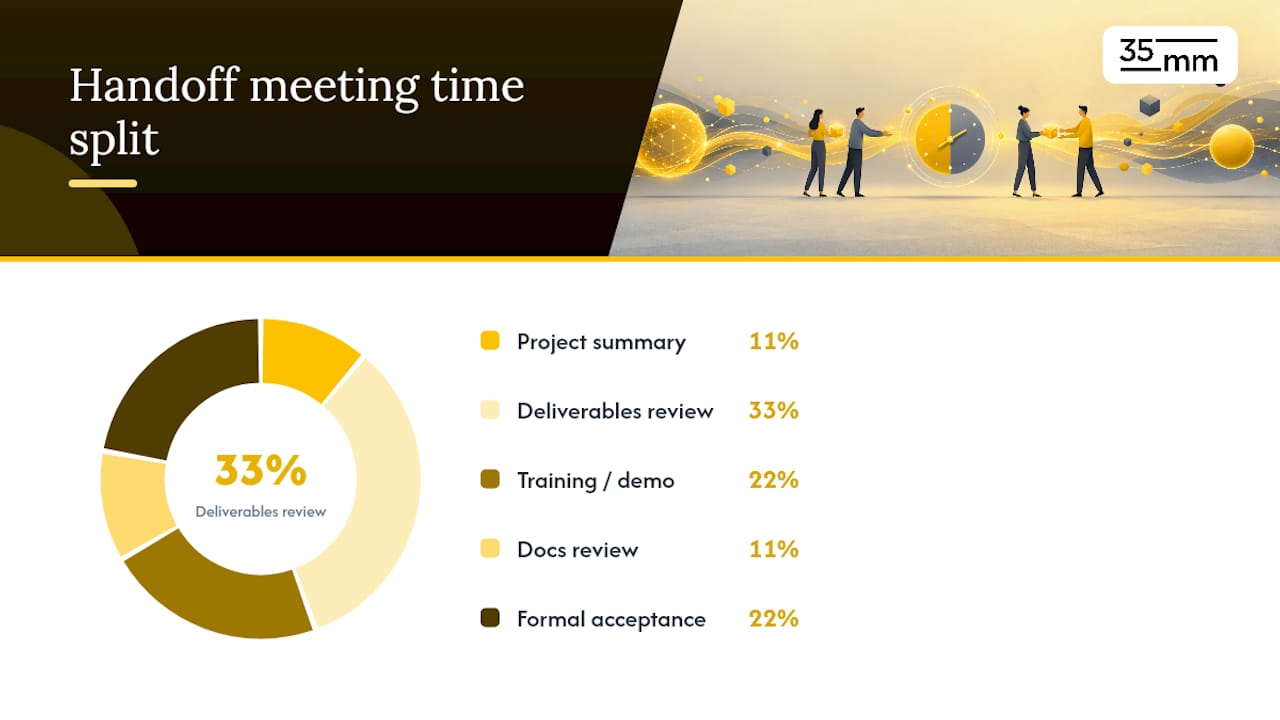
Treat the handoff meeting as a decision session, not a status update. A workable agenda runs like this:
- Project summary and scope recap (5 minutes).
- Deliverables walkthrough against the inventory (15 minutes).
- Quick training or screen recording on tricky files (10 minutes).
- Documentation review, README and rights notes (5 minutes).
- Formal acceptance or exceptions (10 minutes).
Acceptance criteria need to be explicit. Either an item is accepted outright, or it's marked "accepted with exceptions," with the exception written down and assigned an owner. Agency handoff templates treat this moment as the point where ownership formally transfers, which means the record of that meeting matters as much as the meeting itself.
Record the session. Log every open issue with an owner and a due date, and store that recording alongside the issue log as proof the transfer happened and what was agreed. Warranty fixes, correcting something that doesn't match the original brief, are different from new-scope requests. Decide which is which before the meeting ends, not after a dispute starts.
What Happens After the Files Are Delivered?
Most agency handoff structures build in a support window of two to four weeks after delivery, with a response service-level agreement attached. Covered requests usually mean fixing something that doesn't match the approved file. A new crop, a different background, or an added element is new scope, not a warranty fix.
An issue-tracking template keeps this honest: issue, impact, evidence, owner, due date. Five columns, no ambiguity.
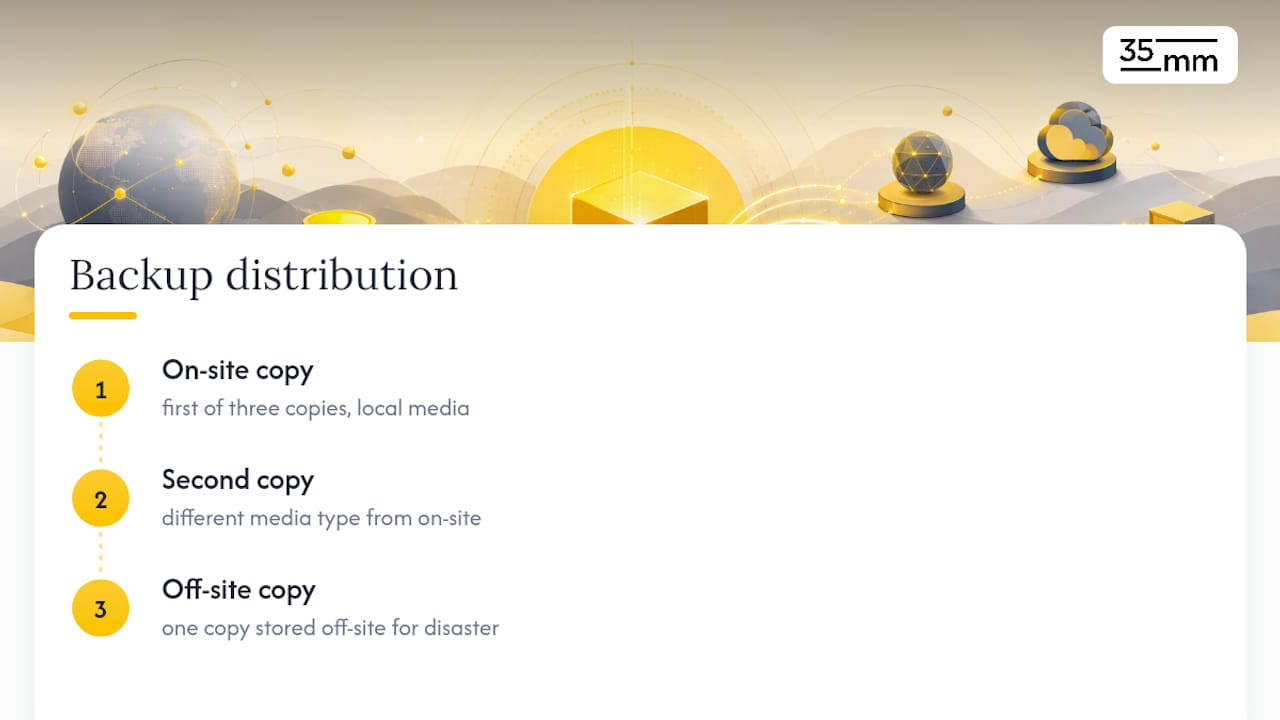
Archival matters more than most teams budget for. The 3-2-1 backup rule, three copies, two different media types, one off-site, protects against the version, gone from every drive, disaster nobody plans for.
Closing the project cleanly means four things: confirm the client downloaded everything, log the delivery in your project management tool, archive a verified backup, and send a short check-in a week later.
Pro Tip: A one-line note in your project tracker, "delivered, downloaded, backed up," takes ten seconds and saves you from ever wondering later whether a project actually closed.
Why Self-Sufficient Handoffs Save Real Budget
The best measure of a clean handoff isn't a compliment. It's silence. A studio's package should be self-sufficient enough that the receiver never has to ask where the approved version lives or how to open a file. That absence of follow-up questions is the actual signal that a handoff worked.
That principle shapes how every project closes, not just how it starts. Fewer clarification emails mean fewer revision rounds, faster sign-offs, and a lower real cost per deliverable, even when the invoice looks identical. One mid-size compositing project needed zero follow-up calls after delivery, purely because the README and inventory answered every question before it got asked. That's not luck. It's a process built to remove the guesswork before it starts.
— 35mm
Let 35milimetre Handle Your Next Handoff
If building and testing this entire process yourself sounds like more overhead than your team has bandwidth for, that's exactly the gap a specialized studio fills. Instead of assembling your own inventory templates, QA checklists, and delivery notes from scratch, you get a studio that already runs this system on every project, with a built-in two-to-four-week support window after delivery.

A dedicated post-production team handles photo retouching, compositing, and CGI work for agencies and brands that need a handoff they can trust without chasing it. Before reaching out, have your approved assets, shot list, and scope of work reference ready. That's what lets a studio move fast instead of asking the same intake questions twice. Visit the post-production and retouching services page to request a scoped quote or a sample handoff review on your next project.
Where to Go for the Original Standards
For the primary specifications behind this checklist, go straight to the source: UPDIG's imaging guidelines, GS1's product image sharing standard, and the VES Transfer Specifications for naming and versioning conventions on image sequences. Agency-side templates like Kiolo's handoff template are worth adapting for your own inventory sheets.
Sources
- UPDIG image receivers guidelines v4.0
- GS1 product image sharing guideline — current standard
- VES Transfer Specifications
- Agency project handoff guide — AgencyPro
- Agency project handoff template — Kiolo
FAQ
What Exactly Counts as a Post-Production Handoff?
It's the full package: final exports, documented source files where contracted, a README with usage notes, access credentials, and a clear acceptance step, not just a folder of finished images.
Should I Always Include RAW Files in the Handoff?
No. Withhold RAW files by default unless the contract specifically calls for them; deliver only the source files that were scoped or paid for.
How Long Should Post-Handoff Support Last?
Most agency handoff structures use a two-to-four-week support window with a defined response time, covering fixes against the approved brief rather than new-scope changes.
What Color Space Should Master Files Use?
RGB, by default, per UPDIG guidelines, unless a print vendor has confirmed a specific profile and a ΔE tolerance under 3 has been agreed on.
Does 35milimetre Handle the Full Handoff Process?
Yes. 35milimetre packages deliverables, runs QA, provides delivery notes, and includes a post-handoff support window as part of its retouching and compositing services.