
Firefly-powered Generative Fill output in Photoshop is cleared for commercial use, according to Adobe's own product documentation. The condition that trips up most studios: partner models and older Beta-era generations may not carry the same rights, so the model you pick inside that generator matters as much as the prompt you write. Resolution limits and generative credit costs can still slow down delivery even when the legal footing is solid.
TL;DR:
- Generative Fill outputs from Adobe Firefly are cleared for commercial use, but using partner models or older beta versions may carry additional legal risks.
- Generative credits are consumed per use, and premium partner models typically cost more credits than Firefly, which is designed to be safer for legal and IP concerns.
- Document all details of the generation process, including prompts, model names, and approval records, to protect against legal claims and disputes.
- AI-generated images are best suited for quick, non-critical tasks; final print or brand-sensitive assets require manual retouching and seam checks.
- Jurisdiction matters: copyright and trademark laws vary, so adapt your documentation and disclosures based on the country where the client’s audience resides.
Table of Contents
- Is Photoshop Generative Fill Legal for Commercial Use?
- Firefly vs. Partner Models: Why the Model Picker Matters
- What Are the Real Limits of Generative Fill Output?
- A Step-by-Step Workflow for Defensible Client Assets
- Legal Risks Worth Taking Seriously
- Does Your Location Change What You Can Do?
- Do You Need to Credit AI-Generated Elements?
- Where Commercial Teams Actually Use Generative Fill
- When to Trust Generative Fill and When to Call In a Studio
- Get Client-Ready Images Without the Guesswork
- Sources
- FAQ
Is Photoshop Generative Fill Legal for Commercial Use?
Yes, provided the output comes from Adobe Firefly, the model Adobe built and licensed specifically to sit behind Generative Fill inside Photoshop. Adobe's product page states Firefly was trained on Adobe Stock content, openly licensed work, and public domain material, which is the basis for its commercial-use clearance. That training approach is why Adobe backs Firefly output with an IP indemnity for enterprise and business customers, a legal protection meant to cover claims that the generated content infringes someone else's copyright.
Indemnity isn't a blank check. It typically covers the output itself, not misuse of that output, and it won't shield you if your prompt deliberately recreates a trademarked logo or a specific celebrity's likeness. Adobe community threads with product-team replies confirm the released, non-Beta version of Generative Fill in Photoshop is the version covered by this commercial-use position. Beta tools historically carried different terms, so a generation made months ago under Beta access is worth a second look before it ships in a client deliverable.
For every job, snapshot these for your records:
- The Adobe help page describing Generative Fill's workflow at the time of generation
- The specific model name shown in the model picker
- The plan tier and indemnity terms tied to your Creative Cloud subscription
Firefly vs. Partner Models: Why the Model Picker Matters
Photoshop's Generative Fill panel doesn't use one single model anymore. Open the model picker and you'll see Adobe Firefly listed alongside third-party partner models, some marked with a small crown icon indicating premium or "explicit content" tiers that draw on separate credit pools and separate legal terms.
Firefly is the model Adobe designed and indemnified for commercial use. Partner models come from outside vendors, and their licensing language doesn't automatically inherit Adobe's protections. That distinction changes both your legal exposure and your invoice, since premium models often burn credits faster.
Before you generate anything for a client project:
- Check which model is active in the picker before you type a prompt
- Note in your project file whenever a premium or partner model was used
- Default to Firefly for anything brand-critical, legally sensitive, or headed for print
Pro Tip: Take a screenshot of the model picker the moment you generate a keeper image. It takes five seconds and settles any "which model made this" question a client or reviewer raises six months later.
What Are the Real Limits of Generative Fill Output?
Generative Fill is fast, but fast doesn't mean finished. Professionals working in Adobe's own community forums frequently flag soft seams where generated pixels meet the original photo, texture that doesn't quite match surrounding grain, and output that looks fine on screen but falls apart at print resolution.
Generative credits add a second constraint. Each generation consumes credits from your Creative Cloud plan, and premium partner models draw them down faster than Firefly, according to Adobe's generative credits FAQ. Run a hero image through a dozen prompt variations and you can burn through a meaningful chunk of your monthly allotment before lunch.
Fixes that actually work in production:
- Run the Enhance Detail feature on any generation headed for print or large-format display
- Upscale conservatively rather than pushing a low-resolution generation past its comfortable ceiling
- Composite manually where seams show, rather than regenerating the same area repeatedly and burning credits
A Step-by-Step Workflow for Defensible Client Assets
Treat every Generative Fill session on a client job like evidence, not just editing. Here's the sequence that holds up under scrutiny:
- Make a precise selection. A tight, accurate selection mask gives the model less room to guess and produces cleaner seams.
- Write and log your prompt. Keep a running text file of every prompt you tried, not just the one that worked. Adobe's help documentation walks through the select, prompt, generate, refine cycle, and each pass through that cycle is worth recording.
- Save the original alongside every variation. Never overwrite the source file.
- Export generation metadata. Model name, prompt text, generation date, and which variation the client approved.
- Run a quality-control pass before delivery. Check resolution against the final output size, compare color and lighting against existing brand assets, and pull a test print for anything going to physical media.
Pro Tip: Save a single "generation manifest" text file per job listing the original filename, the mask used, the model name and version, how many variations you generated, and the timestamp of client approval. It takes two minutes and answers almost any question a client's legal team throws at you later.
That fifth step matters more than it sounds. A client approval email referencing a specific variation number is worth more than any indemnity clause if a dispute ever surfaces, because it proves exactly which asset was signed off and when. For a deeper look at building this kind of record into your standard process, 35milimetre's guide to AI-enhanced imagery walks through disclosure and documentation habits worth adopting studio-wide.
Legal Risks Worth Taking Seriously
The U.S. Copyright Office's guidance on AI makes documentation of process and human authorship central to how AI-assisted work gets evaluated for copyright purposes. A generation with no record of the prompt, model, or human editing decisions behind it is weaker evidence of authorship than one with a paper trail.
Certain prompts create red flags no indemnity fully resolves:
- Prompts that reconstruct a recognizable, identifiable person's face or body
- Prompts referencing copyrighted characters, franchises, or branded packaging
- Prompts that generate a logo resembling an existing trademark
One documentation habit stands above the rest: recording the model name, exact prompt text, and generation date for every asset you deliver. It's the single most practical piece of evidence you can hand a client's legal team if a rights question ever surfaces, according to guidance from the Copyright Office.
Build a mitigation checklist into your contracts, not just your files: written client confirmation of which model was used for sensitive work, model releases on file for any recognizable person appearing in source imagery, and archived prompt and metadata logs kept for the life of the client relationship. 35milimetre's breakdown of AI image copyright practices covers how to structure these clauses so they hold up if a client later asks who owns what.
Does Your Location Change What You Can Do?
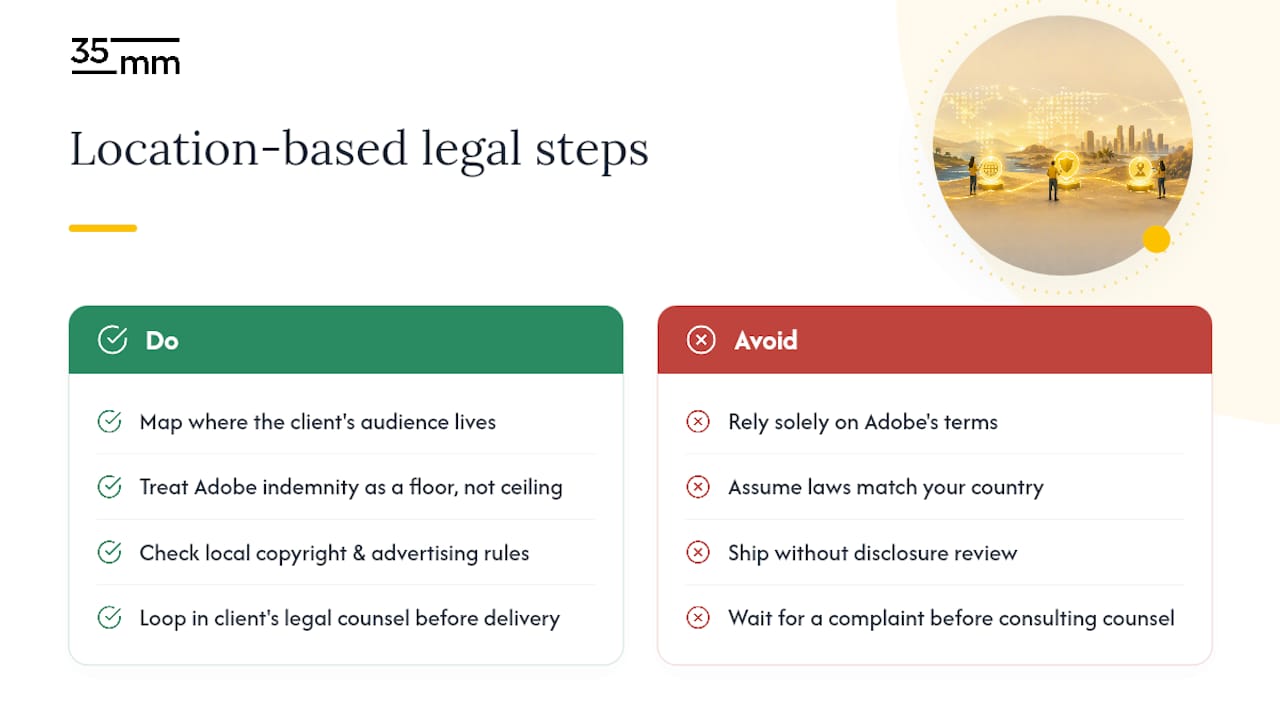
Adobe's commercial-use position on Firefly applies globally to the licensing of the model itself, but copyright law governing the content you generate is set country by country, not by Adobe. A logo-adjacent generation that draws no legal attention in one jurisdiction can trigger a trademark dispute in another, particularly where trademark enforcement is aggressive or where right-of-publicity laws protect a person's likeness more strictly.
The United States treats copyright and AI-assisted authorship as an active, evolving area, which is exactly why the Copyright Office publishes ongoing guidance rather than a single fixed rule. Other countries are moving at different speeds, and some have proposed or enacted AI-specific transparency requirements that go beyond what Adobe's terms require. If your studio serves clients across borders, or your imagery ships into markets outside where you're based, treat Adobe's indemnity as a floor, not a ceiling.
Practical takeaway: know where your client's audience lives, not just where you work. A beverage brand shooting a campaign for European retail shelves faces a different disclosure and labeling conversation than one running the same creative in a domestic market. When a project touches multiple jurisdictions, loop in the client's legal counsel on model choice and disclosure language before final delivery rather than after a complaint arrives. Adobe's terms travel with the software; local copyright and advertising law travels with the client.
Do You Need to Credit AI-Generated Elements?
Adobe doesn't require a public credit line or watermark on Firefly-generated content, and there's no universal legal mandate in the United States forcing disclosure to consumers for commercial imagery. That said, "not required" and "not expected" are two different things, and the gap between them is closing fast.
Some platforms and some clients now ask for it directly. Stock marketplaces increasingly require metadata tagging showing AI involvement. Certain advertising contexts, particularly regulated categories like health, finance, or anything touching political messaging, are drawing scrutiny around undisclosed AI-generated imagery. Internally, even when no external credit is required, recording which elements were AI-generated inside your own project files protects you if a client later asks the question.
The practical standard most studios land on: no public attribution needed for routine commercial work like background extensions or product concepting, but full internal disclosure to the client of which images or elements involved Generative Fill, and written client sign-off before publishing hero imagery, packaging, or anything facing regulatory review. When in doubt, over-disclose to the client and stay silent publicly rather than the reverse.
Where Commercial Teams Actually Use Generative Fill
E-commerce teams lean on Generative Fill constantly for background extension. A product shot cropped too tight for a new banner size gets extended in seconds rather than reshot, a genuine time saver documented in Adobe's own tutorials for concept and compositing work. The caveat: extended backgrounds on a hero product listing still deserve a manual seam check before they go live at full resolution.
Advertising agencies use it heavily at the concept stage, generating rough visual directions for client review before committing to an expensive photo shoot. That's a strong, low-risk use case because nothing generated at concept stage typically ships as final art.
Automotive and tech marketing, two sectors where brand-critical hero imagery carries enormous production budgets, tend to use Generative Fill more cautiously. Fast for internal exploration and pitch decks, but final print and large-format automotive imagery usually goes through manual retouching to guarantee the seamless, print-grade finish a hero shot demands. Photography trade coverage of Generative Fill workflows echoes the same pattern: professionals treat it as an acceleration tool for early-stage work, not a substitute for finishing skill on the assets that carry the most weight.
When to Trust Generative Fill and When to Call In a Studio
Generative Fill earns its place in a commercial workflow fast: social content, rapid client mockups, background cleanup where nobody's scrutinizing pixel-level detail.
Where it runs out of runway is brand-critical output, hero ad creative, packaging, anything hitting print or large-format display. That's where seam quality, color consistency, and defensible documentation start to matter more than speed. Firefly's commercial clearance covers the legal question; it doesn't guarantee the pixel-level polish a print buyer or brand guideline will demand. Our approach treats AI generation as a fast first pass, with studio-level retouching and compositing finishing the work that clients actually put their name on. For teams weighing whether a model release changes their risk calculus, our step-by-step vetting framework walks through exactly that decision.
— 35mm
Get Client-Ready Images Without the Guesswork
Generative Fill handles the quick wins. What happens when the brief calls for a hero shot that has to survive a client's brand review, a print run, and a legal check all at once? That's where a managed studio workflow earns its place, and it's what 35milimetre builds for agencies, brands, and photographers who need imagery that holds up past the first glance.

AI-assisted generation is paired with hands-on retouching, compositing, and CGI work, so nothing ships until seams, color, and resolution meet print standards, not just screen standards. Model choice, prompt history, and approval sign-off are documented on every job to maintain a clear record behind every asset delivered. Whether it's a single product shot that needs background work or a full campaign built from scratch, get in touch with 35milimetre to scope your next project.
Sources
- Photoshop Generative Fill: Use AI to Fill in Images | Adobe
- Use Generative Fill in Photoshop on desktop | Photoshop (Adobe Help)
- U.S. Copyright Office — AI and copyright
- Use generative fill in my projects | Adobe Community
FAQ
Is Generative Fill Free in Photoshop?
Generative Fill is included with a Photoshop subscription, but generations consume monthly generative credits, and premium partner models draw down credits faster than Firefly.
Does Generative Fill Use Credits Every Time You Generate?
Yes. Each generation cycle typically consumes credits from your Creative Cloud plan's allotment, according to Adobe's generative credits FAQ, with premium partner models often costing more per use than Firefly.
What's the Difference Between Content-Aware Fill and Generative Fill?
Content-Aware Fill samples pixels from elsewhere in your existing photo to patch an area, while Generative Fill uses AI, specifically Firefly or a partner model, to generate entirely new pixel content based on a text prompt.
Can You Buy Photoshop Permanently Instead of Subscribing?
No. Photoshop is distributed exclusively through Adobe's Creative Cloud subscription model, and Generative Fill's model access and credit allotments are tied to that active subscription tier.
Can I Use Photoshop Generative Fill Output Commercially Without Restriction?
Firefly-powered output is cleared for commercial use under Adobe's published terms, but partner-model generations, recognizable people, and trademarked elements each carry separate risks worth documenting before you deliver client work.