

Preparing images for campaigns means optimizing every visual asset for resolution, aspect ratio, file format, and creative variation before it reaches an ad platform. Done right, this process is the difference between ads that get served and ads that get results. Google Performance Max and Meta each enforce specific technical standards, and missing them costs you delivery, quality, and budget. The good news is that a repeatable workflow, grounded in platform specs and creative strategy, makes compliance and performance achievable at scale.
How to prepare images for campaigns: technical specs that matter
The foundation of effective campaign image preparation is matching platform requirements exactly. Google Performance Max requires at least one landscape and one square image per asset group, with recommended resolutions of 1200x628 pixels for landscape, 1200x1200 for square, and 960x1200 for portrait. These are not suggestions. Google's algorithm uses these dimensions to serve your ads across Search, Display, YouTube, and Shopping simultaneously.
Meta operates under a different set of constraints. Ad images should stay under 1MB in file size, while landing page hero images should come in under 200KB. WebP is the preferred format for its quality-to-size ratio, though JPEG and PNG remain acceptable. Uploading an oversized file does not just slow load times. It reduces delivery priority on Meta's auction system.

Safe area design is a discipline that most brand managers underestimate. The center 80% of any image must contain all critical subjects, since mobile placements like Stories, Reels, and Discover crop aggressively at the edges. For Meta Stories and Reels specifically, design at 1440px and keep key elements out of the top 220 pixels and bottom 340 pixels to avoid UI overlays covering your product or headline.
| Platform | Format | Recommended Resolution | Max File Size | Safe Area |
|---|---|---|---|---|
| Google Performance Max (landscape) | JPEG, PNG | 1200x628 px | 5MB | Center 80% |
| Google Performance Max (square) | JPEG, PNG | 1200x1200 px | 5MB | Center 80% |
| Google Performance Max (portrait) | JPEG, PNG | 960x1200 px | 5MB | Center 80% |
| Meta Feed / Stories | WebP, JPEG, PNG | 1080x1080 px / 1080x1920 px | 1MB | Avoid top 220 px and bottom 340 px |
Pro Tip: Export a master file at the highest resolution you have, then generate platform-specific exports from that single source. Never scale up from a compressed version.
How can marketing teams build creative variety that prevents ad fatigue?
Creative diversity is not a luxury. It is a technical requirement for algorithmic performance. Google Performance Max performs best with 5–8 distinct images per asset group, and the emphasis is on distinct. Uploading the same hero shot in five different crops does not give the algorithm new material to test. It just wastes asset slots.
The most effective approach is to plan image concepts before production, not after. Each concept should have a different visual hook, a different background treatment, or a different product angle. Changing only captions on visually identical images fails to generate new learning in ad platforms. The algorithm needs genuinely different visual inputs to find the best-performing combination for each audience segment.
One of the most underused tactics in campaign image preparation is including the product name directly on the image. Research shows that adding product names to images can increase ROAS by 43% and conversion rates by 15%. That single design decision, applied consistently across your asset library, compounds over time.
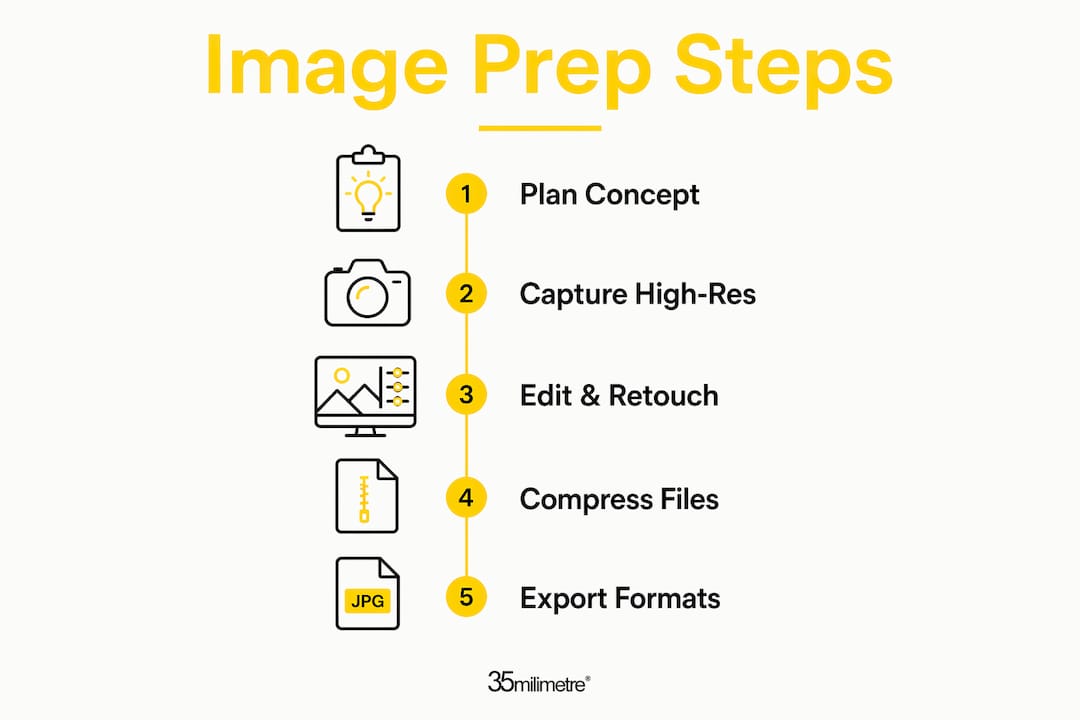
The 70/30 creative freshness strategy is the framework most performance teams use to balance stability and exploration. Allocate 70–80% of production capacity to iterating on proven creative concepts, and reserve 20–30% for testing new visual ideas. This prevents audience fatigue while protecting the performance of your best-performing assets. Generating assets mapped to distinct audience segments, varied by age, gender, and visual style, further supports algorithmic optimization.
Pro Tip: Plan your image concepts in a creative brief before shooting or retouching begins. Defining five distinct visual angles upfront costs far less than reshooting after the campaign launches.
The visual hook is the single frame or composition that stops a viewer from scrolling. A hook must capture attention within 1.5–3 seconds or performance drops sharply. For static images, this means the primary subject must be immediately legible, the color contrast must be strong, and the composition must reward a fast glance. Visual storytelling principles, including brand impact techniques, apply directly to how you frame your product within the first crop.
What tools and workflows make image preparation scalable?
Efficient image preparation for ads depends on a workflow that connects production to delivery without manual bottlenecks. Batch processing tools handle resizing across multiple formats simultaneously, which is the only practical way to generate landscape, square, and portrait crops for every product in a large catalog. Doing this manually for each SKU is not a workflow. It is a liability.
Compression is a non-negotiable step before upload. Compression tools that maintain visual quality while reducing file size are critical for meeting Meta and Google platform limits. Lossless compression works well for PNG files with flat backgrounds. Lossy compression at 80–85% quality handles product photography without visible degradation. The goal is the smallest file that passes a quality check at full screen on a retina display.
The most forward-thinking teams link image production pipelines directly to product feeds. When a new product enters the feed, the pipeline automatically generates the required image variants at the correct specifications. This approach scales to thousands of SKUs without proportional increases in production time. It also keeps campaign assets consistent with live inventory, which reduces the risk of serving ads for out-of-stock products.
A pre-launch checklist prevents the most common upload errors. Before submitting any asset group, verify resolution matches platform requirements, file size falls within limits, key subjects sit within the center 80% safe area, no text or logo is cropped by UI zones, and at least five visually distinct images are included per group. This checklist takes two minutes and prevents hours of troubleshooting after a campaign goes live. For a broader view of how visual content trends are shaping asset requirements in 2026, the landscape has shifted significantly toward format diversity.
How to troubleshoot common mistakes in campaign image preparation
Poor cropping is the most frequent technical error in campaign image preparation. It happens when teams resize a single master image across all aspect ratios without adjusting the composition. Tailored crops for landscape, square, and portrait are the standard practice. Each ratio requires its own framing decision, not a mechanical resize.
Oversized files are the second most common problem, and they are entirely preventable. A 4MB JPEG that looks fine in a design tool will fail Meta's upload requirements and slow Google's ad serving. Run every file through a compression step as the final stage of production, not as an afterthought.
Too little asset variation is a performance killer that shows up slowly. Campaigns that launch with two or three images hit audience saturation faster than campaigns with eight or more distinct visuals. The importance of visual content in sustaining engagement is well documented. When frequency rises and CTR drops, the instinct is often to adjust targeting. The real fix is usually refreshing the creative.
Pro Tip: Build a library of proven assets organized by format and performance tier. When a campaign needs a refresh, pull from the top-performing tier first, then introduce one or two new concepts alongside them.
Ignoring platform safe zones is a mistake that only becomes visible after the campaign launches. A product image that looks perfect in a 1:1 preview can have its logo or price point covered by a "Sponsored" label or a Stories swipe-up prompt. Always preview assets in the platform's native ad preview tool before approving them for delivery. The strategic role of visuals in campaign performance depends on every element being visible and intentional.
Key Takeaways
Effective campaign image preparation combines exact platform specifications, creative diversity, and a repeatable production workflow to maximize ad delivery and engagement.
| Point | Details |
|---|---|
| Match platform specs exactly | Use 1200x628 px for Google landscape and keep Meta files under 1MB to meet delivery requirements. |
| Design within safe areas | Keep all key subjects in the center 80% and avoid Meta's top 220 px and bottom 340 px UI zones. |
| Build genuine creative variety | Upload 5–8 visually distinct images per asset group; changing only captions does not generate new algorithmic learning. |
| Apply the 70/30 freshness rule | Dedicate 70–80% of production to proven concepts and 20–30% to new visual ideas to prevent audience fatigue. |
| Connect production to delivery | Link image pipelines to product feeds for scalable, consistent asset generation across large catalogs. |
What we've learned from preparing campaign images at scale
The shift that changed everything for us at 35milimetre was treating image preparation as a pipeline problem, not a design problem. For years, the conversation with clients centered on making one great image. The real challenge is making thirty great images that each work across five formats, two platforms, and four audience segments. That is a production architecture question, not a creative one.
The brands that perform best in paid campaigns are not necessarily the ones with the most beautiful photography. They are the ones with the most disciplined asset libraries. They know exactly which image performed at which frequency cap, and they have a replacement ready before fatigue sets in. That discipline comes from building the workflow before the campaign, not scrambling to produce variants after the first week of data comes in.
The other thing worth saying plainly: quality still matters. Compression artifacts, poor retouching, and flat lighting are visible at the sizes these platforms serve ads. A technically compliant image that looks cheap will underperform a well-produced image every time. The spec sheet gets you in the door. The craft keeps the viewer's attention.
— 35mm
Professional post-production for campaign-ready visuals
When campaign timelines are tight and asset quality cannot slip, professional retouching and post-production make the difference between images that meet the brief and images that drive results.

35milimetre works with ad agencies, brand managers, and e-commerce teams to produce campaign-ready visuals that meet every platform specification while maintaining the production quality that converts. From compositing and color grading to CGI and AI-enhanced imagery, the studio handles the full range of post-production needs. If your next campaign requires a library of polished, platform-optimized assets, 35milimetre is built for exactly that kind of work. Explore the studio's visual strategies for campaigns to see how the approach translates into results.
FAQ
What resolution should campaign images be?
Google Performance Max recommends 1200x628 pixels for landscape, 1200x1200 for square, and 960x1200 for portrait. Meta recommends 1080x1080 for feed and 1080x1920 for Stories.
What file format works best for Meta ads?
WebP is Meta's preferred format for its quality-to-size ratio. JPEG and PNG are also accepted, but all ad images must stay under 1MB.
How many images should I upload per campaign asset group?
Google Performance Max performs best with 5–8 visually distinct images per asset group. Uploading fewer limits the algorithm's ability to test and optimize delivery.
Why does my ad image look cropped on mobile?
Mobile placements like Stories and Reels crop outside the center 80% safe area. Place all key subjects and text within that zone and avoid Meta's top 220 px and bottom 340 px UI overlay zones.
How often should I refresh campaign image assets?
Apply the 70/30 rule: keep 70–80% of your asset library on proven concepts and rotate in new visuals for the remaining 20–30%. Refresh when frequency rises and CTR begins to fall.