

You invest real time and money into your visuals, and yet the engagement numbers stay flat. That gap between great-looking content and content that actually performs is almost always a technical and strategic problem, not a creative one. Knowing how to optimize visual content means understanding both the craft behind the image and the mechanics that determine whether it loads fast, ranks well, and holds a viewer's attention long enough to matter. This guide covers the full picture: formats, compression, performance signals, design strategy, and everything in between.
Table of Contents
- Key takeaways
- How to optimize visual content: formats, tools, and foundations
- Step-by-step execution for multi-channel visual optimization
- Performance optimization and Core Web Vitals
- Design strategies for engagement and brand storytelling
- My take on visual content optimization after 20 years
- Bring your visual content to the next level
- FAQ
Key takeaways
| Point | Details |
|---|---|
| Modern formats cut file size | Switching to AVIF or WebP reduces image sizes by 25 to 50% without visible quality loss. |
| LCP images need eager loading | Never apply lazy loading to your hero or largest contentful paint image or you will delay rendering by up to 1,500ms. |
| Alt text serves two masters | Descriptive, functional alt text of 10 to 15 words improves both accessibility and search visibility simultaneously. |
| Original visuals outperform stock | Custom visual assets including infographics drive measurably higher organic traffic compared to generic stock photography. |
| Measurement closes the loop | Tracking performance metrics and auditing image formats quarterly turns optimization into a repeatable, improving cycle. |
How to optimize visual content: formats, tools, and foundations
Before you touch a single pixel, you need to know what you are working with. Visual content spans a wide range of types: product photography, infographics, data visualizations, custom illustrations, screenshots, and short-form video. Each format serves a different purpose, and each carries its own technical requirements. Treating them the same way is where most optimization efforts break down.
The single highest-leverage technical decision you can make right now is your image format. AVIF and WebP are not optional upgrades anymore. AVIF delivers roughly 50% smaller files than JPEG, and WebP delivers 25 to 35% smaller files, with AVIF browser support now exceeding 93%. Smaller files mean faster load times, better Core Web Vitals scores, and lower bounce rates. If your site is still serving PNGs or JPEGs where WebP or AVIF would do the job, that is a measurable performance penalty you are paying on every page load.
On the accessibility and SEO side, alt text of 10 to 15 words that describes the functional purpose of an image without keyword stuffing is the standard you should be writing to. Avoid phrases like "image of" or "photo of." Screen readers and search engines both ignore the obvious label and look for context. Specifying explicit width and height attributes on every image element is equally non-negotiable. Without them, browsers cannot reserve layout space, which causes the layout shifts that hurt both user experience and your CLS score.
For tools, the core stack does not need to be complex. Squoosh and ImageOptim handle compression for static assets. Cloudinary and Imgix handle dynamic image delivery and format conversion at scale. For creation, Figma and Adobe Photoshop remain the workhorses, while AI-assisted tools are increasingly useful for generating custom background composites and product scene extensions.
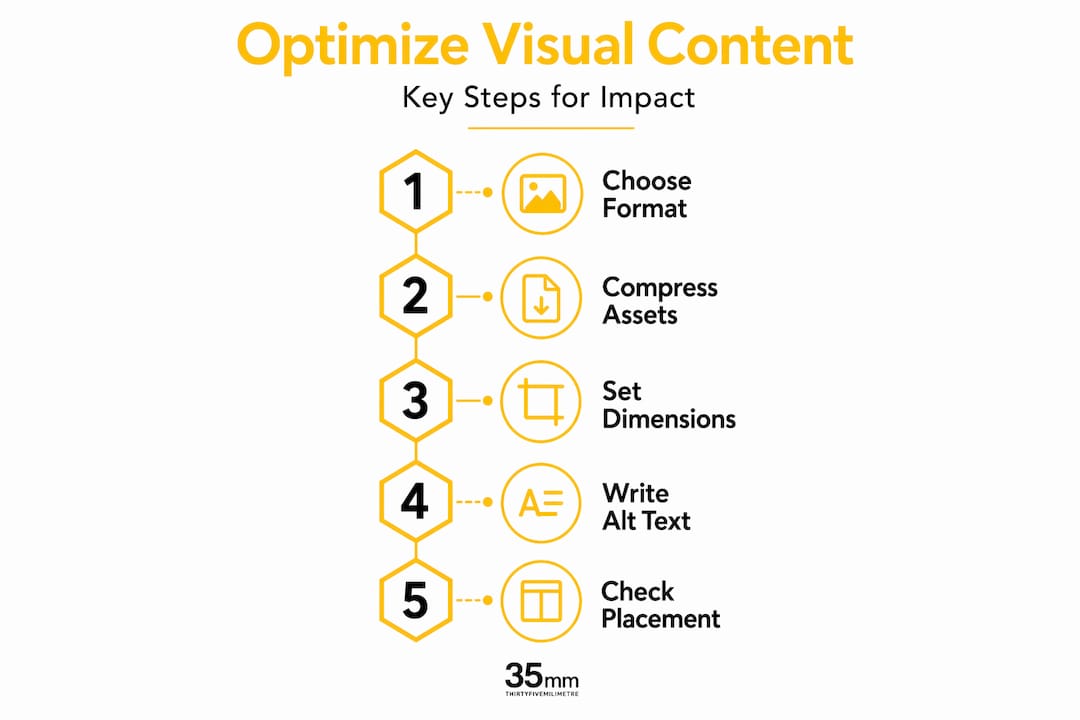
Pro Tip: Set up a simple asset checklist before publishing any visual: format confirmed as WebP or AVIF, dimensions specified, alt text written, and file size under your page weight budget. This takes two minutes and prevents the most common technical mistakes.
Step-by-step execution for multi-channel visual optimization
Knowing the right tools is one thing. Executing consistently across multiple channels and content types is another. Here is how to approach this as a repeatable process rather than a one-off effort.
1. Start with original visuals. The data on this is clear: pages using custom visual assets, including infographics and branded photography, see up to a 110% increase in organic traffic compared to stock-heavy pages. Generic stock photos signal low effort to both algorithms and human readers. Even a well-composed product shot against a clean, custom background outperforms a library image with no brand context.
2. Compress without compromising. Run every image through a compression pass before publishing. Lossy compression at 75 to 85% quality in WebP format is almost always indistinguishable from the original at normal viewing sizes. Your goal is to find the file size floor that preserves visual integrity. Tools like Squoosh let you compare the original and compressed versions side by side, which makes this judgment call fast.
3. Use responsive images. The srcset and sizes attributes in your HTML tell the browser which image file to load based on the viewer's screen size and resolution. A 1,400-pixel-wide desktop image served to a mobile user is a waste. Responsive images fix that. Most modern CMS platforms support this natively, but it still needs to be configured correctly.
4. Set loading attributes deliberately. For images above the fold, use loading='eager' or simply omit the loading attribute entirely, since eager is the default. For images below the fold, loading='lazy' reduces initial page payload significantly. Lazy loading below-the-fold visuals is one of the most effective ways to improve perceived performance without touching your design.
5. Add schema markup for images. Using ImageObject schema from Schema.org tells search engines the subject, caption, and context of your visuals. Content with strategic alt text and ImageObject schema receives 25 to 35% more citations in AI-driven search results than text-only content. That margin will only grow as AI search becomes the default discovery path.
6. Place visuals with intention. Every image should earn its position in the layout. An image dropped between two paragraphs with no spatial or contextual relationship to the text around it creates friction. Data-driven placement strategies, including attention hotspot analysis, show where viewers actually look on a page and allow you to align your key messages with those focal zones.
Pro Tip: Treat your visual production as a workflow, separating creative decisions from mechanical production tasks. This separation, described in depth in our ad agency visual workflow guide, is the difference between a scalable system and a creative bottleneck.
Performance optimization and Core Web Vitals
Page speed is not just a user experience metric. It is a ranking signal, and images are the primary driver of the two most impactful Core Web Vitals: Largest Contentful Paint (LCP) and Cumulative Layout Shift (CLS).
LCP measures how quickly the largest visible element on the page loads. In most cases, that element is an image. The mistakes that hurt LCP scores are predictable and preventable:
- Lazy loading the hero or LCP image, which delays critical rendering by 500 to 1,500ms and is one of the most common technical errors on otherwise well-built pages
- Serving the LCP image without a preload hint, which means the browser only discovers it after parsing the HTML and CSS
- Using oversized source files that require the browser to scale down in real time
- Missing width and height attributes that force the browser to calculate layout dimensions after the image loads
CLS measures how much the page layout jumps as assets load. Every image without explicit dimensions is a potential CLS violation. The fix is straightforward: always declare width and height in your HTML, or use the CSS aspect-ratio property to reserve space before the image arrives.
The fastest fix for a poor LCP score is almost always the same: add fetchpriority='high' to your hero image tag and add a preload hint in the document head. Using fetchpriority='high' and preloading can cut LCP by 500ms to over a full second. That is a meaningful improvement with a single line of code.
Beyond individual images, consider using an image CDN. Services like Cloudflare Images or Cloudinary automatically serve the correct format and size based on the requesting device and browser. Running quarterly image format audits has been shown to improve LCP metrics by 23% in documented case studies, which makes this a scheduled maintenance task worth putting on your calendar.
Pro Tip: Test your LCP image specifically using PageSpeed Insights and look for the "LCP element" call-out. If it flags your hero image, check for lazy loading, missing preload hints, and oversized source files first. Those three issues account for the vast majority of poor LCP scores.
Design strategies for engagement and brand storytelling
Technical optimization gets your content seen. Design strategy determines whether it is remembered. These are two separate disciplines that most visual content workflows treat as one, and that confusion is expensive.

Attention hotspot analysis uses predictive modeling to show where a viewer's eyes will land within the first few seconds of seeing an image or page. Placing your call-to-action or primary message in a high-attention zone is not guesswork when you have that data. Tools like Dragonfly AI and Attention Insight generate these heatmaps without requiring a live user study, making them practical for content teams working at scale. This is one of the most underused tips for visual optimization currently available to marketers.
Cognitive load is the other half of the equation. Ads and visuals with a single, clear message consistently outperform those trying to communicate multiple points at once. If your product image also has a promotional overlay, a brand logo, three feature callouts, and a lifestyle background, the viewer's brain has to work too hard and usually gives up. One image, one message. That constraint forces creative discipline and almost always produces stronger results.
Mixing your visual types across a content piece also matters for engagement. A long-form article that uses only photography feels monotonous. An article that moves between a data visualization, a custom product render, and a screenshot of an interface holds attention longer and serves different learning styles within the same audience. Think about visual content trends for 2026 and how platform-native formats are shaping viewer expectations.
For video specifically, the first three seconds determine retention. Opening with a branded logo animation or a slow reveal is a reliable way to lose most of your audience before your message even starts. Opening with a direct question, a specific claim, or a visually interesting frame from the middle of the content reverses that pattern. Short-form video that leads with the most compelling moment and works backward from there consistently outperforms content that builds to the point.
My take on visual content optimization after 20 years
I have watched talented creative professionals spend weeks on a campaign and then see it underperform because nobody thought carefully about how the images were exported, named, tagged, or loaded. The technical side of visual content optimization is not unglamorous work. It is the work that makes everything else count.
What I have found repeatedly is that the highest ROI improvement most teams can make is also the least exciting: writing proper alt text and setting correct image dimensions. It takes minutes per image, and the cumulative SEO and accessibility benefit compounds over time in ways that a single campaign never will. Treating visual branding as both a creative and a technical discipline is what separates brands that grow through search from brands that plateau.
The other lesson I keep coming back to is that measurement is not the finish line. It is the starting point for the next iteration. If you are not tracking which images drive engagement, which formats are slowing your pages, and which visual placements convert, you are optimizing by intuition. Intuition is useful, but a quarterly audit cycle turns visual content from a cost center into a compound asset.
— 35mm
Bring your visual content to the next level

At 35milimetre, we have spent over two decades building the kind of visuals that perform as well as they look. From color grading and compositing to CGI product renders and AI-enhanced imagery, our post-production team works with ad agencies, e-commerce brands, and business professionals who need results that go beyond aesthetics. If you are ready to move past generic stock assets and build a visual content library that actually converts, explore our post-production and retouching services and see what production-grade optimization looks like in practice.
FAQ
What image format should I use to improve visual content performance?
AVIF is the current best choice for web images, delivering roughly 50% smaller files than JPEG with browser support above 93%. WebP is a strong alternative with 25 to 35% size savings and near-universal browser compatibility.
How does lazy loading affect my LCP score?
Applying lazy loading to your hero or largest contentful paint image delays rendering by 500 to 1,500ms, directly harming your LCP score. Use loading='eager' or fetchpriority='high' on above-the-fold images and reserve lazy loading for below-the-fold content.
How do I write effective alt text for SEO and accessibility?
Write 10 to 15 words describing the functional purpose of the image, avoid redundant phrases like "image of," and skip keyword stuffing. Functional, descriptive alt text serves screen reader users and signals relevant context to search engines.
Why do custom visuals outperform stock photography?
Pages using original visual assets including infographics see up to a 110% increase in organic traffic compared to stock-heavy pages. Custom imagery carries brand context and signals editorial investment that both algorithms and human readers respond to.
What causes cumulative layout shift in images?
Missing width and height attributes on image elements force browsers to recalculate page layout after images load, creating visible content shifts. Declaring explicit dimensions or using the CSS aspect-ratio property reserves space before the image arrives and eliminates this issue.