

Graphic design is a structured skill set that transforms plain information into emotionally resonant visual stories. Learning it graphic design step by step means building a repeatable system, not guessing your way through software menus. Dedicated beginners can reach job-ready status in 6 to 12 months by mastering typography, color theory, layout, and visual hierarchy before touching advanced software features. Tools like Adobe Creative Cloud, Canva, and Figma each serve a different stage of that journey. This guide walks you through every phase, from core fundamentals to portfolio building, so you know exactly what to learn, in what order, and why it matters.
What are the essential design fundamentals every beginner must learn first?
Fundamentals guide every design decision and are transferable regardless of which software you eventually use. Skipping them is the single most common mistake beginners make, and it shows in the work. Before you open Canva or Adobe Illustrator, you need to understand the four pillars that underpin every professional design.
Typography controls readability, hierarchy, and tone more than any other single element. Typography is the most important design skill that separates polished work from amateur output. Beginners often waste time experimenting with dozens of fonts, but professionals use one or two font families and vary size, weight, and spacing to create visual interest without clutter. That constraint is a feature, not a limitation.

Color theory determines the emotional register of your design before a viewer reads a single word. A warm palette signals energy and urgency; a cool, desaturated palette signals trust and calm. Learning to build a cohesive palette using tools like Adobe Color or Coolors takes less than a week, but the payoff lasts your entire career.
Layout and composition govern where the viewer's eye travels. Grids, whitespace, and alignment are not decorative choices. They are structural decisions that make information digestible. A design without a grid is like a sentence without punctuation. It can be read, but it costs the reader unnecessary effort.
Visual hierarchy ties the other three together. It is the art of making the most important element the most visually dominant, guiding attention from headline to subhead to call to action in a deliberate sequence.
Common beginner mistakes to avoid:
- Prioritizing tool shortcuts over design principles, which produces skills that don't transfer across software
- Using too many fonts, colors, or decorative elements in a single composition
- Ignoring whitespace and treating empty space as wasted space
- Skipping the research phase and designing from instinct alone
Pro Tip: Pick one real-world design you admire, such as a magazine cover or a product label, and analyze it. Write down the fonts used, the color palette, and the grid structure. This single exercise teaches more about fundamentals than most tutorials.
How to choose and start learning graphic design software effectively
Software is a tool, not a skill. The skill is design thinking. That said, choosing the right starting point matters because the wrong tool creates unnecessary friction and slows your progress.
Canva is the right entry point for most beginners. It removes technical barriers and lets you focus on composition, color, and typography without learning complex interface controls. Figma is the next logical step, particularly if you are interested in UI design, brand identity, or collaborative work with developers. Both tools are free to start and have strong learning communities on YouTube and Reddit.
The transition to professional-grade software like Adobe Creative Cloud or Affinity Publisher should happen when you have a specific project that demands it, not before. Adobe Photoshop handles photo manipulation and compositing. Adobe Illustrator handles vector graphics and logo design. Adobe InDesign handles multi-page documents like brochures and annual reports. Affinity Designer and Affinity Publisher offer comparable functionality at a one-time cost, which makes them attractive for freelancers watching their budget.
The most important software principle for beginners: master one tool before adding another. Jumping between Canva, Figma, and Illustrator simultaneously produces surface-level familiarity with all three and genuine competence with none. Spend at least 60 days working exclusively in your chosen tool before expanding your stack.
Practical habits that accelerate software learning:
- Recreate existing designs from scratch to understand how they were built
- Follow project-based tutorials rather than feature-by-feature walkthroughs
- Use keyboard shortcuts from day one, since they compound into significant time savings
- Save and organize your files consistently, because professional workflow discipline starts early
What is the step-by-step graphic design process from concept to final delivery?
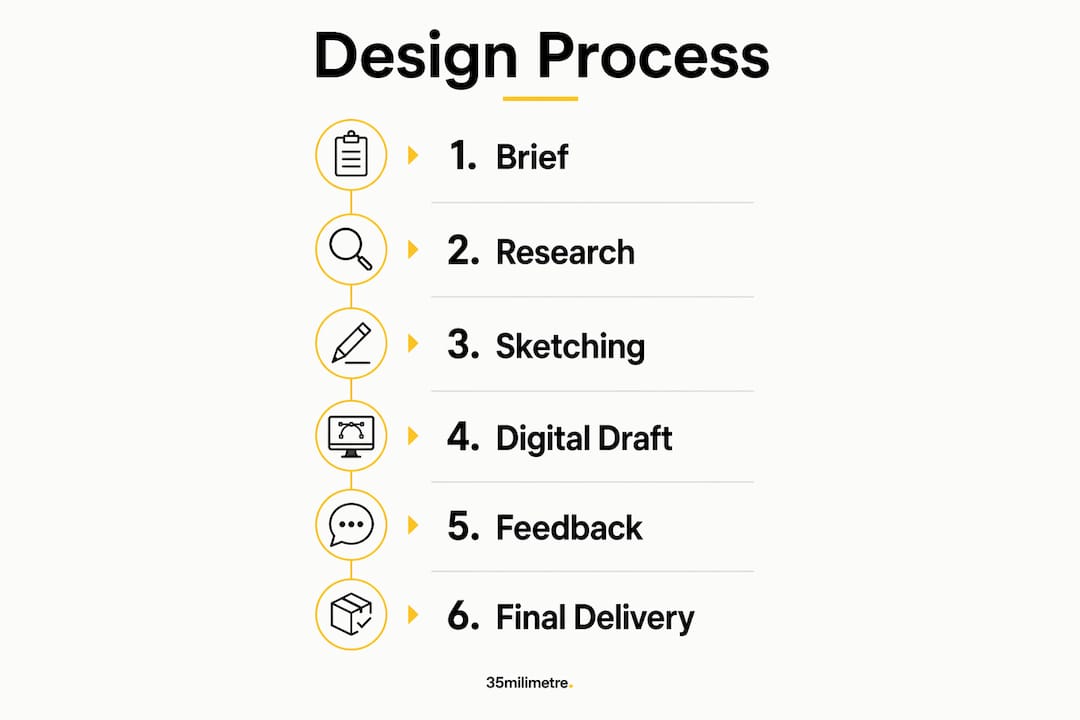
The industry-standard graphic design workflow involves six to seven iterative stages. Teams regularly loop back to earlier stages when new feedback or insights arise. Understanding this cycle prevents the frustration of thinking a design is "done" only to receive a round of revisions. Revision is not failure. It is the process.
Here is how a professional design project unfolds:
- Project brief. Define the goal, audience, deliverables, and constraints before touching any design tool. A clear brief prevents wasted hours. If you are working with a client, reading about how to brief a creative studio gives you a strong framework for structuring that conversation.
- Research and inspiration. Study the competitive space, the brand's existing visual language, and reference designs that solve a similar problem. Platforms like Behance, Dribbble, and Pinterest are standard starting points.
- Ideation and sketching. Work on paper first. Sketching forces you to think about structure without getting distracted by software controls. Even rough thumbnails clarify your thinking faster than opening a blank Figma canvas.
- Digital development. Build your concept in your chosen software. Focus on getting the structure right before refining details. Design thinking methodology, which emphasizes empathize, define, ideate, prototype, and test stages, is the framework most professional studios use at this phase.
- Feedback and revision. Share your draft with a client, mentor, or peer. Collect specific, actionable feedback and revise accordingly. Expect at least two to three rounds.
- Final polishing. Tighten spacing, check color consistency, verify font rendering at all sizes, and confirm that every element aligns to the grid.
- Delivery. Export files in the correct formats for the intended medium, whether that is RGB for screens or CMYK for print, and hand off with clear documentation.
| Stage | Common beginner error |
|---|---|
| Brief | Skipping it and designing from assumptions |
| Sketching | Going straight to software, losing structural clarity |
| Feedback | Taking critique personally instead of analytically |
| Delivery | Exporting in the wrong color mode or resolution |
Pro Tip: Keep a "revision log" for every project. Note what changed, why it changed, and what the final decision was. After ten projects, you will see patterns in your own blind spots and correct them permanently.
How to practice design effectively and build a strong beginner portfolio
Practice without structure produces slow progress. The most effective method for beginners is copying high-quality work to build technical intuition. Recreate a poster you admire, a brand identity system, or a product label, working from the finished result back to the blank canvas. This is not plagiarism. It is the same method musicians use when they learn by playing existing songs. The rule is simple: never present copied work as your own.
Once you have built basic technical confidence through copying, shift to original projects. Start small and focused. Design a logo for a fictional coffee shop. Create a three-post Instagram series for an imaginary product launch. Redesign a real brand's packaging as a personal exercise. Small, complete projects build the repetition that produces skill.
Your portfolio is not a gallery. Professional designers build portfolios with case studies that explain the visual problem, the thinking behind the solution, and the outcome. A hiring manager or client looking at your work wants to understand how you think, not just what you produced. For each project, write three to four sentences covering the brief, your approach, and the result.
Feedback is the accelerant that separates designers who improve quickly from those who plateau. Share your work in communities like the Graphic Design subreddit, Behance, or local design meetups. Receive critique without defending your choices. The goal is to understand how your work lands with a viewer who has no context for your decisions.
Specialization comes after breadth. Spend your first six months exploring typography, branding, digital illustration, and UI design. Then follow your strongest interest and your market's demand. Specialization makes you easier to hire and easier to recommend.
Key takeaways
Mastering graphic design step by step requires learning fundamentals first, choosing one tool and sticking with it, following a structured workflow on every project, and building a portfolio that shows your thinking, not just your output.
| Point | Details |
|---|---|
| Fundamentals before software | Typography, color theory, layout, and visual hierarchy transfer across every tool and every project. |
| One tool at a time | Spend at least 60 days in a single software before expanding your stack to build real competence. |
| Follow the 6-stage workflow | Brief, research, sketch, develop, revise, and deliver on every project to build professional habits. |
| Copy to learn | Recreate admired designs to build technical intuition faster than passive tutorial watching. |
| Portfolio shows thinking | Case studies that explain your design decisions matter more than a collection of finished images. |
What working at 35milimetre taught us about learning design
The most persistent mistake we see from designers entering the professional world is tool obsession. Someone spends three months mastering every Photoshop panel and arrives unable to make a confident color decision or explain why their layout works. Software is learnable in weeks. Design judgment takes years, and it only develops through deliberate practice grounded in fundamentals.
We have watched the industry shift significantly with AI integration in creative studios. AI-powered design assistants compress timelines and help close the gap between design and development, but they do not replace foundational creative thinking. The designers who benefit most from AI tools are the ones who already understand composition, color, and hierarchy. They use AI to execute faster, not to think for them.
Our honest advice: embrace iteration and stop treating revision as a sign of weakness. Every project we deliver at 35milimetre goes through multiple rounds of internal critique before a client sees it. That discipline is not inefficiency. It is how quality gets made. Build that habit early, and it will define your career.
The other thing worth saying directly: your network matters as much as your portfolio. The designers who grow fastest are the ones who share their work publicly, ask questions without embarrassment, and build relationships with other creatives. Design is not a solitary skill. It is practiced in conversation.
— 35mm
When your project needs more than a tutorial can teach
There comes a point in every designer's growth where the gap between what you can produce and what a project demands requires outside expertise. Whether you are working on a product launch, a brand campaign, or commercial imagery that needs to perform at the highest level, the quality of your post-production and visual execution determines how the work lands.
At 35milimetre, we work with ad agencies, startups, and brands that need high-end visual production delivered with precision and creative intelligence. From compositing and color grading to CGI and AI-enhanced imagery, our team brings over two decades of hands-on experience to every project. If you are building something that needs to stand out, we can help you get there. Explore how our visual storytelling approach translates design thinking into imagery that performs.
FAQ
How long does it take to learn graphic design from scratch?
Dedicated beginners reach job-ready status in 6 to 12 months by focusing on fundamentals in the first two months, then building skills through project work and specialization. Consistent daily practice accelerates that timeline significantly.
What software should a beginner start with?
Start with Canva or Figma to learn composition and layout without technical friction, then transition to Adobe Creative Cloud or Affinity when a specific project demands professional-grade tools.
What are the most important graphic design basics?
Typography, color theory, layout and grid systems, and visual hierarchy are the four foundational skills. Mastering these fundamentals produces design judgment that transfers across every software platform and every project type.
Do I need a portfolio to get design work?
Yes, and the portfolio should contain case studies, not just finished images. Explain the brief, your approach, and the outcome for each project so clients and employers understand how you think through design problems.
Can I learn graphic design online without a degree?
Absolutely. Platforms like Coursera, Skillshare, and YouTube offer structured graphic design tutorials that cover everything from color theory to professional workflow. A strong portfolio built through self-directed practice carries more weight than a degree in most freelance and agency hiring decisions.