

3D visualization is defined as the process of creating and communicating design ideas through three-dimensional digital models that are transformed into images, animations, or interactive content via rendering. The industry standard term is 3D visualization, though you will also hear 3D rendering and 3D modeling used interchangeably. They are not the same thing. 3D rendering is the specific computational step that generates a 2D image or animation from a 3D scene, while modeling defines the geometry. Tools like V-Ray, KeyShot, Unity, and Unreal Engine each serve different stages of this process. Architecture, product design, and advertising are the industries that rely on it most heavily, though its reach now extends into data science, engineering, and immersive media.
What are the main 3d visualization techniques?
Two primary techniques define the field: real-time rendering and offline rendering. Understanding the difference between them is the single most useful thing you can do before starting any 3D project.
Real-time rendering
Real-time rendering uses GPU rasterization to generate images fast enough for live interaction. Engines like Unity and Unreal Engine power this approach. Real-time engines now approach photorealistic quality while maintaining the interactivity needed for live design exploration. That combination makes them the right choice for client walkthroughs, design reviews, and any scenario where you need to change a material or camera angle on the spot.

Offline (pre-rendered) rendering
Offline rendering uses ray tracing to simulate how light physically behaves in a scene. The process is slower, sometimes taking hours per frame, but the results are measurably more realistic. Offline engines like V-Ray and KeyShot remain the gold standard for final marketing assets requiring maximum realism. When a product shot needs to look indistinguishable from a photograph, offline rendering is the method.
Choosing the right technique
| Criteria | Real-Time Rendering | Offline Rendering |
|---|---|---|
| Primary tools | Unity, Unreal Engine | V-Ray, KeyShot |
| Speed | Instant to seconds per frame | Minutes to hours per frame |
| Best use case | Client reviews, VR, design iteration | Marketing assets, final product shots |
| Photorealism level | High and improving | Maximum |
| Interactivity | Full | None during render |
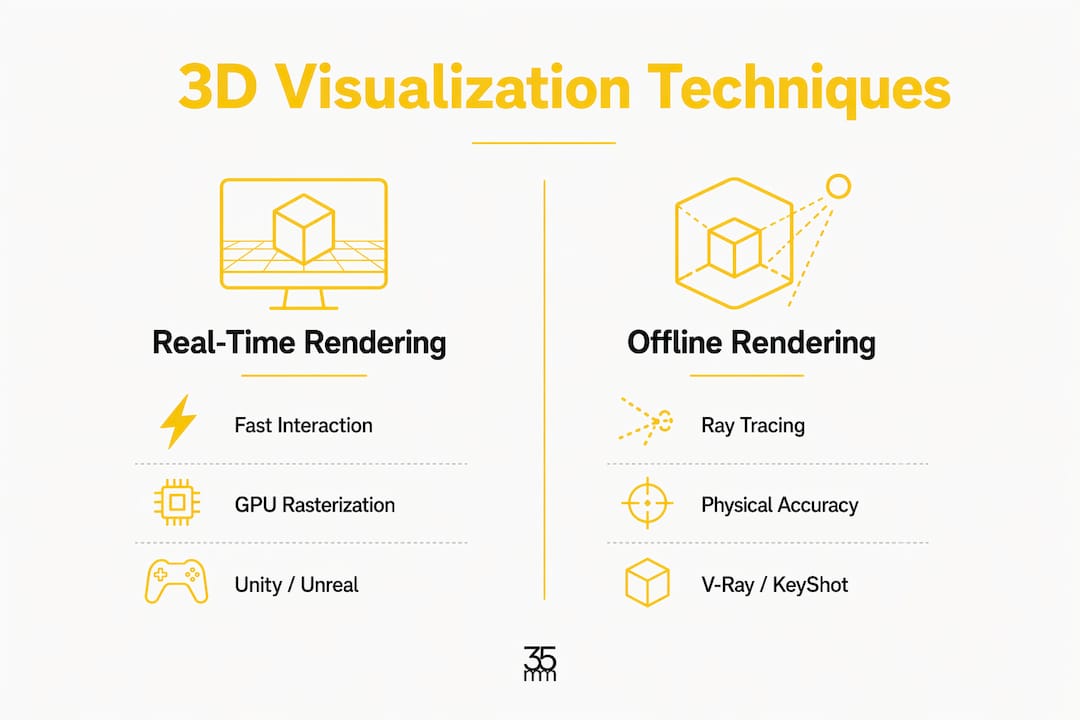
Pro Tip: Choose your technique based on the deliverable, not your comfort zone. If the client needs to make live decisions in the room, real-time is the answer. If the output is a hero image for a campaign, offline rendering earns its render time.
How does 3d visualization fit into a production workflow?
3D visualization is best viewed as a continuous, iterative workflow combining modeling, shading, lighting, and rendering rather than a sequence of isolated tasks. Each stage feeds the next, and skipping steps or treating them as separate silos is where most projects lose time and money.
The four core stages are:
- 3D Modeling: Building the geometry and structure of objects or environments. This is the skeleton of the entire project.
- Material and Texture Assignment: Defining how surfaces look and behave under light. A car body, a concrete wall, and a glass panel each require different material logic.
- Scene Lighting: Placing and configuring light sources to create depth, mood, and realism. Lighting is where a technically correct model becomes a visually compelling image.
- Rendering: The final computational pass that produces the output image or animation.
Failing to account for camera lens effects, depth of field, and material physics is one of the most common reasons renders look artificial even when the geometry is accurate. A model can be geometrically perfect and still produce a flat, unconvincing image if the lighting and camera settings are ignored.
Client feedback loops are another area where workflow discipline pays off. Feedback is most effective at the proxy or low-detail stage rather than after a full high-fidelity render. Presenting a rough proxy model to a client before committing to final materials and lighting saves hours of rework. Think of it as getting approval on the blueprint before building the house.
Pro Tip: Build your feedback checkpoints into the contract, not just the schedule. Clients who approve a proxy model at week one are far less likely to request structural changes at week four.
What industries use 3d visualization most?
The applications of 3D visualization span far beyond architecture and product design, though those two fields remain the most visible users.
Architecture and Real Estate rely on 3D visualization to sell spaces before they are built. Architectural visualization is evolving toward immersive digital experiences such as 360-degree panoramas and real-time walkthroughs that emotionally engage audiences. A rendered apartment walkthrough communicates what a floor plan never can: scale, light, and atmosphere.
Product Design and Manufacturing use 3D visualization for prototyping, client presentations, and marketing. A physical prototype costs time and materials. A 3D product render can be produced, revised, and approved in a fraction of that time. Project validation needs dictate the approach: mechanical simulations require solid volumetric models, while marketing favors photorealistic lighting and visual effects.
Advertising and Media depend on 3D visuals to create imagery that would be impossible or prohibitively expensive to photograph. Studios like 35milimetre use CGI and compositing to place products in environments that reinforce brand identity. You can see how 3D artists shape advertising impact through deliberate scene construction and lighting choices.
Data Visualization is a less obvious but growing application. 3D data visualization improves understanding by providing depth and spatial context not available in 2D representations. Scientific, engineering, and educational fields use spatial 3D models to communicate data relationships that a flat chart simply cannot express.
VR and AR extend 3D visualization into fully immersive environments. Real-time engines power these experiences, allowing users to walk through a building, inspect a product from every angle, or interact with a simulation before anything physical exists.
What are the biggest challenges in 3d visualization?
Large-scale 3D content production is costly and time-consuming. Studios that manage this well share a few common practices.
-
Use instancing and asset libraries. Instancing means placing multiple copies of a single object without multiplying the file size. A forest scene with 10,000 trees is manageable if those trees are instances of one model. Asset libraries let teams reuse materials, lighting rigs, and geometry across projects, compressing production time significantly.
-
Match geometric precision to the project goal. A product visualization for a mechanical engineering review needs accurate dimensions and solid geometry. A lifestyle marketing render for the same product can use a lighter mesh with more emphasis on lighting and environment. Applying engineering-grade precision to every project wastes resources.
-
Stage scenes with emotional intent. Effective scene staging, camera positioning, and atmospheric settings create stronger emotional resonance than resolution alone. A well-composed shot at medium resolution outperforms a technically perfect image with poor framing. Camera angle, depth of field, and light direction are storytelling decisions, not technical afterthoughts.
-
Iterate early, not late. The cost of a revision multiplies at every stage. A change to a model's proportions at the proxy stage takes minutes. The same change after final rendering and compositing can take days.
Pro Tip: Before any render, review your scene through the final camera. Adjust the lens, set depth of field, and check that your key light creates the shadow direction you want. Fixing these in post costs far more than fixing them before the render starts.
For a deeper look at how these principles apply in practice, the 3D design best practices guide from 35milimetre covers scene composition and camera placement in detail.
Key takeaways
3D visualization is a multi-stage workflow combining modeling, lighting, and rendering, and the technique you choose determines both the quality and the speed of your output.
| Point | Details |
|---|---|
| Technique selection matters | Choose real-time rendering for interactive reviews and offline rendering for final marketing assets. |
| Workflow is iterative | Treat modeling, materials, lighting, and rendering as connected stages, not separate tasks. |
| Feedback timing is critical | Collect client approvals at the proxy stage to avoid costly late-stage revisions. |
| Applications are broad | Architecture, product design, advertising, data science, and VR all depend on 3D visualization. |
| Efficiency requires discipline | Instancing, asset libraries, and early iteration keep large-scale projects on budget. |
What two decades of 3d work actually teaches you
The most common mistake we see from professionals new to 3D visualization is treating it as a linear checklist. Model the object, apply materials, add lights, hit render. That mindset produces technically adequate work and nothing more.
What changes with experience is understanding that every stage is a conversation with every other stage. The lighting you plan in your head while modeling will shift once you see the materials. The camera angle you locked in at the start will need to move once the scene has atmosphere. At 35milimetre, we have learned to hold our early decisions loosely and treat the proxy stage as the most important creative conversation in the project, not a formality before the real work begins.
The other shift worth naming is the move toward emotional intent as the primary measure of success. Industry experts emphasize that immersive visualization experiences are the future, where emotional engagement matters more than raw detail resolution. We have seen this play out directly in advertising work. A render with slightly lower polygon counts but perfect lighting and composition consistently outperforms a technically superior image that feels cold or static.
The tools are changing fast. Real-time engines, AI-assisted rendering, and generative imagery are all compressing timelines that used to take days into hours. The professionals who will use these tools best are the ones who understand the underlying principles of light, composition, and material behavior. The software changes. The physics does not.
— 35milimetre
Take your 3d visuals further with expert post-production
Building a strong 3D visualization is only part of the equation. The final image still needs compositing, color grading, and retouching to perform at the level that major brands expect.
35milimetre specializes in commercial visual post-production for brands across technology and automotive sectors. The studio's team works with 3D renders, CGI, and photography to produce marketplace-ready imagery that holds up in any context, from campaign hero shots to product catalog pages. If your renders are technically solid but not quite landing the way you want, that gap is almost always closed in post. Reach out to 35milimetre to see what a dedicated post-production pass can do for your next project.
FAQ
What is 3d visualization, exactly?
3D visualization is the process of representing objects or environments in three dimensions using digital models, then converting those models into images, animations, or interactive content through rendering. It covers the full workflow from modeling through final output.
How is 3d rendering different from 3d modeling?
3D modeling defines the geometry and structure of an object, while 3D rendering is the computational step that applies lighting and materials to produce the final image. Modeling builds the form; rendering creates the perception.
Which software is best for 3d visualization?
The best software depends on your goal. Unity and Unreal Engine lead for real-time and interactive work. V-Ray and KeyShot are the preferred tools for photorealistic offline rendering used in marketing and final production assets.
When should you use real-time vs. offline rendering?
Use real-time rendering when clients need to interact with or explore a scene live. Use offline rendering when the deliverable is a final marketing image or animation where photorealism is the priority.
What makes a 3d visualization look realistic?
Realism comes from accurate material behavior, physically correct lighting, and thoughtful camera settings including lens choice and depth of field. Geometry quality matters, but lighting and material physics have the greatest impact on perceived realism.