

Yes, AI can produce campaign-level consistent commercial imagery, but only when it runs inside a repeatable system, not a single clever prompt. That system needs standardized reference inputs, a modular generation workflow, and a Visual QA fidelity gate before anything reaches the client. Before you trust a new pipeline with a hero SKU, run a small fidelity test on your most complex product, reflective packaging, fine print, patterned fabric, and see what breaks.
TL;DR:
- Achieving campaign-level consistency with AI requires a structured system with standardized inputs, modular workflows, and a visual quality gate, not just a single prompt.
- Building a batch production process involves fixed reference assets, standardized prompts, and strict input and output controls, including matching colors, logos, and proportions.
- Automated visual QA scoring, combined with human review, is crucial to identify and retry images with fidelity issues before publication.
- For complex or reflective products, outsourcing to specialists with a proven fidelity benchmark is often more reliable than relying solely on internal AI workflows.
Table of Contents
- What Does AI Image Consistency Mean for Campaign Assets?
- How Do You Build a Modular Workflow That Locks Style and Fidelity?
- What Should Go Into a Batch Production Checklist?
- How Do You Score Fidelity Before Publishing?
- When Should You Keep AI In-House vs. Hire a Studio?
- How Do You Keep a Product Identical Across Different Scenes?
- How Do You Keep Style and Art Direction Consistent Across a Sequence?
- How Do You Handle Consistency in Video or Multi-Frame Generation?
- How Do You Preserve Spatial Relationships and Perspective?
- How Do You Catch Subtle Inconsistencies Automatically?
- What 35milimetre Has Learned From Building These Systems
- How 35milimetre Delivers Campaign-Ready, Fidelity-Checked Imagery
- Sources
- FAQ
What Does AI Image Consistency Mean for Campaign Assets?
AI image consistency, in the context this guide covers, means keeping a product's appearance, lighting, color, material finish, and label or logo detail coherent across every image in a campaign, whether that's twelve SKU shots for a product launch or forty packaging variants for a retail rollout. It is not about keeping a fictional character's face identical across a storyboard. That's a separate discipline with separate tools, and confusing the two leads teams to the wrong workflow entirely.
Product fidelity is the real battleground. Generative models don't edit your source photo; they synthesize new pixels that approximate it, which is exactly why logos warp, labels blur, and colors drift between otherwise similar outputs. That gap is well documented: frontier image models pass strict product-accuracy checks in only about 25 to 29% of generations in one large benchmark covering 850 products, with logo distortion, missing elements, and color shifts as the most common failure modes.
For a brand manager, this isn't an academic distinction. A shampoo bottle with a slightly shifted label color, a sneaker with a smeared logo, or a snack bag with unreadable nutrition text erodes customer trust and can trigger marketplace compliance flags. Consistency, in the commercial sense, is what keeps the image legally and visually representative of the product you're actually shipping.
How Do You Build a Modular Workflow That Locks Style and Fidelity?
Nobody serious about production-grade output relies on a single model to do everything. The teams getting reliable results treat image generation as a chain of specialized steps, each handling one job well, rather than asking one tool to nail lighting, product accuracy, and upscaling simultaneously.
A workable pipeline looks like this:
- Reference collection. Gather clean, high-resolution source photos and lock the exact hex colors, logo files, and dimensions you'll check against later.
- Prompt or template setup. Build a reusable template per product category with fixed fields: camera angle, lighting style, background type, pose.
- Base scene generation. Use a custom-trained model or a tightly controlled prompt to generate the environment and composition.
- Product insertion or region-aware editing. Insert the real product asset, or edit only the background region, so the product itself is never resynthesized from scratch.
- Relight normalization. Match every image's lighting direction and intensity to a chosen best-lit reference.
- Upscaling and detail pass. Sharpen textures, labels, and edges for final delivery resolution.
Whether you train a custom model or rely on templated prompting depends on scale. Stability AI's guidance suggests a dataset of 20 to 100 well-chosen brand images is often enough to start meaningful customization, and that prompting alone works fine for one-off tests but stops scaling the moment a campaign needs repeatable output. Relighting deserves particular attention here: picking a single best-lit reference image and running every other frame through a matching relight pass is one of the most effective fixes for lighting drift across a batch, and it's far cheaper than reshooting.
Pro Tip: Don't relight after upscaling. Do it before, so the detail pass sharpens a lighting-consistent image instead of baking inconsistency into fine texture.
What Should Go Into a Batch Production Checklist?
Standardizing inputs before generation starts is what separates a controlled batch from a pile of near-misses you'll spend hours fixing. Build your brief around a fixed set of source assets and locked parameters, not loose creative direction.
Collect these before any generation begins:
- Front, back, detail, and macro shots of the physical product
- Verified color swatches with exact hex or Pantone values
- A scale reference object or ruler in at least one reference shot
- Typography samples for any on-package text
- A prompt template per product category with locked camera, lighting, and pose fields
Batch rules matter as much as the inputs. Every image in a set should reference the same product asset, the same fixed pose list, and identical lighting parameters, and files should follow a naming convention that ties each output back to its SKU and template version. Skip this step and you'll spend more time reverse-engineering which settings produced which image than you saved by using AI in the first place.
Set your acceptance criteria before generation, not after. That means a defined logo match tolerance, a maximum color delta between generated and reference swatches, legible label text at full resolution, and consistent texture rendering on materials like fabric or brushed metal. Given that even strong base models pass strict fidelity checks in roughly a quarter to a third of generations without correction, plan for a retry rate, not a one-and-done batch.
How Do You Score Fidelity Before Publishing?
Visual QA is the gate between "the AI made something" and "this is safe to publish." Every generated image should run through an analysis step that scores it against the reference asset, flags anything below threshold, and routes failures into a retry loop rather than a trash folder. Photoroom's Fidelity Layer approach pairs a correction system at the point of generation with this scoring step, and that combination lifted pass rates in one benchmark pairing from the mid-20s to 38.2%, still far from perfect, which is exactly why the gate matters.
A practical scoring rubric usually checks four things:
| Check | What it catches | Typical tolerance |
|---|---|---|
| Logo and text legibility | Blurred, warped, or misplaced branding | Zero tolerance, must match reference |
| Color delta (∆E or hex match) | Subtle hue or saturation shifts | Tight numeric threshold set per brand |
| Silhouette and proportion | Stretched or compressed product shapes | Visual match to reference outline |
| Pattern and logo position | Shifted prints, rotated labels | Position tolerance in pixels or percent |
Automated scoring handles volume, but a human colorist or QA specialist should spot-check anything flagged as borderline and anything shipping on a hero SKU. Set an escalation rule: three failed retries on the same asset means a human redoes the reference setup rather than the system brute-forcing a fifth attempt.
Pro Tip: Log the failure reason on every rejected image, not just a pass or fail flag. A retry that doesn't know why the last attempt failed usually fails the same way twice.
When Should You Keep AI In-House vs. Hire a Studio?
Fidelity-critical SKUs, reflective or textured materials, and campaigns where internal QA bandwidth is thin are the clearest signals to bring in a specialist. Glass, chrome, and complex fabric patterns expose weaknesses in generalist workflows fast, and a team without a dedicated colorist checking color delta on every batch will miss drift that a client notices immediately.
If you're evaluating a vendor, ask direct questions: can they show fidelity benchmarks run on a SKU similar to yours, what's their retry service-level agreement when a batch fails QA, and what relight and color protocol do they follow batch to batch? Vague answers here usually mean an ad hoc process.
Internally, three roles cover most of what's needed: a creative lead setting direction and locking references, an AI operator running the modular pipeline, and a QA specialist or colorist scoring output against acceptance criteria. When handing work to an external studio, require source proofs, the prompt templates used, documented relight parameters, written acceptance rules, and a sample sign-off round before full production runs.
How Do You Keep a Product Identical Across Different Scenes?
The product itself should never be resynthesized. The single biggest lever for identity preservation is treating the product asset as a fixed layer inserted into a generated scene, rather than describing it in a prompt and hoping the model reproduces it faithfully. Region-aware editing tools let you regenerate only the background, surface, or context around a locked product silhouette, which sidesteps the logo-warping and color-shift problems that plague pure text-to-image generation.
Multiple reference angles matter more than most teams expect. A single front-facing hero shot gives a model almost nothing to work with when a campaign calls for a three-quarter angle or an overhead flat lay. Feeding a workflow front, back, and detail shots of the same unit gives it enough geometric information to hold proportions steady even as the surrounding scene changes completely.
Locked metadata helps too. Recording exact hex values for every color panel, the typeface used on labels, and the physical dimensions of the product means every generation has a numeric target to check against, not just a visual impression. Teams that skip this step usually catch drift only after a client flags it, which is expensive compared to catching it in an automated color-delta check before delivery. The product-preservation principle is consistent across the industry: change the environment, never the product.
How Do You Keep Style and Art Direction Consistent Across a Sequence?
Sequential outputs, a twelve-image product carousel, a six-shot lifestyle set, drift stylistically when each image is generated from a fresh prompt instead of a shared template. The fix is treating art direction as a locked configuration file, not a creative suggestion repeated loosely each time.
A style template should fix lighting quality (soft box versus hard directional), color grading targets, background category, and camera focal length as explicit parameters, not adjectives left open to interpretation. "Warm, editorial lighting" means something different to a model on Monday than it does on Thursday; a locked color temperature value does not.
Sequencing also benefits from generating in batches from the same seed configuration or base scene template rather than treating each shot as an independent creative brief. When a campaign needs variation, like different products in the same lifestyle setting, vary only the product insertion step and keep the base scene, lighting rig, and color grading pass identical across the set. That's the same modular logic used for single-image fidelity, just applied across a sequence instead of one frame.
Where this breaks down most often is handoff between team members. If one person prompts image three and someone else prompts image nine without referencing the same template file, the set will show it. A shared, versioned template solves this more reliably than a written style guide that's easy to skim past.
How Do You Handle Consistency in Video or Multi-Frame Generation?
Temporal consistency, keeping a product's appearance stable frame to frame in AI-assisted video or animated sequences, raises the difficulty considerably compared to static images. A single inconsistent frame is a QA failure you catch and fix; a flickering label or shifting color across two seconds of footage is a motion artifact that's harder to spot in review and more jarring to a viewer when it slips through.
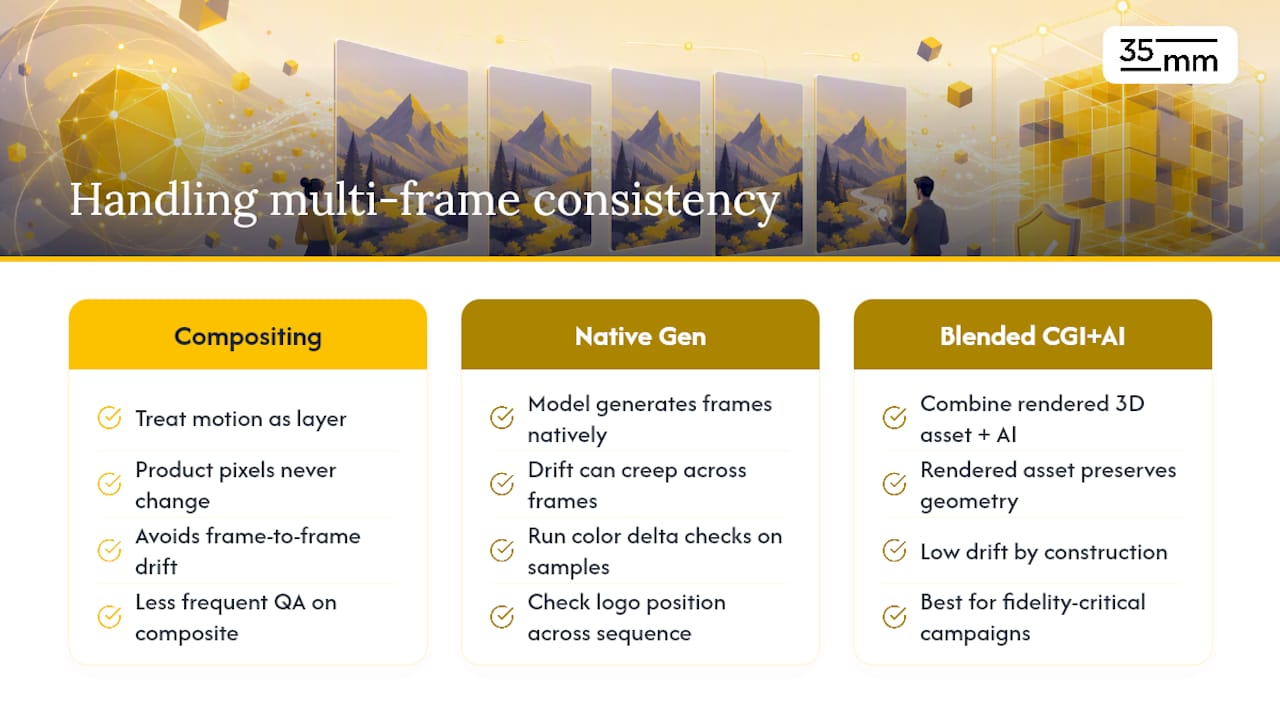
The practical answer for commercial work right now is conservative: treat AI-generated motion as a layer on top of a fixed product asset rather than letting a model regenerate the product across every frame. Compositing a locked, high-fidelity product render into a generated or filmed background motion sequence avoids frame-to-frame drift entirely, because the product pixels never change, only the environment around them does.
For teams generating multi-frame sequences natively, the same reference-locking discipline from static workflows applies, just with tighter tolerance. Color delta and logo position checks need to run on sampled frames throughout the sequence, not just the first and last, since drift often creeps in gradually across the middle. If a campaign's video component is fidelity-critical, this is usually the point where blending traditional CGI rendering with AI-assisted elements outperforms a fully generative approach, because a rendered 3D asset holds its geometry and material properties across every frame by construction.
How Do You Preserve Spatial Relationships and Perspective?
Perspective drift, a product that looks subtly wider, taller, or angled differently between shots, is one of the more common defects that slips past first review because it's small enough to feel like personal taste rather than an error. It shows up most in categories with strict proportional expectations: footwear, electronics, bottled goods with printed volume markers.
Locking camera parameters in the prompt template is the first defense: fixed focal length, fixed camera height, fixed distance from subject. Loose language like "product shot from a slight angle" produces a different angle every run. A numeric value, camera at 35mm equivalent, eye level, three feet from subject, gives every generation in a batch the same spatial starting point.
Scale references solve a subtler problem. Without something in the original photography to establish real-world size, a generated scene has no way to know whether a bottle is six inches or ten inches tall, and proportions can shift silently across a batch. Including a ruler, a coin, or a known-size object in at least one reference shot per SKU gives the workflow a size anchor to check against during QA, and it's one of the cheapest insurance steps available since it costs nothing beyond an extra reference photo.
How Do You Catch Subtle Inconsistencies Automatically?
Most fidelity failures worth catching are too small for a fast human scan and too consistent in category to leave to chance, which is exactly the gap automated scoring is built to close. Color delta measurement using ∆E values compares generated output against a locked hex reference numerically, catching shifts a reviewer's eye adjusts to after looking at the same product forty times in a row.

Logo and text legibility checks work the same way: an automated pass comparing generated text regions against the source typography catches subtle warping or kerning shifts that read as "fine" at thumbnail size but fail the moment a client zooms in. Silhouette comparison against a reference outline catches proportion creep before it compounds across a full batch.
None of this replaces human judgment entirely. Automated scoring should flag anything below threshold and route it to a retry queue, with a colorist or QA specialist reviewing borderline cases and anything on a hero asset regardless of score. The combination of automated fidelity correction and Visual QA scoring is what moves pass rates from the mid-20s into the high-30s in published benchmarks, and that gap between "generated" and "publishable" is exactly what a retry loop with a logged failure reason is designed to close over successive attempts rather than one lucky pass.
What 35milimetre Has Learned From Building These Systems
Two decades of retouching, compositing, and CGI work taught one thing about AI generation before it ever became a service line: raw output is a starting point, not a deliverable. An Istanbul studio builds custom templates, runs relight passes, and applies a Visual QA gate on every campaign batch, applying the same discipline of manual retouching extended to a new generation layer. [Case studies and detailed client results are available on request.]
— 35mm
How 35milimetre Delivers Campaign-Ready, Fidelity-Checked Imagery
If your last AI test run came back with a warped logo or a color-shifted label, you're not doing anything wrong, you're just missing the correction layer that turns raw generation into something a brand can actually ship. 35milimetre runs that layer as a service: AI Product Compositing built around locked reference assets, relight normalization, and a fidelity check before anything reaches your approval queue.

Expect a defined process, not a black box. Every project starts with a review of your source photography and brand parameters, moves through relight and color-matching passes, and ends with a proof round before final delivery, with a retry built in if a batch doesn't clear your acceptance criteria. When packaging text or dieline accuracy is part of the fidelity requirement, our packaging design team works alongside the compositing pass rather than treating label accuracy as an afterthought. For assets that need traditional retouching precision layered on top of AI-generated bases, our photo compositing and retouching service handles the finishing pass.
Send us one complex SKU, glass, patterned fabric, reflective packaging, and ask for a fidelity benchmark before committing to a full campaign batch. It's the fastest way to see whether a given workflow holds up on your actual product, not a generic example.
Sources
- How to close the fidelity gap in AI product photography | Photoroom
- On-Brand Creative: 3 Levels of Customization with Generative AI — Stability AI
- How to Maintain Brand Consistency with AI-Generated Product Images | GESTEL
FAQ
Can AI Generate Fully Consistent Product Images?
Not reliably on its own. Base models pass strict fidelity checks in only about 25 to 29% of generations in one large benchmark, so consistency depends on a correction and QA system layered around the generation step, not the model alone.
What Is a Fidelity Gate, and Why Does It Matter?
A fidelity gate is a Visual QA checkpoint that scores every generated image against locked references, brand colors, logo files, proportions, before it's approved for publishing. Images that fail get logged with a reason and routed to a retry rather than shipped as-is.
How Many Reference Photos Do I Need for a Custom Brand Model?
A dataset of roughly 20 to 100 well-chosen images is often enough to start meaningful customization, with quality and representativeness mattering more than raw volume.
Should I Use AI or Traditional Photography for a Campaign?
It depends on the SKU. Reflective, highly textured, or fidelity-critical products often still benefit from real photography or CGI as the base layer, with AI handling scene variation and background work around a locked product asset.
How Much Does AI Product Compositing Cost With 35milimetre?
Pricing depends on the scope and SKU complexity of your project, and current rates are available directly through 35milimetre's AI Product Compositing page.