
AI-enhanced imagery combines model-driven generation and AI-assisted augmentation to compress concept-to-delivery timelines while keeping creative control firmly in human hands. The best approach for any production team is to treat every AI output as a raw asset, not a finished deliverable. Feed it into your established retouching and compositing pipeline, validate it against brand standards, and archive the provenance before it ships.
Quick-start actions for your team:
- Choose the model by job type. Text-to-image generators for concepting, generative fill for in-context edits, dedicated upscalers for resolution work.
- Lock seeds and quality settings at the start of a campaign so outputs stay visually consistent across deliverables.
- Run a validation loop before any asset goes to media buy or print, checking for text artifacts, anatomy errors, and lighting inconsistencies.
- Keep provenance records. Tools like SynthID embed invisible watermarks that document AI origin, which matters for commercial rights and client contracts.
Pro Tip: 35milimetre treats AI generation as the first pass in a multi-stage compositing workflow, not the final output. That mindset is what separates campaign-grade work from quick social posts.
Table of Contents
- What does "AI-enhanced imagery" actually cover?
- Where does AI-enhanced imagery create real ROI?
- Which tools should you use for each job?
- What does a production workflow look like end to end?
- How do you write prompts that actually work?
- How do you integrate AI outputs into a professional retouching pipeline?
- How does 35milimetre use AI in real client projects?
- What are the legal and ethical checkpoints for U.S. commercial use?
- What are the most common AI image failures and how do you fix them?
- What do AI-enhanced projects actually cost and how long do they take?
- Key Takeaways
- What the tools won't tell you about AI imagery
- How 35milimetre supports creative teams with AI-enhanced post-production
- Useful sources and further reading
What does "AI-enhanced imagery" actually cover?
The phrase covers two distinct production modes that are often conflated. Generation means producing an image from scratch via a text prompt or reference image, using models like OpenAI's DALL·E, Midjourney, or Stable Diffusion. Augmentation means using AI to improve or modify an existing asset: inpainting a background, upscaling a low-resolution file, applying style transfer, or running automated retouching passes.
AI augmentation is now the more common production mode in professional studios, because most commercial briefs start with a photograph or a 3D render that needs refinement rather than a blank canvas. The practical boundary between the two modes is blurring fast. Modern models like Google's Imagen 4 support conversational prompting and invisible watermarking via SynthID, which means a single tool can handle both generation and provenance documentation.
Common studio tasks mapped to each mode:
- Generation: concept art, mood boards, background plates, product mockups from scratch
- Augmentation: background replacement, object removal, resolution upscaling, color-grade matching, skin retouching
- Hybrid: compositing a generated background behind a product photograph, then running a manual retouch pass to unify lighting
Where does AI-enhanced imagery create real ROI?
AI-enhanced visual marketing, as Fisher College of Business frames it, combines visual perception theory with data-driven experimentation to improve ad effectiveness. For production teams, that translates into concrete time and cost advantages across several use cases.
High-impact applications and their ROI shape:
- Rapid A/B social assets. Generate five background or color variants of a hero image in minutes rather than scheduling reshoots. The iteration velocity alone justifies the tool cost for most social teams.
- E-commerce product variants. Swap colorways, surfaces, or environments without restaging the product. This is especially strong for product image optimization across large SKU catalogs.
- Concept art and look development. AI mood boards compress the concepting phase from days to hours, giving creative directors more options to present before committing to a full production budget.
- Ad campaign mockups. Rough out a campaign visual in a generative tool, then hand it to a retoucher for the final composite. Clients see a polished direction faster, and fewer rounds of revision follow.
- Visual content performance. Visual content consistently drives higher engagement rates across digital channels, and AI makes it faster to produce more of it.
When not to use AI-generated assets: identity-sensitive creative (real people, real locations with legal clearances), imagery where exact product dimensions matter for regulatory or safety reasons, and any campaign where the client contract requires documented photographic provenance.
Which tools should you use for each job?

Matching the right tool to the task is where most teams stumble. Here is how the major platforms break down by production role.
Text-to-image generators
- OpenAI DALL·E (DALL·E 3/4): Strong prompt adherence and API access via the OpenAI Image API, which supports both generation and multi-turn editing through the Responses API. Best for product shots and social hero images where prompt precision matters.
- Midjourney: Exceptional aesthetic quality and stylistic range. Best for concept art, editorial visuals, and mood boards. Commercial licensing requires a paid plan; confirm terms before production use.
- Adobe Firefly: Trained on licensed content, which makes it the safest choice for commercial work where rights documentation is non-negotiable. Integrates directly into Photoshop and Illustrator.
- Stable Diffusion / SDXL: Open-weight models with deep community support, LoRA fine-tuning, and plugins for Photoshop, Blender, and GIMP via Stability AI's ecosystem. Best for teams that need full local control or custom model training.
Generative editing and compositing
- Adobe Photoshop (Neural Filters + Generative Fill): The most practical integration point for retouchers already in the Adobe ecosystem. Generative Fill handles background extension, object removal, and in-context additions without leaving the PSD.
- Runway (Gen-4): Strong for image-to-video and motion graphics work, and increasingly capable for still compositing. Best for teams producing video and motion alongside stills.
Upscaling
- Topaz Gigapixel AI: The professional standard for resolution upscaling. It handles fine detail recovery on product shots and portraits better than most in-model upscalers, and it runs locally without cloud latency.
Provenance
- SynthID: Google DeepMind's invisible watermarking technology, embedded in Imagen 4 outputs. Operationally important for commercial shoots that need documented AI origin.
Pro Tip: For U.S. commercial production, Adobe Firefly's licensed-content training is the lowest-risk starting point. Pair it with Topaz Gigapixel for final resolution work and you have a defensible rights chain from generation to delivery.
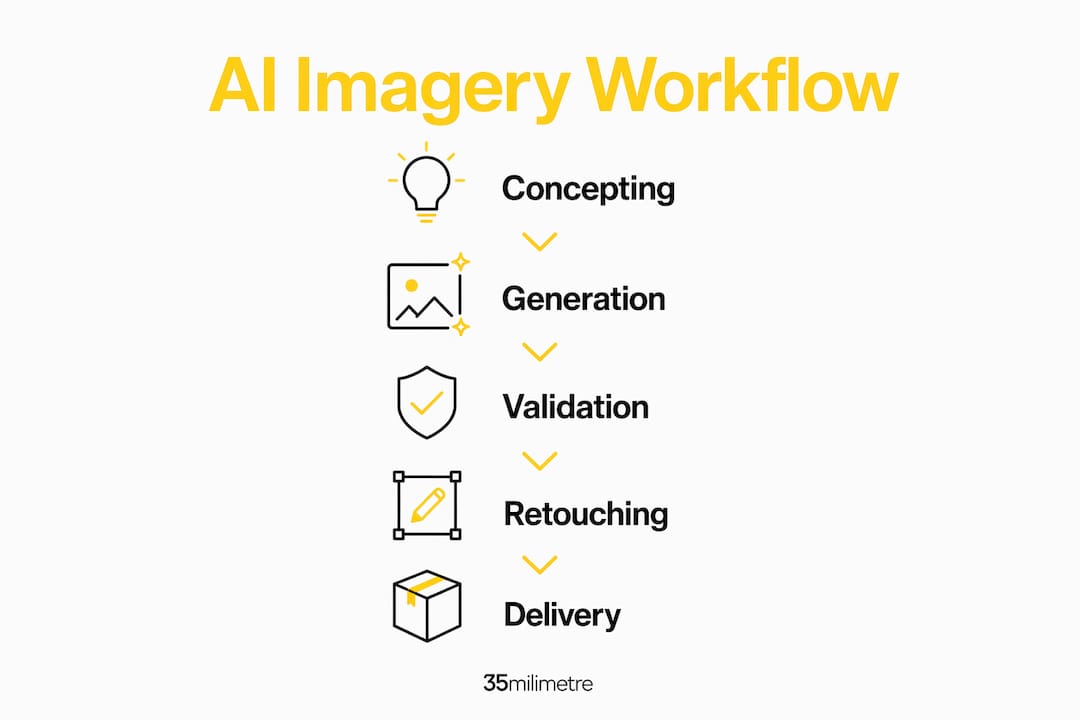
What does a production workflow look like end to end?
A repeatable workflow is what separates one-off experiments from campaign-grade output. Here is the sequence 35milimetre uses.
- Brief and constraints. Define deliverable specs (dimensions, color space, usage rights), brand guardrails (color palette, typography, tone), and any legal restrictions before touching a model.
- Model selection. Match the model to the job using the tool guidance above. Note the quality setting you plan to use: low for fast drafts, medium or high for deliverables.
- Prompt brief. Write a structured prompt using the six-slot framework (see the next section). Record the prompt in your project file.
- Generation rounds. Run two to three generation passes, varying seeds to build a selection pool. Do not commit to a single output from the first pass.
- Selection criteria. Evaluate outputs against: correct anatomy, accurate text rendering, lighting consistency with the intended composite, and brand color compliance.
- Edit and composite pass. Bring selected outputs into Photoshop or your compositing tool. Apply masking, color matching, dodge and burn, and any manual retouching needed.
- Color grade and output specs. Apply ICC profiles, confirm output resolution, and export to the required format (TIFF, PNG, JPEG at specified compression).
- Delivery and archive. Deliver final files and archive the prompt, model version, seed, quality setting, and any SynthID metadata alongside the PSD or EXR source file.
QA checkpoints at every stage: text accuracy, facial feature integrity, lighting direction consistency, floating or disconnected objects, compositing seams, and brand color compliance.
How do you write prompts that actually work?
A six-slot structured brief is the professional standard: subject, style, lighting, composition, mood, technical. Translate each slot into the model's dialect before you submit.
Dos and don'ts:
- Do state the intended deliverable in the prompt ("product shot for e-commerce white background").
- Do use constraints rather than stacking adjectives ("sharp focus, f/2.8 equivalent depth of field" beats "beautiful stunning crisp").
- Don't leave the technical slot empty. Resolution, aspect ratio, and output format cues improve adherence significantly.
- Don't rely on a single generation. Vary the seed and select from a pool.
Example prompts by use case:
- Product shot: "White ceramic coffee mug, minimalist studio photography style, soft diffused side lighting, centered composition with slight three-quarter angle, clean and confident mood, 4:5 aspect ratio, high quality, white seamless background."
- Social hero: "Athletic sneaker floating mid-air, dynamic sports photography style, dramatic rim lighting with dark background, low angle looking up, energetic and bold mood, 9:16 aspect ratio, high quality."
- Concept art: "Futuristic electric vehicle interior, concept art style, cool blue ambient lighting, wide interior shot from driver perspective, sleek and aspirational mood, 16:9 aspect ratio, high detail."
Pro Tip: Lock your seed number once you find a generation you like. Reusing the same seed with minor prompt edits lets you iterate on a composition without losing the visual character that made the first output work.
How do you integrate AI outputs into a professional retouching pipeline?
Professional workflows treat AI outputs as raw assets requiring layered manual retouching and compositing before final delivery. The post-processing sequence matters as much as the generation step.
Post-processing steps in order:
- Selection and triage. Pick the strongest outputs from your generation pool based on the QA criteria above.
- Upscaling. Run selected assets through Topaz Gigapixel AI before any retouching to maximize detail recovery at the target output resolution.
- Mask clean-up. Refine subject edges, remove generation artifacts at boundaries, and separate subject from background layers.
- Color matching. Match the AI output's color temperature and tonal range to any photographic elements in the composite using Photoshop's Match Color or manual curve adjustments.
- Dodge and burn. Sculpt volume and depth manually, especially on product surfaces where AI-generated lighting tends to flatten.
- Texture retouching. Address skin, fabric, or surface inconsistencies that the model introduced. This is where human craft is still irreplaceable.
- Noise reduction. Apply targeted noise reduction on smooth surfaces before final export.
For 3D pipeline handoffs, Stable Diffusion's Blender plugin allows you to use AI-generated textures or background plates directly in a Blender scene, then composite the 3D render over them in Photoshop. This hybrid approach is particularly effective for ad campaign imagery where product accuracy and environmental mood both matter.
Pro Tip: Save a "provenance file" alongside every PSD: a plain text document recording the prompt, model name and version, seed, quality setting, and whether SynthID watermarking was applied. This takes two minutes and protects you in any rights dispute.
How does 35milimetre use AI in real client projects?
35milimetre's approach is to use AI generation for the parts of a project where iteration speed creates value, and manual retouching for the parts where precision is non-negotiable.
On a recent automotive campaign, the studio used Midjourney to generate a pool of background environments for a hero vehicle shot. The vehicle itself was photographed and composited manually in Photoshop, with the AI-generated backgrounds serving as background plates. The final composite went through a full color-grade pass and manual dodge-and-burn on the vehicle body before delivery. The AI step compressed the background concepting phase significantly, while the manual retouching pass ensured the vehicle's paint finish met the client's technical standards.
Process checklist for that type of project:
- Generate a background pool using a structured prompt with locked seed
- Select two to three candidates against brief criteria
- Upscale selected backgrounds via Topaz Gigapixel
- Composite vehicle photography over background in Photoshop
- Match color temperature between vehicle and background
- Manual retouch: paint finish, reflections, shadow grounding
- Final color grade in Adobe Camera Raw or Lightroom
- Archive prompt, seed, model version, and SynthID metadata
The most valuable thing AI has changed in our workflow is not the output quality. It is the number of creative directions we can show a client before a single dollar is spent on a full production day. That shift in the concepting phase changes the entire conversation with the client.
What are the legal and ethical checkpoints for U.S. commercial use?
Rights and provenance are not afterthoughts. They belong in the brief, the contract, and the archive.
Rights checklist for U.S. production teams:
- Confirm commercial licensing terms for every model you use. Adobe Firefly's terms explicitly cover commercial use; Midjourney's commercial rights depend on your subscription tier; Stable Diffusion's open-weight license has its own conditions.
- Review training data provenance. Some models have faced legal challenges in U.S. courts over training data. Prefer models with documented licensed-content training for high-stakes campaigns.
- Apply SynthID or equivalent watermarking where the model supports it. Invisible watermarks document AI origin and are becoming a standard operational practice for commercial shoots.
- Include contract clauses covering warranties about AI-generated content rights, indemnities for training data claims, and provenance record-keeping obligations for both vendor and agency.
- Never use AI to generate likenesses of real people without explicit clearance. This is a live legal risk in the U.S. under right-of-publicity laws.
Pro Tip: Add a one-sentence provenance note to every deliverable metadata field: "Generated/augmented using [model name, version] on [date]; SynthID applied; prompt archived." It takes seconds and creates a defensible paper trail.
For legal questions specific to your campaign or jurisdiction, consult a qualified intellectual property attorney. This guide reflects general operational practice, not legal advice.
What are the most common AI image failures and how do you fix them?
AI generation still struggles with text rendering, complex compositions, and fine facial details. Knowing the failure modes lets you catch them before delivery.
Troubleshooting checklist:
- Text artifacts: Garbled or incorrect text in generated images. Fix: remove text from the AI output entirely and add it manually in Photoshop using the correct typeface.
- Anatomy errors: Extra fingers, misaligned joints, distorted proportions. Fix: targeted inpainting on the affected area with a corrective prompt, or manual retouch for subtle issues.
- Inconsistent lighting: Multiple light sources that contradict each other. Fix: re-prompt with explicit lighting constraints, or correct manually with dodge and burn.
- Floating objects: Elements that lack grounding shadows or contact points. Fix: add shadows manually in Photoshop or recompose the scene in 3D.
- Compositing seams: Visible edges where AI output meets photographic elements. Fix: refine masks, apply edge blending, and match grain/noise levels between layers.
Cases requiring full manual retouch or a reshoot: exact product dimensions for regulatory imagery, scenes involving real identifiable people, and any creative where the client contract specifies photographic origin.
What do AI-enhanced projects actually cost and how long do they take?
Pricing models vary significantly across the tool stack. Most text-to-image generators use a subscription or credit model: Adobe Firefly is included in Creative Cloud subscriptions, Midjourney runs on a monthly subscription with generation limits, and OpenAI's API charges per image based on quality setting and resolution. Topaz Gigapixel AI is a one-time purchase for local use. Running Stable Diffusion locally requires a capable GPU (an NVIDIA RTX 3080 or better is the practical minimum for SDXL), which shifts cost to hardware rather than subscription fees.
Sample timeline for a small commercial project with AI-enhanced post-production:
| Phase | Traditional Timeline | AI-Enhanced Timeline |
|---|---|---|
| Concepting / mood boards | multiple days | several hours |
| Background / environment creation | a few days | a few hours |
| Hero asset photography | 1 day | 1 day |
| Compositing and retouching | multiple days | multiple days |
| Color grade and output | 4–8 hours | 4–8 hours |
| Total | 6–9 days | 3–5 days |
AI shortens timelines most in the concepting and environment phases. It can add iteration time when a campaign's look is still undefined, because the ease of generating options sometimes extends the decision-making process rather than shortening it. Lock the creative direction before you start generating at scale.
Key Takeaways
AI-enhanced imagery delivers the most value when every generated output is treated as a raw asset, validated against brand standards, and integrated into a professional retouching pipeline before delivery.
| Point | Details |
|---|---|
| Generation vs. augmentation | Know which mode fits the task: generation for concepting, augmentation for refining existing assets. |
| Six-slot prompt structure | Use subject, style, lighting, composition, mood, and technical slots for consistent, campaign-grade outputs. |
| Validation loop is non-negotiable | Check every output for text artifacts, anatomy errors, and lighting issues before it reaches a client or media buy. |
| Provenance records protect you | Archive prompt, model version, seed, and SynthID metadata alongside every source file for rights documentation. |
| 35milimetre's hybrid approach | The studio combines AI generation for concepting and background work with manual retouching for precision deliverables. |
What the tools won't tell you about AI imagery
The conversation around AI imagery tends to split into two camps: enthusiasts who treat every new model release as a production revolution, and skeptics who dismiss the outputs as too inconsistent for serious work. Both positions miss the practical reality.
The real challenge is not output quality. Modern generators produce images that can fool a careful eye. The challenge is consistency across a campaign. A single stunning image is easy to generate. Thirty images that share the same lighting logic, color temperature, and compositional grammar, all of which hold up at print resolution, is a different problem entirely. That is where the seed management, style libraries, and manual retouching discipline described in this guide actually earn their place.
There is also a tendency to underestimate how much the post-processing pass matters. Teams that skip straight from generation to delivery are the ones who end up with artifacts in the final print run. The role of AI in image editing is best understood as expanding the toolkit available to a skilled retoucher, not replacing the retoucher's judgment. The studios doing the best work with these tools are the ones that treat AI outputs with the same critical eye they would apply to a raw photograph fresh off the camera.
How 35milimetre supports creative teams with AI-enhanced post-production
If your team is producing commercial campaigns, product visuals, or ad creative and you want AI-enhanced imagery that actually meets production standards, 35milimetre offers a done-for-you alternative to building that capability in-house.

The studio handles the full pipeline: from AI-assisted concepting and generation through compositing, retouching, CGI rendering, and final delivery at print or digital spec. You get campaign-ready assets without the overhead of managing model subscriptions, GPU infrastructure, or the QA process that separates professional output from quick generations. 35milimetre works directly with ad agencies, brands, and photographers on a project basis, with no long-term contract required.
To discuss a project or request a capability overview, visit 35milimetre's studio page and reach out directly.
Useful sources and further reading
The following resources informed this guide and offer deeper reading on specific topics.
- OpenAI Image Generation API: Official documentation covering generation and edit endpoints, multi-turn editing via the Responses API, and quality setting parameters.
- GPT Image Models Prompting Guide: OpenAI's practical guide to structured prompting, quality settings, and iterative refinement for production workflows.
- Imagen — Google DeepMind: Technical overview of Imagen 4's capabilities, including SynthID invisible watermarking and text rendering improvements.
- AI Image Prompting: The Complete 2026 Guide (SurePrompts): Detailed breakdown of the six-slot prompt anatomy and model-dialect mapping for professional prompting.
- AI-Enhanced Visual Marketing (Fisher College of Business): Academic framing of AI visual marketing as a discipline combining perception theory and data-driven testing.
- AI Art (Wikipedia): Comprehensive history of AI-generated visual art, covering model evolution from GANs to diffusion models and the current text-to-image ecosystem.
- The Advanced Guide to Spotting AI Imagery (Medium): Practitioner-focused analysis of how AI augmentation is used in professional photography and the challenges of distinguishing AI-enhanced from purely photographic assets.
- Images and Vision (OpenAI API): Developer reference for integrating image generation and vision capabilities into production pipelines.
Archive your prompts, model versions, seeds, and quality settings alongside every source file. Reproducibility is not a nice-to-have for commercial work. It is the difference between a campaign you can defend and one you cannot.