

Most commercial 3D rendering projects land within a predictable range: a single exterior or interior still typically takes several business days from brief to first draft, with final delivery (including revision rounds) in about one to two weeks. A short animation or walkthrough runs 3–6 weeks end to end. Those numbers assume a complete brief, supplied 3D files, standard resolution output, and two included revision rounds.
The fastest actions you control as a client:
- Submit Revit or clean CAD files rather than PDFs or hand sketches
- Consolidate all feedback through a single decision-maker before sending it
- Approve camera angles on a white-clay draft before texturing begins
- Provide reference images for materials, lighting mood, and finish preferences upfront
Brief completeness is the single variable that most consistently separates a smooth two-week delivery from a four-week one. When a studio has to interpret vague inputs or wait on missing assets, every stage downstream absorbs the delay.
Key Takeaways
| Point | Details |
|---|---|
| Single still turnaround | Expect 6–14 business days from brief to final delivery, including two revision rounds. |
| Animation multiplier | Every second of animation equals 24–30 frames; a 30-second clip can take 3–5 weeks end to end. |
| Biggest schedule driver | Incomplete briefs and multi-stakeholder feedback loops add more days than any technical factor. |
| Rush pricing reality | Priority scheduling carries a 25% premium and requires at least 48 hours of advance notice. |
| 35milimetre fit | The studio delivers commercial CGI, product stills, and compositing for agencies and brands with milestone-based scheduling. |
Table of Contents
- What does a 3D rendering timeline actually look like?
- How long does each deliverable type realistically take?
- Render time vs. project turnaround: why they are not the same thing
- What affects your 3D rendering timeline most?
- What are the steps in 3D rendering and how long does each take?
- How can you compress a 3D visualization timeline without losing quality?
- How do outsourcing and rush services affect your schedule?
- Why do animation projects take so much longer?
- How 35milimetre plans and delivers projects
- First draft vs. final delivery: what revision rounds actually mean
- What to do when you have a hard deadline
- 35milimetre: commercial CGI and 3D rendering for campaigns
- Sources
What does a 3D rendering timeline actually look like?
The table below maps common deliverable types to realistic first-draft and final-delivery windows, along with a rough rush uplift. These ranges reflect standard studio workflows with a complete brief, two revision rounds, and no major scope changes mid-project.
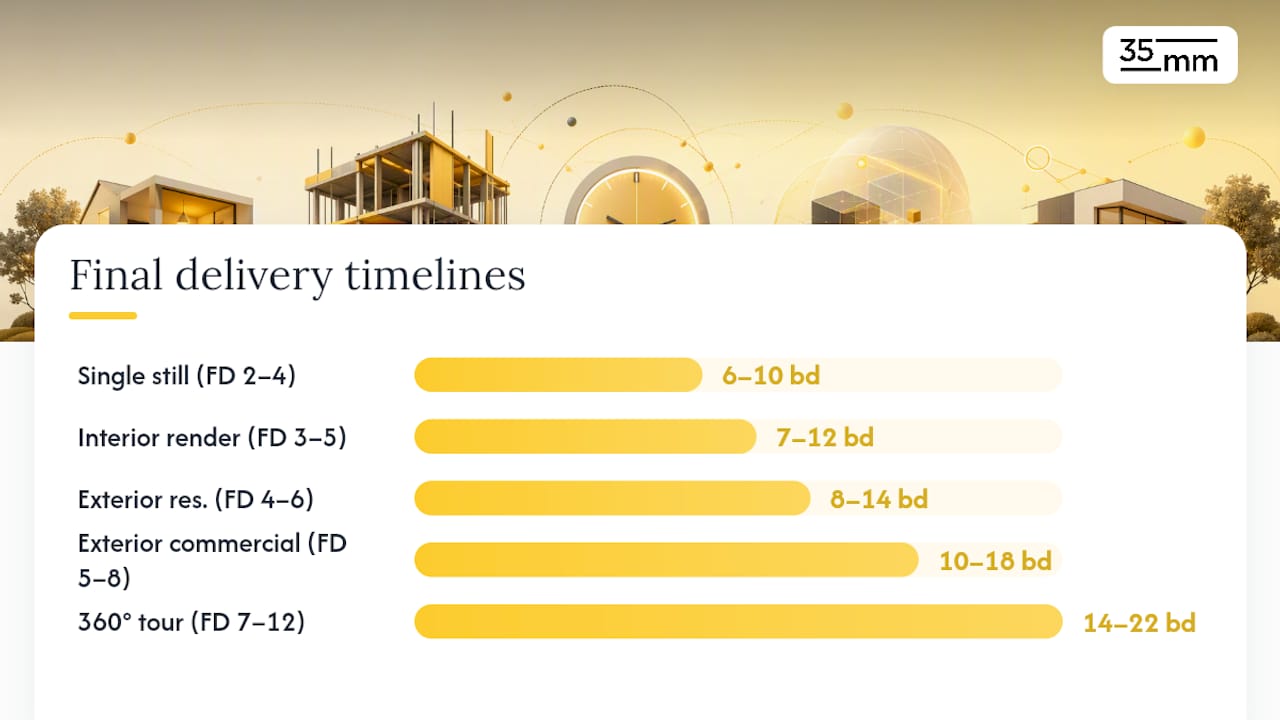
| Project type | First-draft range | Final delivery (2 revisions) | Rush uplift |
|---|---|---|---|
| Single still (simple) | 2–4 business days | 6–10 business days | 25% |
| Interior render (1 room) | 3–5 business days | 7–12 business days | 25% |
| Exterior render (residential) | 4–6 business days | 8–14 business days | 25% |
| Exterior render (commercial) | 5–8 business days | 10–18 business days | 30–50% |
| Aerial / site context | 5–8 business days | 10 business days | 30–50% |
| 3D floor plan | 2–4 business days | 5–9 business days | 25% |
| 360° / VR tour | 7–12 business days | 14–22 business days | 40–50% |
| Animation / walkthrough (30s) | 2–3 weeks | 4–6 weeks | 40–60% |
Assumptions: "Standard" means a complete brief, editable 3D source files (Revit or DWG), 4K or lower output resolution, and two revision rounds. Each revision round typically adds 2–5 business days depending on scope of changes.
The most expensive mistake in project planning is treating the first-draft date as the delivery date. A first draft is a working proof, not a finished asset. Budget at least two revision cycles and a final-render queue into every milestone schedule.
How long does each deliverable type realistically take?
Turnaround times shift considerably once you move beyond a single simple still. Here is what to expect per output type, including what drives complexity within each category.
Single still images are the fastest deliverable. A simple product or architectural still with minimal custom materials can reach first draft in 2–4 business days. Complex stills with custom furniture, intricate lighting setups, or photorealistic landscaping push that to 5–7 days for the first draft, with total delivery around 10–14 business days after revisions.
Interior renders for one room typically run 3–5 days to first draft. A full-house package covering 5–8 rooms takes longer in absolute terms but benefits from model reuse: once the base geometry is built, each additional view adds proportionally less time. Studios often offer phased delivery for multi-room packages, releasing hero views first while secondary angles follow.
Exterior renders for residential projects land in the 4–6 day first-draft window. Commercial exteriors with complex facades, entourage (people, vehicles, landscaping), and contextual surroundings push toward 5–8 days for a first draft. According to Property Render's studio workflow data, a standard residential render runs 6–10 working days end to end, while large commercial projects can stretch to 1–3 weeks.
Aerial and site-context renders require additional modeling of surrounding terrain, neighboring structures, and landscape context. That added scope typically adds 1–3 days to the exterior baseline.
3D floor plans are among the fastest deliverables because they involve less lighting complexity and no photorealistic material work. First drafts in 2–4 days, finals in 5–9 days, are realistic for standard residential layouts.
360° tours and VR renders multiply the work of a standard still: every viewpoint requires its own lighting pass and quality check, and output files must be stitched and tested across viewing platforms. Expect 7–12 days to first draft and 14–22 days to final delivery.
Animations and walkthroughs operate on a different scale entirely, covered in detail in the animation section below. Short 30-second marketing flythroughs commonly run 2–6 weeks depending on length and complexity, per ArchiCGI's production timeline data.
Bundling multiple views from the same model reduces per-image time meaningfully. If a studio builds a full exterior model for one hero shot, adding three additional camera angles costs a fraction of the original modeling time.
Render time vs. project turnaround: why they are not the same thing
Clients often ask how long a render takes and expect a number in hours. That figure, the raw compute time, is only one component of the full 3D rendering process.
Compute render time is the hours a machine (or render farm) spends calculating light, shadow, and material interactions for a single frame or image. As the Chaos Group's complete guide to 3D rendering explains, this ranges from near-instant in real-time engines to hours or days per frame in offline path-traced rendering, depending on scene complexity, lighting setup, and sampling settings.
Project turnaround is the full wall-clock time from brief receipt to final delivery, including every human-driven stage before and after the machine runs.
Here is a simplified calculation to illustrate the gap:
- Raw compute estimate: 120 frames (a 5-second clip at 24 fps) × 2 hours per frame = 240 compute hours on a single workstation.
- Render farm parallelism: Distribute across 20 machines → 12 hours of actual clock time for rendering alone.
- Add pipeline stages: Modeling and scene setup (2 days) + lookdev and lighting (1 day) + test renders and client approval (1–2 days) + compositing and post (1 day) = 5–6 additional working days.
- Add revision rounds: Two rounds at 2–3 days each = 4–6 more days.
- Total wall-clock time: What looked like 12 hours of compute becomes 2–3 weeks of calendar time.
The practical implication: a studio quoting "48-hour render time" is describing machine hours, not your delivery date. Always ask for the full project turnaround, not just the render queue estimate.
What affects your 3D rendering timeline most?
Several variables consistently push schedules out or pull them in. Understanding them lets you anticipate delays before they happen.
Primary drivers:
- Brief completeness: A vague brief forces the studio to make interpretive decisions, which almost always triggers extra revision rounds. A complete brief with reference images, finish specifications, and confirmed camera angles is the single highest-leverage input a client controls.
- 3D file format and quality: Studios report zero added modeling days for clean Revit imports, versus 2–3 days for DWG files requiring cleanup, and 2–4 days for non-editable PDFs that require geometry to be rebuilt from scratch.
- Scene complexity: Custom furniture, bespoke materials, complex lighting rigs, and dense entourage (vegetation, people, vehicles) each add modeling and lookdev time.
- Resolution and output size: Rendering at 8K or print resolution multiplies per-frame compute time compared to 4K web output.
- Renderer and hardware: GPU-accelerated engines are typically faster than CPU-only pipelines. Cloud render farms can reduce local compute hours dramatically, though at added cost. Hardware baselines matter: an 8GB+ VRAM GPU and 32GB+ system RAM represent a reasonable minimum for commercial-quality work.
- Number of revision rounds: Each round adds 2–5 business days. Unlimited or poorly scoped revisions are the most common cause of schedule overruns.
Secondary drivers:
- Stakeholder review processes with multiple approvers slow feedback loops considerably.
- Licensed asset procurement (furniture libraries, vegetation packs, branded materials) can add 1–2 days if assets are not already in the studio's library.
- External dependencies like site survey photos, physical material samples, or brand-standard color profiles require coordination outside the studio's control.
Pro Tip: *Assign a single decision-maker on the client side before the project starts.
What are the steps in 3D rendering and how long does each take?
A standard still-render project moves through eight distinct stages. Here is a realistic duration for each, assuming a single exterior or interior image with two revision rounds.
- Brief and intake (0.5–1 day): The studio reviews your files, asks clarifying questions, and confirms scope. A complete brief compresses this to a few hours; an incomplete one can stretch it to 2 days while the team waits on missing information.
- 3D model import or build (1–4 days): Clean Revit files import in hours. DWG files typically need 2–3 days of cleanup. PDFs or sketches require geometry to be built from scratch, adding 2–4 days.
- Materials and texturing (1–2 days): Applying finishes, sourcing or creating custom material maps, and matching brand-specified colors or real-world samples.
- Lighting and lookdev (1–2 days): Setting up the lighting environment, time-of-day, and camera angles. This stage defines the mood of the final image and often requires the most artistic judgment.
- Draft and test renders (0.5–1 day): Low-resolution passes that let the client approve composition, lighting direction, and material choices before committing to full-resolution compute.
- Client review window (1–3 days per round): The time your team needs to review, consolidate feedback, and return it. This is entirely client-controlled.
- Final renders (0.5–2 days): Full-resolution compute, which can run overnight on a capable workstation or be parallelized on a render farm.
- Compositing, post-production, and delivery (0.5–1 day): Color grading, sky replacement, entourage compositing, and file packaging in agreed formats.
A staged workflow in professional studios typically allocates roughly 30% of total project time to preparation and briefing, 40% to modeling and materials, 20% to revisions and detailing, and 10% to final render and post, according to Property Render's workflow analysis.
Missing inputs do not pause a project — they reset it. If a studio is mid-lookdev and discovers the specified tile pattern is unavailable or the floor plan has changed, the modeling stage effectively restarts for the affected elements. Locking inputs before work begins is not a formality; it is the most direct way to protect your delivery date.
How can you compress a 3D visualization timeline without losing quality?
Speed and quality are not mutually exclusive, but compressing a schedule requires deliberate choices. These tactics are studio-proven and can be applied selectively depending on how much time you need to recover.
- Submit editable CAD or Revit files. This single action eliminates 2–4 days of geometry reconstruction. It is the highest-ROI input a client can provide.
- Approve camera angles on a white-clay draft. Locking composition before texturing begins means the studio does not redo lookdev work after a camera change.
- Use draft-resolution passes for early approvals. A 1K or 2K test render takes a fraction of the compute time of a 4K final. Approving lighting and materials at draft resolution saves the full-resolution queue for confirmed shots only.
- Bundle multiple views from the same model. Adding three camera angles to an already-built scene costs far less than commissioning three separate projects.
- Parallelize asset creation. While one artist builds geometry, another can source and prepare material libraries. Studios with dedicated specialists (a 3D artist, a post-production artist, a designer) can run these tracks simultaneously.
- Use a cloud render farm. Distributing final renders across cloud nodes compresses overnight compute into a few hours, which is particularly valuable for animations.
- Schedule consolidated feedback windows. Instead of drip-feeding comments over three days, agree on a single 24-hour review window per round. This keeps the studio's queue uninterrupted.
| Tactic | Speed gain | Cost impact | Quality risk |
|---|---|---|---|
| Revit / CAD files at start | 2–4 days saved | None | None |
| White-clay camera approval | 1–2 days saved | None | None |
| Draft-resolution passes | 0.5–1 day saved | None | Low (approval only) |
| Bundled views | 20–40% per view | Reduced per-view cost | None |
| Cloud render farm | 50% compute time | Added cloud cost | None |
| Consolidated feedback | 1–3 days saved | None | None |
| Rush priority slot | 30–50% schedule | 25% premium | Low if scoped correctly |
When a deadline is genuinely immovable and tactics alone are not enough, a rush premium is the appropriate lever.
How do outsourcing and rush services affect your schedule?
Outsourcing to a specialist studio gives you access to dedicated pipelines, render infrastructure, and specialists who are not splitting attention across internal projects. The trade-off is lead time: most studios schedule work in advance, and dropping a project into an already-full queue without notice rarely produces the result you need.
Rush services typically compress studio schedules by 30–50%, but they require advance notice. Giving a studio 48 hours of warning before a rush request significantly improves scheduling flexibility and reduces the risk of quality trade-offs that come from genuinely compressed timelines.
A realistic milestone template when working backward from a hard deadline:
- Deadline minus 14 days: Brief submitted with all source files, reference images, and confirmed scope.
- Deadline minus 10 days: First draft delivered by studio.
- Deadline minus 7 days: First revision feedback submitted by client (consolidated, single approver).
- Deadline minus 5 days: Revised draft delivered.
- Deadline minus 3 days: Second revision feedback submitted.
- Deadline minus 1–2 days: Final delivery and file packaging.
That schedule assumes a standard still or small package. For animations or large multi-view projects, double the lead times.
Some studios charge a flat rush fee; others apply a percentage to the total project cost. Either way, the premium reflects real costs: overtime, displaced queue slots, and additional machine hours. Negotiating a rush rate is reasonable; expecting rush delivery at standard pricing is not.
Communicating a hard deadline clearly matters more than most clients realize. Tell the studio the date the asset must be live, not just the date you want to receive it. A studio that knows your campaign goes live on a specific date will build in a delivery buffer; one that only knows your "preferred" date may not.
Why do animation projects take so much longer?
Animation timelines operate on a fundamentally different scale because every second of finished video multiplies the rendering workload by 24–30 frames. ArchiCGI's production data confirms that short marketing flythroughs commonly range from 2–6 weeks depending on length and complexity.
The frame-count math for a 30-second animation at 24 fps:
- 30 seconds × 24 fps = 720 frames total
- At 1 hour per frame on a single workstation: 720 hours of compute
- Distributed across 20 render farm nodes: 36 hours of clock time, just for rendering
- Add previs, layout approval, lighting across shots, compositing, and sound: 3–5 additional weeks
That is why a 30-second walkthrough that looks simple to a client represents weeks of pipeline work.
Animation-specific checklist:
- Previs / animatic (3–5 days): A low-resolution motion draft that locks camera moves, pacing, and shot sequence before any high-quality rendering begins.
- Layout approval (1–2 days): Client signs off on the animatic before the studio commits to full lookdev across all shots.
- Lighting and lookdev across shots (3–7 days): Unlike a still, every shot in an animation must maintain consistent lighting logic as the camera moves.
- Per-shot render estimates (variable): Interior shots with complex global illumination cost more per frame than simple exterior flyovers.
- Compositing and post-production (3–7 days): Color grading, motion blur, depth-of-field effects, and title card integration.
- Sound and music (1–3 days): If the deliverable includes audio, this stage runs in parallel with compositing but requires its own approval round.
Typical total ranges by animation length:
- 15-second marketing loop: 2–3 weeks
- 30-second flythrough: 3–5 weeks
- 60-second product or architectural walkthrough: 5–8 weeks
Complexity increases the timeline faster than duration does. A 30-second interior walkthrough with custom furniture, complex glass materials, and volumetric lighting can take longer than a 60-second exterior flyover of a simple building. Resolution compounds this: rendering at 4K doubles or triples per-frame compute time compared to 1080p.
How 35milimetre plans and delivers projects
35milimetre operates as a three-specialist team: a post-production artist, a graphic designer, and a 3D artist, with the ability to bring in additional talent when a project's scale demands it. That structure means every project has a dedicated specialist at each stage rather than a generalist moving between tasks.

An example project timeline: 6-view product launch package
| Milestone | Day |
|---|---|
| Brief received and intake check completed | Day 1 |
| 3D model imported and scene built | Day 3 |
| Materials, lighting, and lookdev finalized | Day 5 |
| First draft (all 6 views) delivered | Day 7 |
| Client first revision feedback received | Day 9 |
| Revised draft delivered | Day 10 |
| Client second revision feedback received | Day 12 |
| Final renders completed | Day 14 |
| Post-production, compositing, and delivery | Day 14 |
That 14-day window is realistic for a well-briefed package with consolidated feedback. Projects with incomplete briefs or multi-stakeholder review processes typically run 18–22 days for the same scope.
How the studio handles intake and prioritization:
- Every brief goes through an intake check on Day 1: file formats confirmed, missing assets flagged, scope locked before modeling begins.
- Camera angles and composition are approved on white-clay geometry before any texturing or lighting work starts.
- AI tools are used selectively at early stages, particularly for background population, lookdev prototyping, and asset sourcing, while final frames go through the full human-driven pipeline to meet commercial quality standards. This hybrid approach reflects what Chaos Group's rendering guide describes: AI accelerates early stages, but professional output still relies on multi-stage craft to guarantee fidelity.
- When a project requires additional capacity, the studio scales by bringing in trusted partners rather than compromising the core team's attention on existing deliverables.
The 3D visualization techniques the studio applies span offline path-traced rendering for hero stills and hybrid real-time workflows for rapid client approvals, which compresses the visible timeline without sacrificing final-frame quality.
First draft vs. final delivery: what revision rounds actually mean
The distinction between a first draft and a final deliverable is one of the most consistently misunderstood parts of a rendering project timeline. A first draft is a working proof: it confirms that the geometry, lighting direction, and composition are correct. It is not a finished asset, and treating it as one leads to scope creep and missed deadlines.
Most professional studios include two revision rounds in a standard engagement. The first round addresses structural feedback: camera angle adjustments, material swaps, lighting changes, and composition corrections. The second round handles fine-tuning: color temperature, minor material tweaks, and final approval before the high-resolution render queue runs.
Each revision round adds 2–5 business days to the schedule, split between client review time and studio turnaround. The client review window is entirely within your control. A studio can turn around a revision in 24–48 hours; a client that takes five days to consolidate feedback from three internal stakeholders adds those five days to the calendar, not the studio.
Scope changes introduced after the first draft, such as a new camera angle, a changed floor plan, or a different material specification, are not revisions. They are new work and should be scoped and priced separately. Establishing this distinction in writing before the project starts protects both parties and keeps the timeline honest.
For visual content used in marketing campaigns, the stakes of a delayed final delivery are concrete: a missed campaign launch date, a product page without imagery, or a pitch deck without hero visuals. Building two full revision rounds into the milestone schedule from day one is the most reliable way to avoid those outcomes.
What to do when you have a hard deadline
Hard deadlines require a different planning posture than flexible ones. Here is how we approach them at 35milimetre, and what we recommend to every client who comes to us with a fixed date.
Submit a complete brief with a named decision-maker before anything else. This is not a formality. A brief that arrives with all source files, confirmed camera angles, reference images, and a single named approver allows the studio to start modeling on Day 1 rather than spending the first two days in clarification loops. The decision-maker designation matters as much as the files: committee-driven feedback is the most common cause of revision rounds that run long.
Request phased delivery and accept draft-quality signoff for early milestones. If your deadline is firm, agree with the studio to deliver hero views first at draft resolution for internal approvals, with final-resolution files following. This gives your team something to work with while the studio completes the full render queue. It also surfaces any major feedback early, when changes are still cheap to make.
If your deadline requires it, budget for it from the start rather than negotiating after the brief is submitted. Studios that know a rush premium is on the table will prioritize your project in their queue; those asked to rush at standard rates often cannot deliver the same quality under compressed conditions.
35milimetre: commercial CGI and 3D rendering for campaigns
When a campaign deadline is fixed and the visual quality cannot be compromised, the right studio is one that has built its entire process around that constraint. 35milimetre works with ad agencies, product teams, and brand managers who need commercial-grade CGI and 3D rendering delivered on a schedule that actually holds.

The studio specializes in product visualization, architectural stills, compositing, and AI-enhanced imagery for technology and automotive brands. Projects are scoped and scheduled from a complete brief, with milestone dates confirmed before modeling begins.
To get an accurate timeline and quote, include in your initial contact:
- Source files (Revit, DWG, OBJ, or reference drawings)
- Required views and output formats
- Named decision-maker and approval process
- Target delivery date (campaign live date, not your "preferred" date)
- Reference images for lighting mood, materials, and finish
Standard lead time for new projects is 3–5 business days from brief receipt to project start. Rush scheduling is available with 48 hours of advance notice. Reach out to the studio directly to confirm availability and discuss your project scope.
Sources
The following resources support the timeline ranges and workflow guidance covered above. Each covers a distinct aspect of the 3D rendering process.